Add-on for the Navigator and Phone GPS (DLC Car): speed limit, cruise control and ETA for American Truck Simulator
Adds a speed limit icon, the cruise control indicator and the estimated time of arrival to the navigator and phone of the Road Trip Fords. Version for ATS 1.61.
Download Add-on for the Navigator and Phone GPS (DLC Car): speed limit, cruise control and ETA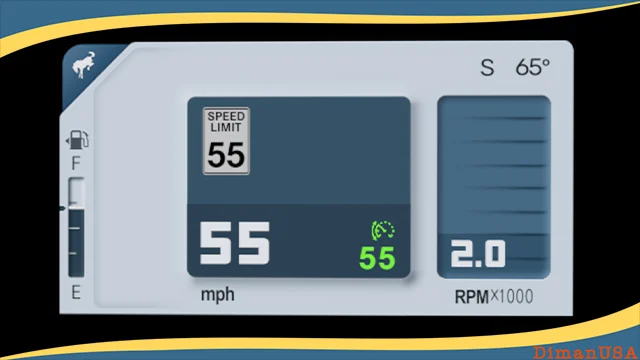
More screenshots on Steam Workshop ↗
What this mod does
Add-on for the Navigator and Phone GPS DLC Car is a mod by DimanUSA that improves the navigation screens of the SCS cars from the Road Trip: Ford DLC in American Truck Simulator. It adds information the game doesn’t show out of the box.
What it adds
- A new speed limit icon, easier to read according to the comments.
- The cruise control indicator.
- The estimated time of arrival (ETA).
To switch screens, use the key bound to the infotainment screen mode.
Compatible cars
- Ford Bronco 2024
- Ford F-150 2023
- Ford Crown Victoria 2006
- Ford Mustang 1967 (phone GPS only)
What you should know
The title shows version 1.61, the game version it’s made for. It was published on October 2, 2026 and last updated on October 30, with seven change notes. One user says nothing changed for him; the author recommends trying it on a clean profile and checking whether you have other dashboard or navigator mods. If something goes wrong, he asks you to tell him which mods you use and in what order. The same author made “Look back!”, for looking through the rear window when reversing.
Holyfix Check
Will it work with your mods?
Load your game.log.txt and check whether this mod is for your ATS version, whether you're missing a mod or DLC it needs and where to place it.
It's in Documents › American Truck Simulator › game.log.txt. It's read in your browser: the file is never uploaded.
Something else failing? Holyfix for ATS checks all your mods at once.
User rating
Our rating
0.0 / 5- Useful info missing from the stock game
- Recently updated
- Author who replies in the comments
- It may conflict with other dashboard or navigator mods
- On the 1967 Mustang it only affects the phone GPS
- You need the Road Trip: Ford DLC
- Unofficial mod: the brands belong to their owners; neither Holymod nor the author is affiliated with them
Requirements
Links go to each DLC’s official Steam page.
- American Truck Simulator 1.61
- Road Trip: Ford DLC
- Steam account
How to install it
- Open the “Add-on for the navigator and Phone GPS DLC Car” page on Steam Workshop and click “Subscribe”.
- Launch American Truck Simulator and wait for Steam to finish downloading the mod.
- Open your profile's Mod Manager and enable “Add-on for the navigator and Phone GPS DLC Car”.
- Get into one of the Fords and switch screens with the infotainment screen mode key.
- If you don't see any changes, disable other dashboard or navigator mods, or try it on a clean profile.
Version history
-
2 Oct 2026Current
Release
-
1.61(f)30 Oct 2026
Latest update
Common problems
What does it show?
Speed limit, cruise control and estimated time of arrival.
Does it work on the Mustang?
Only on the phone GPS.
I don't see any change
The author suggests trying it on a clean profile without other navigator mods.
More mods for ATS
 Requires DLC
  Requires DLC
  ✓ ATS 1.61
  ✓ ATS 1.61
  ✓ ATS 1.61
  ✓ ATS 1.61