Realistic Infotainment for DAF 2021: eight infotainment screens for the DAF XF, XG and XD for Euro Truck Simulator 2
Recreates eight infotainment pages (phone, radio, media, navigation and more) on the 2021 DAF XF, XG and XG+ and the DAF XD. For ETS2 1.61 or later. Released October 22, 2026; 1.7 MB.
Download Realistic Infotainment for DAF 2021: eight infotainment screens for the DAF XF, XG and XD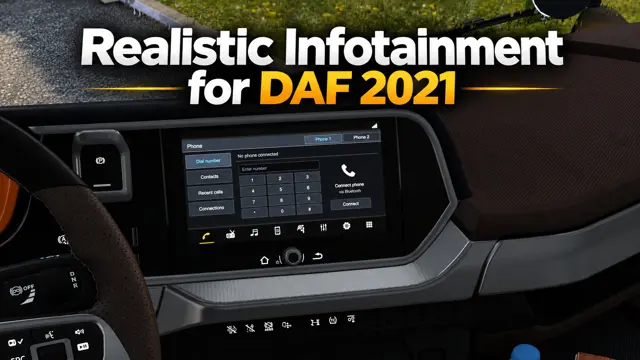
More screenshots on steamcommunity.com (Steam Workshop) ↗
What this mod does
Realistic Infotainment for DAF 2021, by NiamhFox, recreates eight pages of the infotainment system of the 2021 DAF XF, XG and XG+ and the DAF XD in Euro Truck Simulator 2. It also replaces the «+» icons on the bottom bar with Audio and Settings. It was released on October 22, 2026 and weighs 1.7 MB.
What it includes
- Phone, Radio, Media, Smartphone, Navigation (with the original SCS GPS), Audio, Settings and Apps pages.
- You cycle through them with the «Infotainment display mode» action, which you need to bind to a key in the controls.
- After Apps, the cycle goes back to Phone.
Version and warnings
It is for ETS2 1.61 or later, and the author also tested it on the 1.62 open beta. The pages are visual only: there are no real touch controls, pairing, streaming, radio tuning or audio settings, and the Smartphone page does not connect to CarPlay, Android Auto or WebLink. The author tried adding a ninth screen-off page, but the game did not show it, so he removed it. Disable other GPS, CarPlay or infotainment mods that replace the same screens. Credits go to SCS Software for the trucks and original assets, and to NiamhFox for the new pages; reuploads are not allowed. More cabin mods in the interiors category.
Holyfix Check
Will it work with your mods?
Load your game.log.txt and check whether this mod is for your ETS2 version, whether you're missing a mod or DLC it needs and where to place it.
It's in Documents › Euro Truck Simulator 2 › game.log.txt. It's read in your browser: the file is never uploaded.
Something else failing? Holyfix for ETS2 checks all your mods at once.
User rating
Highlights and things to keep in mind
- Eight screens that bring the modern DAF dashboards to life
- Keeps the original SCS GPS on the navigation page
- The author clearly explains what works and what does not
- Light: 1.7 MB
- The pages are visual only: they have no real functions
- Do not combine it with other GPS, CarPlay or infotainment mods that change the same screens
- You need to bind a key to "Infotainment display mode"
- Unofficial mod: trademarks belong to their owners; neither Holymod nor the author is affiliated with them
Requirements
- Euro Truck Simulator 2 1.61 or later (according to the author)
- 2021 DAF XF, XG or XG+, or DAF XD
- A key bound to "Infotainment display mode" in the controls
- A Steam account to subscribe on the Workshop
How to install it
- Open the mod page on Steam Workshop and click "Subscribe".
- Start Euro Truck Simulator 2 and open the Mod Manager for your profile.
- Disable other GPS, CarPlay or infotainment mods that change the same screens.
- Enable the mod and confirm the changes.
- In Options > Controls, bind a key to "Infotainment display mode".
- Get into your DAF and press that key to move from one page to the next.
Version history
-
initial22 Oct 2026Current
Released on Steam Workshop
Common problems
Which trucks does it work on?
The 2021 DAF XF, XG and XG+ and the DAF XD.
Which pages does it include?
Phone, Radio, Media, Smartphone, Navigation (original SCS GPS), Audio, Settings and Apps.
Do the radio or CarPlay actually work?
No: they are visual recreations, with no touch controls, pairing, streaming or tuning; Smartphone does not connect to CarPlay, Android Auto or WebLink.
How do I switch pages?
Bind a key to "Infotainment display mode" in the game controls.
Which game version is it for?
ETS2 1.61 or later; the author also tested it on the 1.62 open beta.
More mods for ETS2
 ETS2 1.61Requires DLCMultiplayer
 ETS2 1.61Requires DLCMultiplayer
 ✓ ETS2 1.62Requires DLC