Scania SmartDash Left Air Vent & A-Pillar Frames & Retarder Fix: SmartDash dashboard touch-ups for Euro Truck Simulator 2
Fixes the left air vent, the A-pillar housings and the retarder on the SmartDash dashboard of the Scania R and S. Updated October 22, 2026; 4.3 MB, free.
Download Scania SmartDash Left Air Vent & A-Pillar Frames & Retarder Fix: SmartDash dashboard touch-ups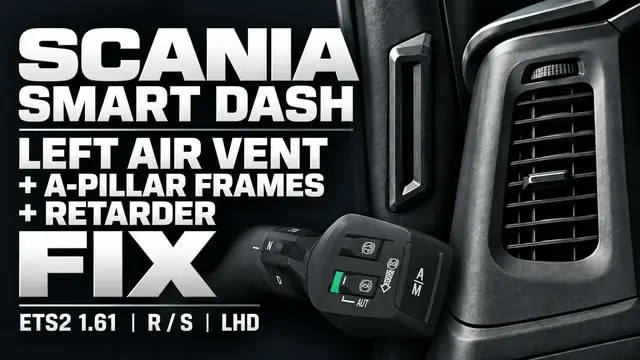
More screenshots on steamcommunity.com (Steam Workshop) ↗
What this mod does
Scania SmartDash Left Air Vent & A-Pillar Frames & Retarder Fix, by chuan, touches up the left-hand-drive SmartDash interior of the Scania R and S in Euro Truck Simulator 2. These are specific fixes to the dashboard model, and on Steam it already has more than 4,000 subscribers and 60 ratings.
What it changes
- Deeper left driver air vent duct with fewer reflections.
- Fixed housings for the A-pillar blind-spot indicators.
- New upper exhaust-brake slider on the SmartDash lever head.
- Retarder switch set to the AUT position.
Version and warnings
It only modifies left-hand-drive SmartDash interiors: right-hand-drive and analog dashboards are not changed. Place it above other mods that replace the static SmartDash interior model, as the load order guide explains. It was released on October 15, 2026 and last updated on October 22 (five change notes). The author does not state the game version. The comments warn that mods changing the wiper animation can conflict with this one, and one player fixed a wiper clipping through the cab by installing Realistic Wipers. More mods for the brand in the Scania guide.
Holyfix Check
Will it work with your mods?
Load your game.log.txt and check whether this mod is for your ETS2 version, whether you're missing a mod or DLC it needs and where to place it.
It's in Documents › Euro Truck Simulator 2 › game.log.txt. It's read in your browser: the file is never uploaded.
Something else failing? Holyfix for ETS2 checks all your mods at once.
User rating
Highlights and things to keep in mind
- Deeper left air vent with fewer reflections
- Fixes the A-pillar housings
- Adds the exhaust-brake slider and sets the retarder to AUT
- More than 4,000 subscribers and 60 ratings
- Left-hand-drive SmartDash interiors only
- It must sit above other SmartDash interior mods
- May conflict with mods that change the wiper animation
- The author does not state the game version
- Unofficial mod: trademarks belong to their owners; neither Holymod nor the author is affiliated with them
Requirements
- Euro Truck Simulator 2
- Scania R or S with the left-hand-drive SmartDash interior
- A Steam account to subscribe on the Workshop
How to install it
- Open the mod page on Steam Workshop and click "Subscribe".
- Start Euro Truck Simulator 2 and open the Mod Manager for your profile.
- Enable the mod and place it above other mods that replace the static SmartDash interior model.
- Confirm the changes and get into the cab of a Scania R or S with the SmartDash interior.
Version history
-
update22 Oct 2026Current
Latest of 5 change notes on Steam (no public details)
-
initial15 Oct 2026
Released on Steam Workshop
Common problems
Which trucks does it work with?
The Scania R and S with the left-hand-drive SmartDash interior.
Does it change right-hand-drive or analog interiors?
No, the author says those are not modified.
Where does it go in the load order?
Above other mods that replace the static SmartDash interior model.
What if the wiper clips through the cab?
One player says in the comments that installing Realistic Wipers fixed it; this is not an instruction from the author.
More mods for ETS2
 ETS2 1.61
 ETS2 1.61
 ✓ ETS2 1.62Requires DLC
 ✓ ETS2 1.62Requires DLC