Aures Livestock Skins for Hytale
Texture pack that gives nine of Hytale's farm animals over 150 random patterns, including rare variants, without touching models or behavior.
Download Aures Livestock Skins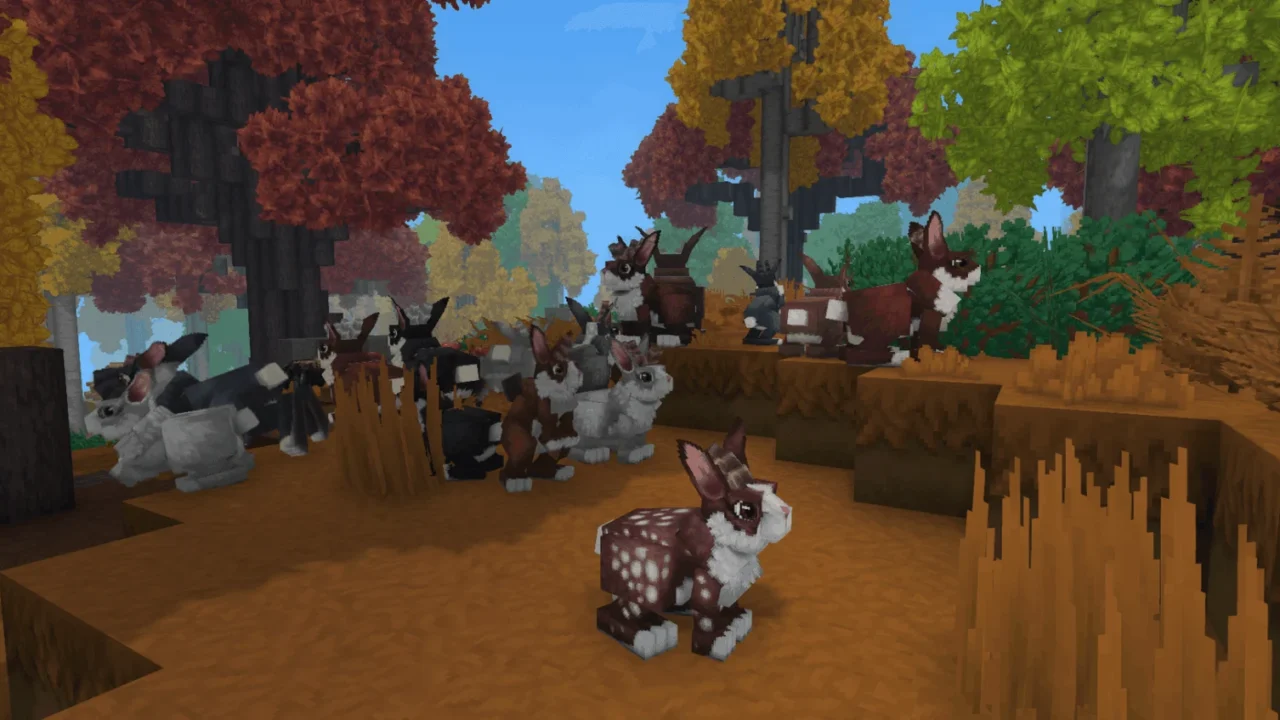
More screenshots on CurseForge ↗
What this mod does
Aures Livestock Skins is a texture pack for Hytale’s farm animals. Its goal is to stop herds from looking like clones: every animal that spawns in the world randomly gets one of the many new patterns and colors.
What changes
- It affects nine animals: camel, chicken, cow, goat, mouflon, pig, rabbit, ram and sheep.
- It includes over 150 new patterns that are assigned randomly.
- There are rare special variants for collectors.
- It only changes the look: it doesn’t modify the animals’ models or behavior.
Who it’s for
For players who spend hours on their farms and want more visual variety without changing gameplay. Since it doesn’t touch behavior, it’s easy to combine with other mods; the author says it’s compatible with Celly’s Baby Animals.
Version
Version 0.6.1 is published for Hytale 0.6. According to the author, a flickering issue that affected some animals was resolved from game version 0.6 onward thanks to an official fix.
Checked on October 20, 2026: the author hasn’t yet published a file tagged for Hytale 0.7 (Update 7) on CurseForge. We’ll check again and update this page as soon as it’s out.
User rating
Highlights and things to keep in mind
- Lots of visual variety on your farms
- Doesn't alter gameplay or models
- Compatible with other animal mods like Celly's Baby Animals
- Each pack version is made for a specific game version
- You have to enable it in every world where you want to use it
Requirements
- Hytale (Early Access) on PC, version 0.6 for version 0.6.1 of the pack
- Enable the pack in the world settings
How to install it
- Open the pack's page on CurseForge and click Install to install it with the CurseForge app, or download the .zip from the Files tab.
- If you download it manually, copy the .zip into %APPDATA%\Hytale\UserData\Mods (Windows), following the instructions on the mod's page.
- Before creating the world, open the world settings and check Aures Livestock Skins.
- For an existing world, right-click its icon, enable the pack and save the settings.
- Load your save: animals that spawn from then on will use the new patterns.
Common problems
I installed the pack but the animals look the same
The pack must be checked in the world settings; otherwise it doesn't load in that save.
Some animals flickered on older versions
The author says the bug was fixed from Hytale 0.6 onward; update the game and the pack to the latest version.
Does it change how animals behave?
No, it only changes their look.
More mods for Hytale
 Multiplayer