BLM Lights for Assetto Corsa
BLM Lights controls track lighting with CSP: tiered track lights, brightness, ambient occlusion, digital flags and wet asphalt, all with keyboard shortcuts. Free.
Download BLM Lights
More screenshots on OverTake.gg (página oficial del autor) ↗
What this mod does
BLM Lights is an app by Blamer, who also made BLM Car, for controlling track lighting in Assetto Corsa with Custom Shaders Patch. It’s really handy in night races: you can switch the track lights on, change their level and tweak brightness without leaving the session.
What it offers
- Turn track lights on and off and switch between three levels on tracks set up for it.
- Brightness settings for the track and cars, vertex ambient occlusion, digital flags and wet asphalt.
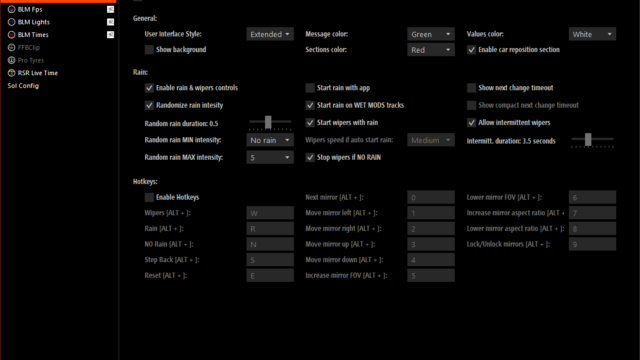
- Editable keyboard shortcuts for every function.
- A compact user interface and a developer mode for creating or editing track lights.
- Presets per game mode and an option to disable it on specific tracks.
Requirements
The author says you need Custom Shaders Patch, without specifying a version. The settings are in Content Manager, under Settings, Apps, BLM Lights. The author has videos covering how to use it, how to create lights and the debugging tool.
Known issues
The latest version is from May 2020 and the page doesn’t confirm compatibility with current CSP versions. Some users said it didn’t appear in their app list or that the game crashed outside compact mode.
User rating
Mod video
Our rating
0.0 / 5- Full control of lights in night races
- Keyboard shortcuts for everything
- Videos by the author explaining how to use it
- No updates since May 2020
- The page doesn't confirm compatibility with current CSP
- Only for the original Assetto Corsa (2014), not for Assetto Corsa EVO or Competizione
Requirements
- Assetto Corsa (Steam)
- Custom Shaders Patch (required); the author doesn't specify a CSP version
- Content Manager recommended (for the settings)
- No DLC needed
How to install it
- Open the BLM Lights page on OverTake.gg and log in.
- Download the file.
- Drag it into Content Manager or extract it into the Assetto Corsa root folder.
- Enable and configure it in Content Manager > Settings > Apps > BLM Lights.
- In the session, use the compact interface or the keyboard shortcuts.
Common problems
Does it work without CSP?
No; the author says CSP is required.
What are light levels?
Some tracks come with three lighting levels and the app lets you switch between them.
The game crashes
Use compact mode; one user had crashes in the other modes.
More mods for Assetto Corsa