BLM Car for Assetto Corsa
App to control Custom Shaders Patch features from the track: rain, wipers, mirrors and resetting the car to the track, all with keyboard shortcuts. Free.
Download BLM Car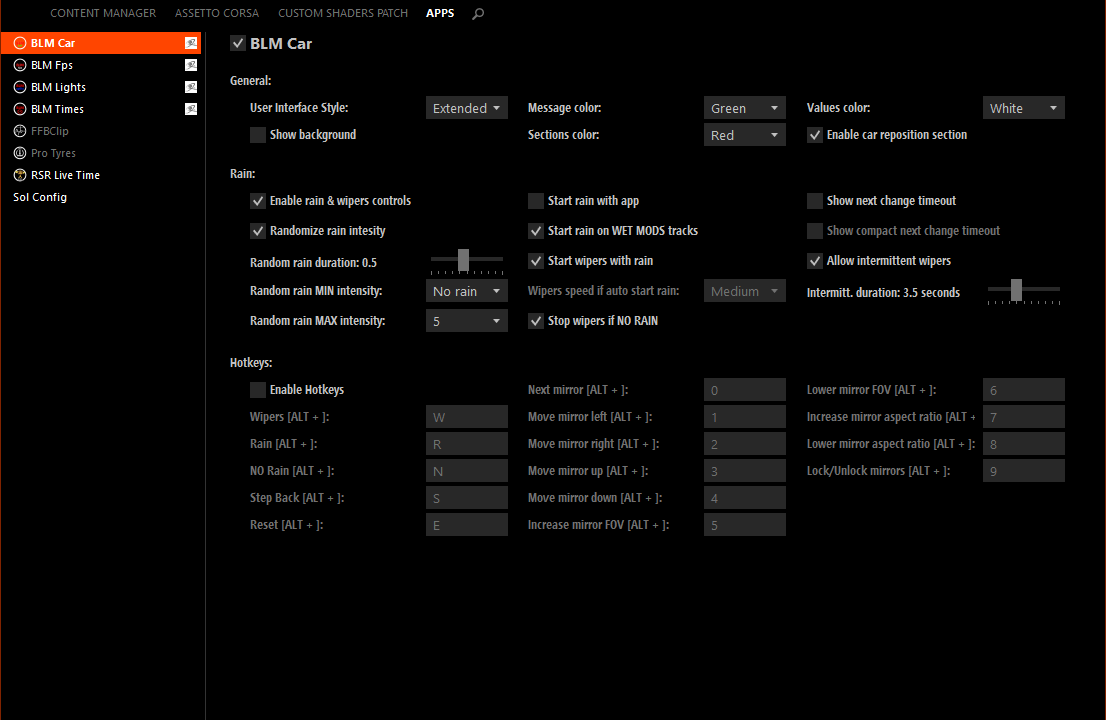
More screenshots on OverTake.gg (formerly RaceDepartment) ↗
What this mod does
BLM Car is an app by Blamer that gives you direct control over several Custom Shaders Patch features without leaving the track. It’s especially handy for driving in the rain: you can start rain, change its intensity or turn on the wipers with a keyboard shortcut.
Features
- Rain: start it, stop it or step the intensity up and down, or let it vary randomly between a minimum and a maximum over configurable periods.
- Wipers: normal or intermittent mode, with a 2.5 to 5 second cycle (3.5 by default).
- Mirrors: switch mirrors, adjust position, field of view and aspect ratio, or use one as a monitor.
- Reset the car: put it back on track or rewind 300 meters, offline only and in single-car sessions; it invalidates the lap.
- Editable shortcuts: Alt+W wipers, Alt+R rain, Alt+S rewind, Alt+E reset and Alt+N clear rain.
Sol compatibility
If you use Sol, turn off the automatic rain option on its settings page 4 and the related Sol Plan Selector options so BLM Car can control the rain and wipers.
Things to keep in mind
For the mirrors you need the SMART MIRRORS extension or to enable real mirrors in smart_mirror.ini. On mod cars, rain and wipers only work if the car has the windshield shader and wiper blades set up. Since 1.7.2 you can hide the reset buttons.
User rating
Mod video
Highlights and things to keep in mind
- Rain and wiper control with keyboard shortcuts
- Random rain with configurable intensities
- Mirror adjustment on track
- Needs Custom Shaders Patch and Content Manager
- Resetting the car only works offline
- No updates since 2020
Requirements
- Assetto Corsa for PC
- Custom Shaders Patch (required)
- Content Manager for the app settings
- Free OverTake.gg account to download
How to install it
- Install or update Custom Shaders Patch from Content Manager.
- Go to the BLM Car page on OverTake.gg, log in and download the file.
- Drag it into Content Manager or copy its contents into your main Assetto Corsa folder.
- Adjust the options in the Apps section of the Content Manager settings.
- If you use Sol, turn off its automatic rain and the related Sol Plan Selector options.
- On track, open BLM Car or use the Alt+W, Alt+R, Alt+S, Alt+E and Alt+N shortcuts.
Version history
-
1.7.228 Mar 2020Current
Option to hide the reset and rewind buttons
-
1.7.128 Nov 2019
Fixes 1.7 by adding missing DDS files
-
1.728 Nov 2019
Option to disable rain and wipers; autostart removed
Common problems
The rain doesn't change with Sol enabled
In Sol, turn off the automatic rain option (page 4) and the related Sol Plan Selector options.
The wipers don't move on a mod car
The car needs the windshield shader and the wiper blades as separate objects.
Can I reset the car online?
No. It only works offline and in single-car sessions.
More mods for Assetto Corsa

 Multiplayer
  Multiplayer