Track Map Display (Extended) for Assetto Corsa
Expanded version of Neys' map app rewritten in Lua: minimap, full map and progress bar, colors by position, class or flag, and maps generated from the AI line.
Download Track Map Display (Extended)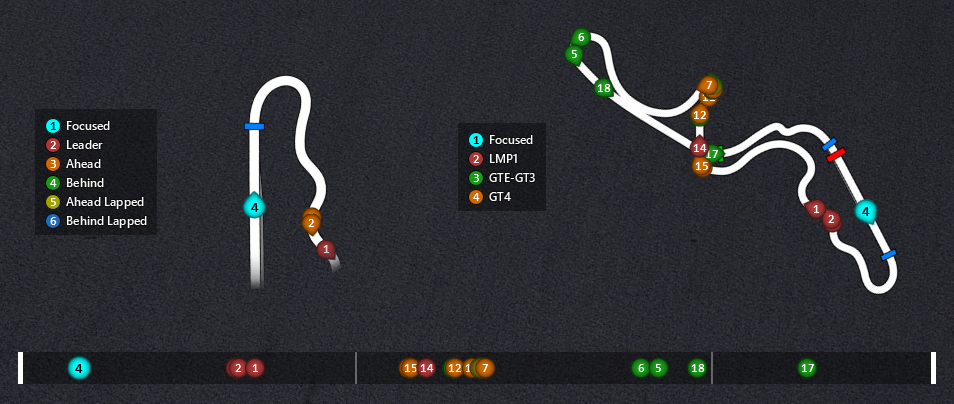
More screenshots on OverTake.gg (formerly RaceDepartment) ↗
What this mod does
Track Map Display (Extended) is the evolution of Neys’ map app, released by AW939 with the original author’s permission and rewritten in Lua since version 4.0. It replaces the Kunos map with three widgets and generates clean maps for any track that has an AI line.
Widgets
- MapDisplay Mini: a minimap similar to the original with a different style.
- MapDisplay Full: the whole track with every car.
- MapDisplay Progress: a flat bar showing each car’s progress through the lap, sectors and cars in the pits.
Features
- Generates maps from the fast_lane.ai file, with configurable thickness, colors, pit, finish line, sectors and DRS zones, including batch generation before you launch the game.
- Each driver appears as a circle with their position.
- Colors by position, by class, by flag or in free mode, where it can hide traffic and teleport you on supported servers.
- Two color legends and settings from each widget’s gear icon.
Requirements and warnings
It needs at least Custom Shaders Patch 0.1.78 (0.1.79 recommended) and Visual C++ 2022 for the image generator. The maps are based on the AI line, which is smoother than the real track, so they don’t reflect the exact width. The author doesn’t plan active maintenance and encourages people to make derivative versions.
User rating
Mod video
Highlights and things to keep in mind
- Three map widgets in one
- Automatically generated maps for almost any track
- Class colors that are ideal for multiclass races
- Needs CSP 0.1.78 or later
- The maps don't reflect the real track width
- The author doesn't plan active maintenance
Requirements
- Assetto Corsa for PC
- Custom Shaders Patch 0.1.79 or later (0.1.78 minimum, with lower performance)
- Microsoft Visual C++ Redistributable 2022
- Tracks with an AI line (fast_lane.ai)
- Free OverTake.gg account to download
How to install it
- Update Custom Shaders Patch and install Visual C++ Redistributable 2022.
- Go to the Track Map Display (Extended) page on OverTake.gg and log in.
- Download the .zip (about 21 MB).
- Drag it into Content Manager or copy the apps and content folders into the Assetto Corsa root folder.
- On track, open MapDisplay Mini, Full or Progress from the CSP apps bar.
- Adjust each widget with its gear icon; changes are saved automatically.
Version history
-
4.7.121 Sep 2023Current
Replaces a function missing in CSP versions before 0.1.80-p346
-
4.721 Sep 2023
New Progress widget, cars in the pits and configurable position markers
-
4.617 Sep 2023
Fix for calculating online positions when best laps are missing
Common problems
The game stutters at the start
That's the map being generated the first time. You can generate them beforehand with the included .bat scripts.
My antivirus flags create_png.exe
The mod page treats it as a false positive: it's the packaged version of the create_png.py script.
Car positions don't line up on a non-generated map
Check the WIDTH and HEIGHT values in the track's map.ini.
More mods for Assetto Corsa