CamTool 2 for Assetto Corsa
Tool for creating cinematic shots and custom replays with up to 99 cameras animated with keyframes. Free; the version must match your game version.
Download CamTool 2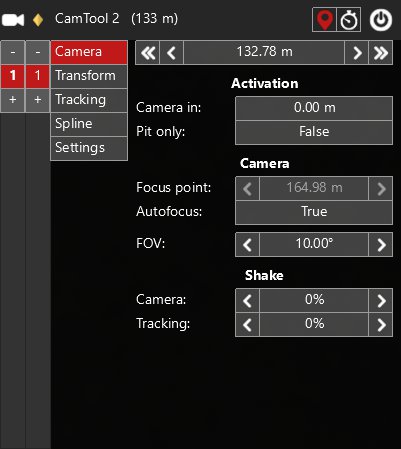
More screenshots on OverTake.gg (formerly RaceDepartment) ↗
What this mod does
CamTool 2 is the classic tool for making broadcast-style videos and replays in Assetto Corsa. It was created by kasperski95 and has over 100,000 downloads on OverTake.gg. It takes over the Kunos free camera so you can place, animate and chain cameras however you like.
Features
- Up to 99 cameras, each with up to 99 keyframes.
- Position mode: the camera interpolates between keyframes based on where the followed car is.
- Time mode: it interpolates based on replay time, ideal for stationary cars.
- Per-camera settings for focus point, autofocus, field of view and shake.
- Car tracking with offsets and blending, spline-curve paths and recording of the track and pit lane lines.
- Saving and loading setups per track.
Before you use it
To control the camera, the app accesses the game’s memory, so each CamTool version only works with one specific Assetto Corsa version. Check the game version in the bottom-left corner at startup; the latest release is 1.16 x64.
Tips
In replay mode the frame rate can drop. The author recommends recording in slow motion at maximum quality and speeding up the video afterward. Camera cuts can cause the occasional audio click.
User rating
Mod video
Highlights and things to keep in mind
- Full camera control for professional-looking videos
- Up to 99 cameras with keyframes
- Free and widely used by video creators
- Only works with the game version it was made for
- Can lower FPS in replays
- No updates since 2017
Requirements
- Assetto Corsa 1.16 x64 for Windows PC
- Python apps enabled in Content Manager or in the game
- Free OverTake.gg account to download
How to install it
- Check in the bottom-left corner of the game that your version is 1.16.
- Go to the CamTool 2 page on OverTake.gg, log in and download the file.
- Copy its contents into your main Assetto Corsa folder.
- If Windows blocks the .py or .dll files, unblock them in their properties.
- Enable the app in Content Manager (Settings > Apps > Activated apps) or in the game under Options > General > UI Modules.
- Open a replay, activate CamTool and start creating cameras and keyframes.
Version history
-
1.16 x642 Nov 2017Current
Latest release
-
1.15.2
Updated for Assetto Corsa 1.15.2 x64
-
CamTool 2: normalized spline position mode, tracking, spline and new interpolation
Common problems
The app doesn't do anything
Check that the CamTool version matches the game's and that Windows hasn't blocked the .py and .dll files.
My replay stutters
The author recommends recording in slow motion at maximum quality and speeding up the video when editing.
Are there ready-made camera templates?
The mod page links to replay presets by user rambokim.
More mods for Assetto Corsa

 Multiplayer

 Multiplayer