Sidekick for Assetto Corsa
All-in-one app that shows gear, speed, lap times, deltas, fuel and tires in a compact panel, with optimal shift lights per car. Free and highly rated.
Download Sidekick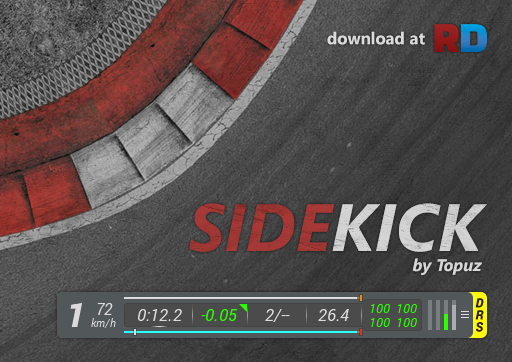
More screenshots on OverTake.gg (formerly RaceDepartment) ↗
What this mod does
Sidekick is an Assetto Corsa app by Topuz, created as the successor to RaceEssentials. It packs the info you need on track into an unobtrusive panel and is one of the highest-rated apps on OverTake.gg, with 4.93 stars from over 200 reviews.
What it shows
- Always visible: gear, speed and rev light.
- Times: current, last and best lap plus your personal best, which is kept between sessions, with valid-lap tracking.
- Deltas to your best lap and to the cars ahead and behind, with an indicator showing whether you’re gaining or losing time.
- Lap, position and remaining session time.
- Fuel: consumption per lap, laps remaining and how much to add to finish the race.
- Tires: wear, temperatures and pressures with colors based on the compound’s ideal values.
Extras
It calculates each car’s optimal shift point by reading its power and torque curves, and if the peak sits well below the rev limiter it learns the gearing on your first run. It has an ERS, KERS or Push to Pass bar, important alerts (force feedback clipping, crooked steering wheel on the out-lap, new best lap), a settings sub-app and another one with car data.
Usage
Alt+A switches sections and Alt+S cycles the data in each one. For mod cars without ideal tire values you can add .ini files, and Content Manager can generate them.
User rating
Mod video
Highlights and things to keep in mind
- Lots of useful info in very little space
- Shift lights calculated for each car
- Near-perfect rating on OverTake
- No updates since 2017
- Mod cars need extra data for ideal tire values
- It's a Python app: you have to enable it in the settings
Requirements
- Assetto Corsa for PC
- Python apps enabled in the game or Content Manager settings
- Free OverTake.gg account to download
How to install it
- Go to the Sidekick page on OverTake.gg and log in.
- Download the .zip (about 370 KB).
- Extract it into your main Assetto Corsa folder so it ends up in apps/python/Sidekick.
- Enable Sidekick in the game under Settings > General or in the Python apps section of Content Manager.
- On track, open the apps sidebar and add Sidekick and, if you want, its settings sub-app.
- Use Alt+A to switch sections and Alt+S to cycle the data.
Version history
-
1.11.123 Sep 2017Current
Ferrari Pack data for ideal temperatures and pressures, plus fixes
-
1.112 Aug 2017
Deltas to the cars ahead and behind, Push to Pass bar and off-center steering wheel alert
-
1.1023 Feb 2017
Support for timed races and a new tire temperature formula
Common problems
I can't see the ideal tire values with a mod car
The app includes data for the Kunos cars. For mods you add .ini files, and Content Manager can generate them.
Can I switch the units to km/h?
Yes, from the settings sub-app: scale, km/h or mph, opacity and shift light options.
Is it still being updated?
The latest version is from September 2017; it includes data for the Kunos packs up to the Ferrari Pack.
More mods for Assetto Corsa

 Multiplayer
  Multiplayer
  Multiplayer
  Multiplayer