proTyres for Assetto Corsa
A tire-only app: temperatures by zone, pressure vs. target, wear, lock-ups and a tire life estimate that learns from your driving. Free.
Download proTyres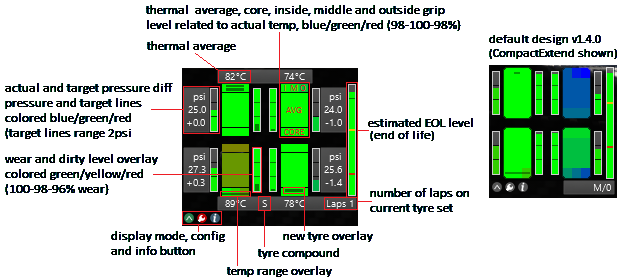
More screenshots on OverTake.gg (formerly RaceDepartment) ↗
What this mod does
proTyres is an Assetto Corsa app by Jens Roos with a very clear motto: it’s all about the tire. It reads the pressure, temperature and wear data for each car and compound straight from the game files, with no setup needed on your part, and shows them in a compact panel. It has a 4.84 rating from over 100 reviews.
What it shows
- Temperature for each tire zone (inner, middle and outer) with colors based on the compound’s grip.
- Range bar showing where the average temperature sits within the working window.
- Pressure with the difference from the optimal target, and wear in three levels.
- Three-color brake slip indicator.
- End-of-life bar that estimates how much distance you have left with good grip and learns per car.
- Pit board with a compound summary, laps on the used set and out-lap data.
Settings
You can save pressure corrections per compound and axle based on track temperature, choose between several display modes per session type and switch units (psi, bar or kPa). The .ini file lets you adjust scale, fonts, colors and logging.
Version
Version 2.0.0 (June 2020) reads the data.acd files directly, so the extra data packs are hardly ever needed anymore.
User rating
Highlights and things to keep in mind
- Very complete tire info with no setup
- Life estimate for your set of tires
- Reads data from Kunos and mod cars
- Only shows tires
- Advanced configuration is done in an .ini
- No updates since 2020
Requirements
- Assetto Corsa for PC
- Python apps enabled in the game
- Content Manager optional for changing settings
- Free OverTake.gg account to download
How to install it
- Go to the proTyres page on OverTake.gg and log in.
- Download the file (about 440 KB).
- Copy its contents into your main Assetto Corsa folder so it ends up in apps/python/proTyres.
- Enable proTyres as a UI module in the game or Content Manager settings.
- On track, open the app from the sidebar and switch modes with its button.
- For mod cars that need it, put the .ini and .lut files in the app's cars_extra folder.
Version history
-
2.0.02 Jun 2020Current
Reads data.acd files directly
-
1.5.522 May 2020
Minor feature and fix
-
1.5.316 Aug 2019
Fixed a rare crash with Content Manager
Common problems
Do I have to install the Ini & Lut data pack?
Since 2.x, hardly ever: the app reads the data.acd files. It's only needed for some mod cars.
What does the red slip indicator mean?
A hard lock-up under braking, though it also triggers on curbs and gravel, so it doesn't always mean damage.
How does the tire life estimate work?
It's calculated from the wear curve and conditions, and it gets more accurate per car as you use it.
More mods for Assetto Corsa
 Multiplayer
  Multiplayer