F-150 Dark Dashboard: dark gauges and screen for the Road Trip Ford F-150 in ATS for American Truck Simulator
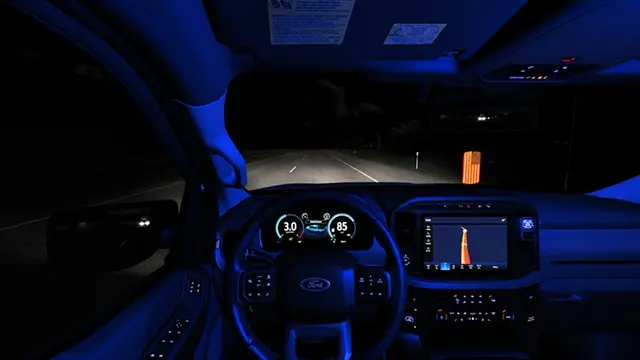
Replaces the blue theme of the Road Trip: Ford F-150 gauge cluster and screen in ATS with a graphite one with white lighting. Updated on October 4, 2026; 4.9 MB.
Download F-150 Dark Dashboard: dark gauges and screen for the Road Trip Ford F-150 in ATS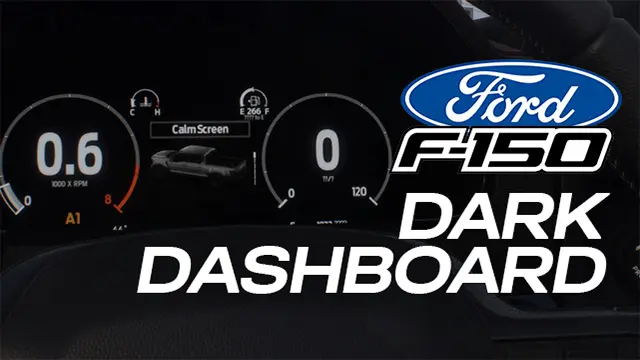
More screenshots on steamcommunity.com (Steam Workshop) ↗
What this mod does
F-150 Dark Dashboard, by zhuchek, is a dark, minimalist redesign of the instrument cluster and infotainment screen of the Ford F-150 from the Road Trip: Ford DLC for American Truck Simulator. It replaces the stock blue theme with a graphite gray one.
What it changes
- Graphite panels, neutral gray gauges and white text instead of the blue theme.
- White backlighting on the dashboard and on the physical buttons (steering wheel, climate control and others).
- Warning lights keep their original colors.
- The in-game map keeps its stock colors.
Requirements and warnings
Steam lists the Road Trip: Ford DLC as required. The author asks you to place the mod at the very top of the list and fully restart the game after enabling it. Since it replaces F-150 dashboard files, it conflicts with other mods that change those same screens. It is only a reskin of the stock cluster: when a player asked for fuel and temperature needles, the author replied that there are no new layouts or needles. He does not state the game version. The description comes in English and Russian. It was released and updated on October 4, 2026 and weighs 4.9 MB. More mods for this DLC in the Road Trip: Ford mods guide.
Holyfix Check
Will it work with your mods?
Load your game.log.txt and check whether this mod is for your ATS version, whether you're missing a mod or DLC it needs and where to place it.
It's in Documents › American Truck Simulator › game.log.txt. It's read in your browser: the file is never uploaded.
Something else failing? Holyfix for ATS checks all your mods at once.
User rating
Highlights and things to keep in mind
- A dark, clean look for the F-150
- White backlighting on the physical buttons too
- Warning lights keep their colors
- The author clearly explains the load order
- Requires the Road Trip: Ford DLC
- Conflicts with other mods that change the F-150 dashboard
- You must fully restart the game after enabling it
- The author does not state the game version
- Unofficial mod: trademarks belong to their owners; neither Holymod nor the author is affiliated with them
Requirements
Links go to each DLC’s official Steam page.
- American Truck Simulator
- Road Trip: Ford DLC (Steam lists it as required)
- A Steam account to subscribe on the Workshop
How to install it
- Open the mod page on Steam Workshop and click "Subscribe".
- Start American Truck Simulator and open the Mod Manager for your profile.
- Enable the mod, place it at the very top of the list and confirm the changes.
- Close the game completely and start it again.
- Get in your Ford F-150 and look at the cluster and screen.
Version history
-
update4 Oct 2026Current
Second change note on the same day (no public details)
-
initial4 Oct 2026
Released on Steam Workshop
Common problems
What do I need?
The Road Trip: Ford DLC, which Steam lists as required.
Does it add new needles?
No: the author explains it is only a reskin of the stock cluster, with no new layouts or needles.
Does it change the map too?
No: the in-game map keeps its original colors.
Where do I put it in the list?
At the very top, and fully restart the game after enabling it, according to the author.
More mods for ATS
 ATS 1.61Requires DLC
 ✓ ATS 1.62Requires DLC
 Requires DLC
 Requires DLC
 ATS 1.61
 ATS 1.61Requires DLC