Animated LED Window Eyes: animated LED lights for truck windows for Euro Truck Simulator 2
Animated LED "window eyes" in five colors for most SCS trucks. By TumbEd, author of EKO Truck Parts, released January 2025; no game version stated.
Download Animated LED Window Eyes: animated LED lights for truck windows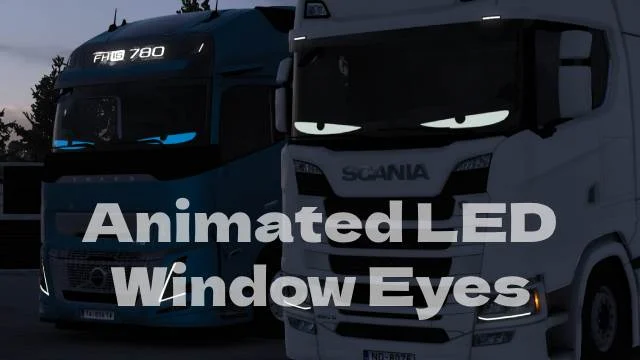
More screenshots on Steam Workshop ↗
What this mod does
Animated LED Window Eyes is a mod by TumbEd that adds animated LED «window eyes» to most SCS trucks in Euro Truck Simulator 2. They’re the eye-shaped light strips that many truckers put on their windows. It has over 310,000 subscribers and is under 300 KB.
Colors
- White
- Green
- Blue
- Red
- Amber
Trucks
It works on most SCS trucks. The author warns that a few are missing because the parts don’t fit them well; he doesn’t give the list.
How to use it
The page doesn’t explain where to pick the part. Look for it when customizing the truck at the service shop, among the cab or light accessories. If it doesn’t show up on your truck, it may be one of the unsupported models.
Version
The author doesn’t state a game version. The mod was released on January 17, 2025 and has a single changelog note. The same author made EKO Truck Parts, another heavily subscribed parts pack.
It’s free and needs no DLC or other mods.
Holyfix Check
Will it work with your mods?
Load your game.log.txt and check whether this mod is for your ETS2 version, whether you're missing a mod or DLC it needs and where to place it.
It's in Documents › Euro Truck Simulator 2 › game.log.txt. It's read in your browser: the file is never uploaded.
Something else failing? Holyfix for ETS2 checks all your mods at once.
User rating
Our rating
0.0 / 5- Eye-catching animated lights
- Five colors
- Tiny file
- The author doesn't state a game version. It may cause errors on 1.61; Holyfix will warn you if so.
- Not available for every SCS truck
- The page doesn't explain where to pick the part
Requirements
- Euro Truck Simulator 2
- No DLC or other mods required
How to install it
- Open the “Animated LED Window Eyes” page on Steam Workshop and click “Subscribe”.
- Launch Euro Truck Simulator 2 and wait for Steam to finish the download.
- Open your profile's Mod Manager, enable the mod and confirm the changes.
- At the service shop, customize the truck and look for the window eyes among the accessories.
Common problems
What colors does it have?
White, green, blue, red and amber.
It doesn't show up on my truck
The author warns that some trucks are missing because the part doesn't fit.
Does it work on mod trucks?
The author only mentions SCS trucks.
More mods for ETS2

 ETS2 1.57Multiplayer
  ETS2 1.56
  ✓ ETS2 1.61
  ETS2 1.57