NIL Navigation – Futuristic Dark COLOR PRO: dark GPS and world map with colored routes and HD icons for Euro Truck Simulator 2
A dark, futuristic interface for the ETS2 GPS and world map, with multi-color routes and 20 redesigned icons. Updated November 7, 2026; 1.7 MB, free.
Download NIL Navigation – Futuristic Dark COLOR PRO: dark GPS and world map with colored routes and HD icons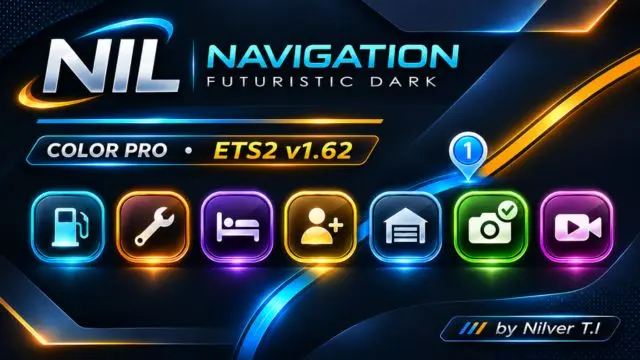
More screenshots on steamcommunity.com (Steam Workshop) ↗
What this mod does
NIL Navigation – Futuristic Dark COLOR PRO, by [ADM] Nilver T.I, replaces the look of the Euro Truck Simulator 2 GPS and world map with a dark, futuristic interface that uses its own colors and HD icons. The idea is to make roads stand out more against the background so you can read your route at a glance. On Steam it has more than 2,700 subscribers and 38 ratings.
What it changes
- A modern, dark-themed navigation interface.
- Custom map colors that improve road contrast.
- Multi-color routes and waypoints.
- 20 redesigned icons for services and points of interest.
- Different colors for discovered roads and the ones you have not driven yet.
Version and warnings
It was released on November 3, 2026 and last updated on November 7, 2026 (four change notes). It weighs 1.7 MB, Steam lists no required DLC and the author does not state the game version. Place it above other mods that change the GPS, the world map or the interface, as the load order guide explains. In the comments, some players say they cannot see undiscovered points or truck dealers on the map, or that they cannot drag it. You will find more utilities in ETS2 tools.
Holyfix Check
Will it work with your mods?
Load your game.log.txt and check whether this mod is for your ETS2 version, whether you're missing a mod or DLC it needs and where to place it.
It's in Documents › Euro Truck Simulator 2 › game.log.txt. It's read in your browser: the file is never uploaded.
Something else failing? Holyfix for ETS2 checks all your mods at once.
User rating
Highlights and things to keep in mind
- Dark theme that improves road contrast
- Multi-color routes and waypoints
- 20 redesigned HD icons
- Light: 1.7 MB
- The author does not state the game version
- It must sit above other GPS, map or interface mods
- Some users say they cannot see undiscovered points or truck dealers, or cannot drag the map
Requirements
- Euro Truck Simulator 2
- A Steam account to subscribe on the Workshop
How to install it
- Open the mod page on Steam Workshop and click "Subscribe".
- Start Euro Truck Simulator 2 and open the Mod Manager for your profile.
- Enable the mod and place it above other mods that change the GPS, the world map or the interface.
- Confirm the changes and open the world map to see the new colors and icons.
Version history
-
update7 Nov 2026Current
Latest of 4 change notes on Steam (no public details)
-
initial3 Nov 2026
Released on Steam Workshop
Common problems
What exactly does it change?
The look of the GPS and world map: dark theme, custom map colors, multi-color routes and 20 redesigned icons.
Where does it go in the load order?
Above other mods that change the GPS, the world map or the interface, according to the author.
Does it need a DLC?
No: Steam lists no required DLC.
Which game version is it for?
The author does not say; the latest update is from November 7, 2026.
Is there an American Truck Simulator version?
The page does not offer one; a player asked for it in the comments.
More mods for ETS2
 ✓ ETS2 1.62

 ETS2 1.61
 ✓ ETS2 1.62