Waze Navigation: Waze-style GPS for ETS2 for Euro Truck Simulator 2
Gives the in-cab GPS a Waze look: icons, colors, speedometer, time left and a dark theme with the headlights. By StonesRP99; the author lists 1.46 or later.
Download Waze Navigation: Waze-style GPS for ETS2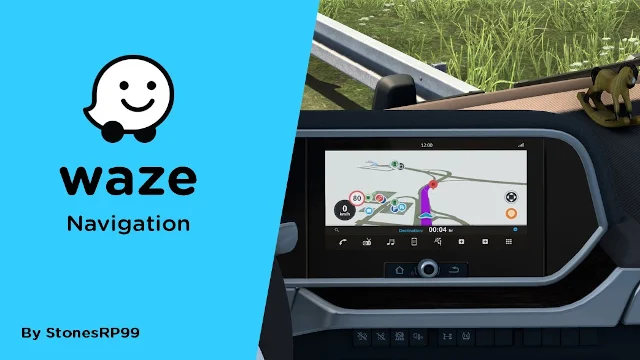
More screenshots on Steam Workshop ↗
What this mod does
Waze Navigation changes the look of the in-cab navigation in Euro Truck Simulator 2 to resemble Waze. It’s by StonesRP99 and has almost 400,000 subscribers.
What’s included
- Waze-style map icons and road markers.
- Route and background colors similar to the app’s.
- Speedometer, remaining travel time (in game hours) and cruise control speed.
- A dark theme when you turn on the headlights.
Add-ons
There’s a ProMods compatibility add-on and a permanent dark mode add-on; if you use the latter, you lose the automatic switch with the headlights. There’s also a version for ATS.
Compatibility
It works with the stock navigation screens and with the cab accessories from the DLCs. On mod trucks the default layout may work. If the icons or colors don’t change, the author recommends raising the mod’s priority. In some cabs the map looks too bright or too dark: you can fix it with the dashboard lighting.
Version
The author lists 1.46 or later. The latest update is from May 31, 2024. In the comments, one player says that on 1.61 the route goes back to the normal look, and another reports a crash on 1.60.
Holyfix Check
Will it work with your mods?
Load your game.log.txt and check whether this mod is for your ETS2 version, whether you're missing a mod or DLC it needs and where to place it.
It's in Documents › Euro Truck Simulator 2 › game.log.txt. It's read in your browser: the file is never uploaded.
Something else failing? Holyfix for ETS2 checks all your mods at once.
User rating
Our rating
0.0 / 5- GPS with useful info: speedometer, time remaining and cruise control
- Automatic dark theme with the headlights
- Very lightweight
- Latest game version confirmed by the author: 1.46 (or later). It may cause errors on 1.61; Holyfix will warn you if so.
- One player says that on 1.61 the route goes back to the normal look
- Unofficial mod: trademarks belong to their owners; neither Holymod nor the author is affiliated with them
Requirements
- Euro Truck Simulator 2
- No DLC or other mods required
- Optional: the author's ProMods Compatibility add-on and Dark Mode add-on
How to install it
- Open the “Waze Navigation” page on Steam Workshop and click “Subscribe”.
- Launch Euro Truck Simulator 2 and wait for Steam to finish the download.
- Open your profile's Mod Manager, enable the mod and confirm the changes.
- If you use ProMods, add its compatibility add-on.
- If the icons or colors don't change, move the mod up in the Mod Manager list.
Common problems
Does it work with ProMods?
Yes, with the author's ProMods Compatibility add-on.
The icons don't change
It may be a conflict with another mod: the author recommends raising its priority.
The map looks too bright or too dark
Adjust the dashboard lighting, according to the author.
Is it affiliated with Waze?
No, the author states it has no connection to Waze.
More mods for ETS2
 ETS2 1.60

 ETS2 1.53Requires DLCMultiplayer