Sheldor’s AC EVO Setup Wizard for Assetto Corsa EVO
Setup wizard for Assetto Corsa EVO: mark the car's problem (understeer, oversteer…) and it suggests what to change and what would get worse. Free, in Spanish too.
Download Sheldor’s AC EVO Setup Wizard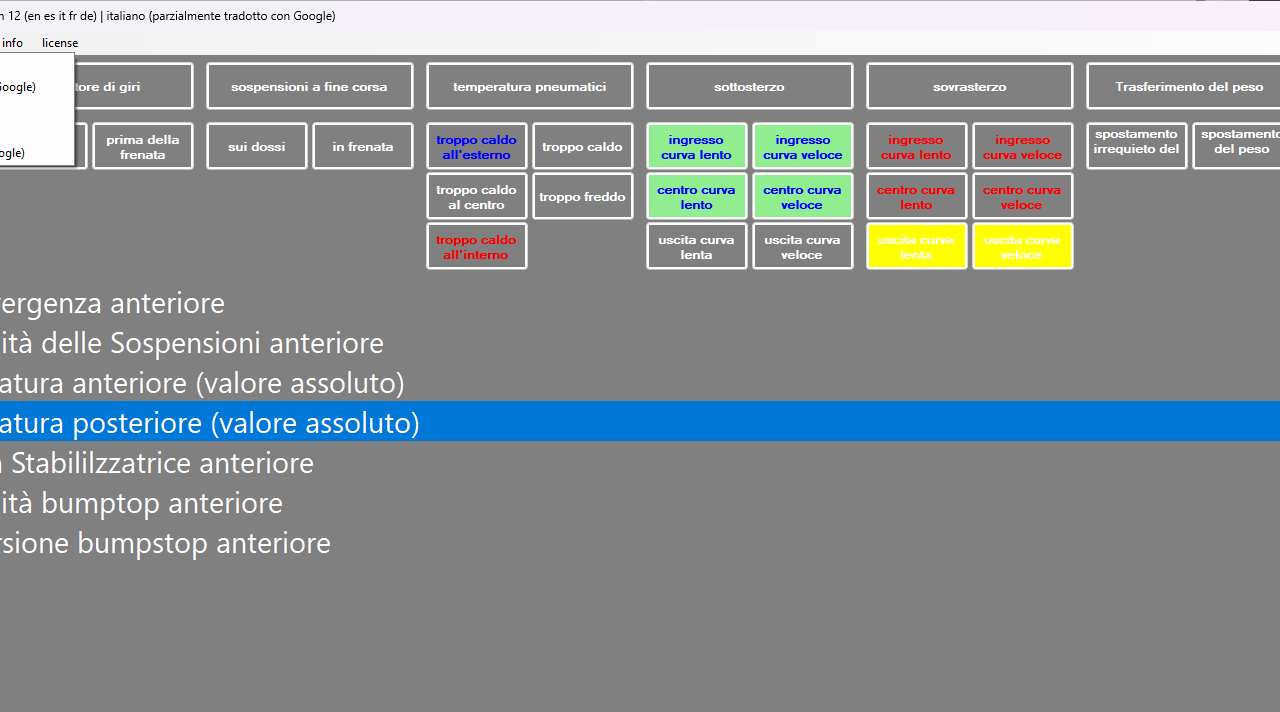
More screenshots on OverTake.gg ↗
What this mod does
Sheldor’s AC EVO Setup Wizard is an assistant for building setups in Assetto Corsa EVO without being an engineer. Instead of changing values at random, you tell the program what the car is doing wrong and it suggests what to change in the game’s setup menu. Since December 2025 it’s dedicated solely to EVO and includes the game’s setup options.
How it works
- Left-click the problems you notice, for example understeer on corner entry; they’re highlighted in green.
- The tips appear below. The more problems you mark, the more refined the suggestions get.
- Right-click to protect an aspect you don’t want to get worse.
- Click a tip to see what it affects: what improves in blue and what gets worse in red.
The program doesn’t connect to the game: it doesn’t read telemetry or change anything for you. You apply the changes by hand in EVO’s garage. The author points out that changes are usually symmetrical between left and right, except at some tracks.
Languages
It’s available in English, Spanish, French, Italian and German. The translations are partly machine-made and can be corrected in a CSV file with Excel or OpenOffice.
Who it’s for
For anyone who gets lost among anti-roll bars, ride heights and differentials and wants a quick cause-and-effect guide. The author also has a setup manager and a version of the wizard for other sims.
User rating
Highlights and things to keep in mind
- Explains what each change improves and what it makes worse
- Includes a Spanish translation
- Very lightweight
- Doesn't read game data: everything is manual
- Last updated in February 2026, before EVO versions 0.7 to 0.9
- Only one rating
Requirements
- Windows (the author also fixed an issue on Linux)
- Microsoft .NET 8.0; the program offers to install it on first launch
- Assetto Corsa EVO to apply the changes
How to install it
- Download the ZIP from OverTake.gg.
- Extract it and open the program.
- If prompted, install .NET 8.0.
- Choose your language.
- Left-click the car's problems and right-click to protect what you don't want to make worse.
- Apply the suggested changes by hand in EVO's garage.
Version history
-
13.221 Feb 2026Current
New problems for grip in slow and fast corners and unstable entry and exit; the RPM problem is removed
-
129 Dec 2025
Dedicated solely to AC EVO, new setup options and French, Spanish and Italian languages
-
—11 Sep 2025
Adds the over-rotation problem and fixes license texts
Common problems
Does it sync with the game?
No. The author confirms it doesn't connect to EVO; it only tells you what to change.
Is it available in Spanish?
Yes, although the translation is partly machine-made and can be corrected.
Does it work for other sims?
This version is for EVO only; the author has another wizard for several sims.
More mods for AC EVO
 Multiplayer
  Multiplayer
  Multiplayer
  Multiplayer