Live Telemetry Evo for Assetto Corsa EVO
Transparent overlay showing real-time engine, pedal and per-wheel data (temperature, pressure, wear, load) by reading EVO's shared memory. Portable and free.
Download Live Telemetry Evo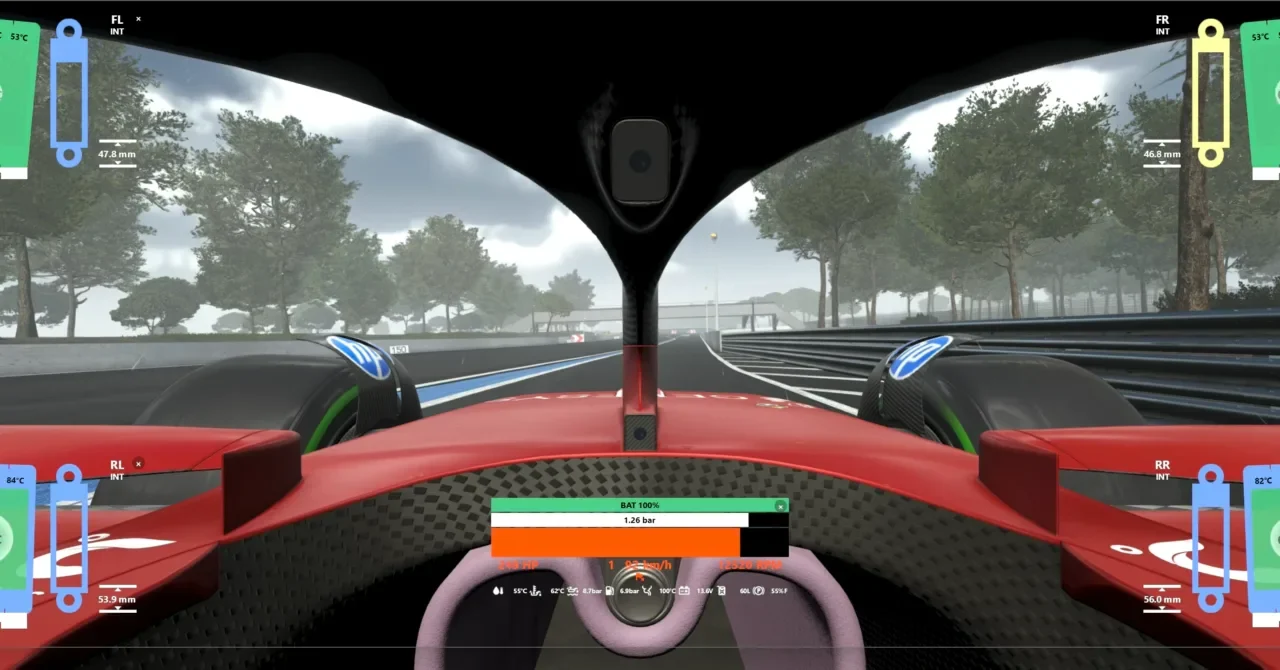
What this mod does
Live Telemetry Evo is a transparent window that stays on top of the game and shows live telemetry. It’s a port of the classic LiveTelemetry plugin from the original Assetto Corsa, now as a standalone program that works with every Assetto Corsa: AC, ACC, EVO and Rally.
What it shows
- Engine: RPM, power, turbo and hybrid battery (including EVO’s KERS).
- Each wheel: temperature by zone, pressure, wear, load and contact patch.
- Driver inputs: pedals, steering and force feedback, plus suspension and brakes.
How it works
It reads the shared memory blocks that EVO publishes for external apps, so it doesn’t modify any game files. It automatically detects which Assetto Corsa you have open, lets you move and resize each widget, has global keyboard shortcuts, CSV logging and a VR mode with SteamVR/OpenVR.
Who it’s for
For anyone who tweaks setups and wants to see what the tires and brakes are doing without leaving the track. It’s most useful in offline testing and practice sessions.
User rating
Highlights and things to keep in mind
- Tons of per-wheel data, ideal for setups
- Portable, free and open source
- One program for every Assetto Corsa
- Young project with frequent changes
- Windows only
- Telemetry changes in EVO may require updating the app
Requirements
- Windows PC
- Assetto Corsa EVO (or another compatible Assetto Corsa)
- For VR: SteamVR/OpenVR
How to install it
- Go to the project's releases page on GitHub and download the latest executable.
- Save it in its own folder; no installation needed.
- Launch Assetto Corsa EVO and get on track.
- Run Live Telemetry Evo: it detects the game automatically.
- Position and resize the widgets and use the shortcuts to show or hide them.
Version history
-
0.7.42 Aug 2026Current
Fixes for brake bias in ACC, data when switching cars and temperature windows
-
0.7.31 Aug 2026
Better automatic game detection and no false positives from stale shared memory
-
0.7.224 Jul 2026
Fixed the executable closing in the VR overlay
Common problems
Does it modify the game?
No. It only reads the shared memory EVO provides to external apps.
Does it work in VR?
Yes, since 0.7.1 it has panels for SteamVR/OpenVR.
It doesn't detect the game?
Update to 0.7.3 or later, which improved detection by executable.
More mods for AC EVO
 Multiplayer
  Multiplayer
 Multiplayer