AC EVO Video Settings Switcher for Assetto Corsa EVO
Small launcher for anyone who plays Assetto Corsa EVO on both a monitor and in VR: it opens the game in your chosen mode and swaps the graphics settings for you. Free.
Download AC EVO Video Settings Switcher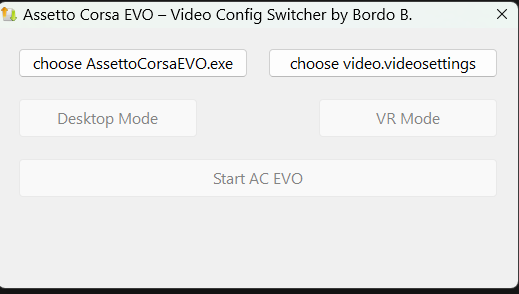
More screenshots on OverTake.gg ↗
What this mod does
If you switch between a monitor and a VR headset in Assetto Corsa EVO, you already know the ideal graphics settings for each are very different. In VR you usually lower quality to keep frame rates up, and on a monitor you want the opposite. Up to version 0.8, EVO kept a single video settings file for both modes; since 0.8, VR has its own video profile in the game. Video Settings Switcher, by Gaspedal, was created to solve that and is still useful if you want to swap complete settings files (for example, separate profiles for monitor and headset) without editing them by hand.
How it works
- It launches EVO in desktop mode or OpenXR (VR) mode.
- Before opening the game, it puts the video settings file for that mode in place.
- It stores two versions of the file, one in the Desktop folder and another in the VR folder.
Initial setup
The first time, you point it to the game executable and the video settings file, which according to the author is at Documents\ACE\video.videosettings. The program copies that file into its Desktop and VR folders, and you replace them with your own versions. To do that, set up the game on your monitor and save the file to Desktop, then do the same in VR.
Maintenance
Every time you change the graphics in-game, update the copy in the corresponding folder. If you don’t, the tool will load the old settings again.
Who it’s for
It only makes sense if you use both a monitor and VR on the same PC. If you always play one way, you don’t need it.
User rating
Highlights and things to keep in mind
- Saves you from reconfiguring graphics when switching to VR
- Very lightweight
- Easy to understand
- December 2025 version, well before 0.9
- You have to keep the copies up to date by hand
- No ratings
Requirements
- Assetto Corsa EVO on PC (Steam)
- Windows
- OpenXR-compatible VR headset
How to install it
- Download the tool from OverTake.gg and extract it.
- Open it and set the path to AssettoCorsaEVO.exe.
- Set the video settings file (Documents\ACE\video.videosettings).
- Set up the game on your monitor and save that file to the tool's Desktop folder.
- Do the same in VR and save it to the VR folder.
- From now on, open EVO from the tool by choosing Desktop or VR.
Version history
-
1.018 Dec 2025Current
First release
Common problems
Does it change anything in the game?
It only copies the matching video settings file before opening EVO.
Why do my old settings come back?
You need to update the Desktop or VR copy every time you change the graphics.
Is it paid?
No. It's freeware.
More mods for AC EVO


 Multiplayer