EVO Web Server Manager for Assetto Corsa EVO
Web panel to create and manage Assetto Corsa EVO dedicated servers from your browser, even remotely: tracks, cars, weather, sessions and auto-restart. Free.
Download EVO Web Server Manager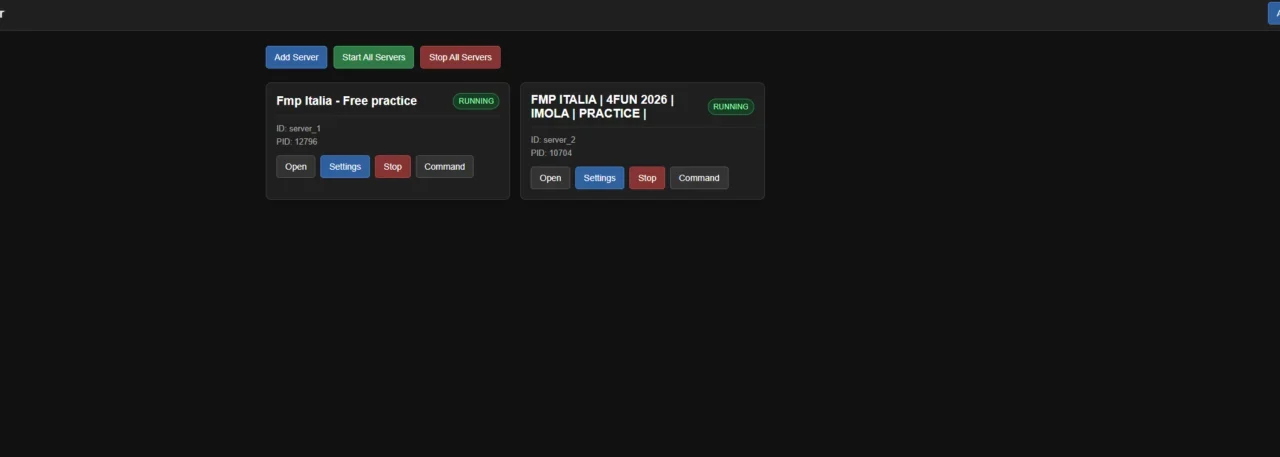
What this mod does
EVO Web Server Manager is a web interface for running Assetto Corsa EVO dedicated servers. Instead of editing config files and launching the server by hand, you do everything from your browser, either on the same machine or remotely.
What it lets you do
- Create and manage several servers at once and start or stop them one by one or all together.
- Configure track, cars, weather, grip and practice, qualifying, warm-up and race sessions.
- Full race weekends, with mandatory pit stops, pit windows and refueling.
- Automatically generate the server config and season definition.
- Clone servers with independent ports.
- Restart a crashed server, up to two times in a row.
- Download results and entry lists.
Remote access
The panel opens at http://127.0.0.1:5000 and can be exposed using your IP or domain. It’s compatible with Caddy as a reverse proxy, and if you use Caddy or Authentik you can disable the built-in login.
Version 1.5.0
The latest version splits the control panel from an engine that works in the background. That way, closing the panel no longer stops the servers. It can also run as a Windows service, which starts before you log in. If you’re coming from 1.4.x, the installer migrates your config, servers, logs and results. It’s open source under the MIT license.
User rating
Highlights and things to keep in mind
- Full management from your browser
- Multiple servers and auto-restart
- Open source (MIT)
- Designed for Windows
- Exposing the panel to the internet requires taking care of security
- An EVO server patch may require updating it
Requirements
- Windows
- Assetto Corsa EVO dedicated server (official tool on Steam)
- For remote access: open ports or a proxy like Caddy
How to install it
- Download the latest version from the releases page on GitHub.
- Run the installer; if you're coming from 1.4.x, choose the previous folder to migrate.
- Open the control panel.
- Go to http://127.0.0.1:5000 in your browser.
- Create a server and choose track, cars, weather and sessions.
- Start it and, if you want, enable service mode or start with Windows.
Version history
-
1.5.08 Oct 2026Current
Separate panel and engine, Windows service mode and an installer that migrates from 1.4.x
-
1.4.428 Aug 2026
Fixes mandatory pit stops in race weekends and adds tire, refueling and pit window settings
-
1.4.227 Aug 2026
Compatibility with the latest EVO dedicated server and server cloning
Common problems
Is it for playing online?
Yes, it's for setting up EVO dedicated servers where other drivers race.
Can I manage it from another computer?
Yes, by exposing the panel with your IP or domain; it supports Caddy as a reverse proxy.
Is it paid?
No. It's free and open source; the author accepts donations via PayPal.
More mods for AC EVO


 Multiplayer