ACE UI App Loader for Assetto Corsa EVO
Open-source loader that lets you run several community UI apps at once in the Assetto Corsa EVO HUD, with a drawer to enable them. Free and safe to use online.
Download ACE UI App Loader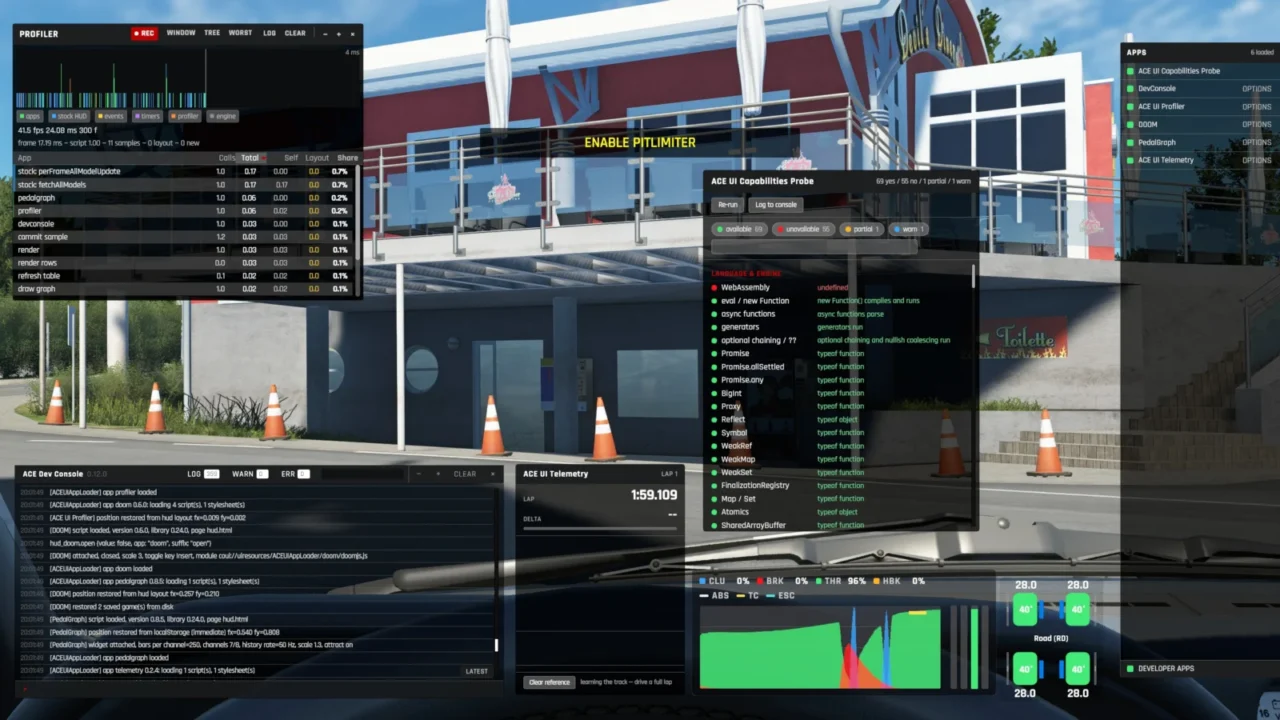
What this mod does
Assetto Corsa EVO’s interface is built with web pages, but the game has no official system for adding apps to the HUD. The problem is that every UI mod has to replace the same file, so two mods at once overwrite each other. ACE UI App Loader solves that: it replaces that file just once and lets several apps coexist in the game.
What it brings
- A side drawer that appears on the right edge of the screen with all your installed apps.
- Enable and disable each app separately, with no file conflicts.
- Windows remember their position between sessions (since 0.26).
- Tools for app creators: a profiler, a console and a UI engine capabilities detector.
Compatible apps
The same author publishes Better Delta Bar (a delta bar to see whether you’re gaining or losing time) and Pedal Graph (an on-screen graph of throttle, brake and clutch). There’s even a version of DOOM you can play inside the HUD.
Safety and online play
It’s not an executable and doesn’t run in the background: it’s data files in your user mods folder, without touching the game installation. It doesn’t connect to the internet and only changes what you see, not how the car drives, so it works in multiplayer. The code is open source (MIT license).
Versions
Each version is made for a specific game build. 0.27.0 is for 0.9.1. When EVO updates, you’ll need to download the matching version; if you use an old one, you’ll see a red warning.
User rating
Highlights and things to keep in mind
- Lets you combine several HUD apps without conflicts
- Open source, no executables
- Works in multiplayer
- Needs updating after every EVO patch
- It doesn't add any information on its own: you need compatible apps
- Very recent project with few ratings
Requirements
- Assetto Corsa EVO on PC (Steam), build 0.9.1+release.6 for version 0.27.0
- At least one compatible app to make the most of it (Better Delta Bar, Pedal Graph…)
How to install it
- Download the ACEUIAppLoader ZIP for the latest version from GitHub (not the -alternate one unless you need it).
- Press Win + R, paste %USERPROFILE%Saved GamesACE and press Enter.
- Drag the mods folder from the ZIP into that window and accept merging it with the existing one.
- Install the apps you want to use the same way (for example Better Delta Bar or Pedal Graph).
- Open EVO and move the mouse to the right edge of the screen to open the app drawer.
- After each game patch, download the loader version made for that build.
Version history
-
0.27.025 Sep 2026Current
Right-click options in apps, persistent windows and redesigned settings
-
0.26.024 Sep 2026
Drawer that opens from the edge and saved window positions
-
0.24.020 Sep 2026
First public release with support for multiple apps
Common problems
Can I get banned for using it online?
The author explains that everything is local and only changes the UI, not the car's behavior, and that it works in multiplayer.
The app drawer doesn't appear, what should I do?
Try the alternate ZIP (-alternate), which loads in a different order relative to other mods.
I get a red warning, why?
Your loader version doesn't match the game's current build. Download the matching version.
Does it touch the game files?
No. Everything goes in Saved GamesACE, alongside your settings.
More mods for AC EVO


 Multiplayer
  Multiplayer
  Multiplayer
  Multiplayer