ACE Setup Tool for Assetto Corsa EVO
Windows app to manage, compare and analyze Assetto Corsa EVO setups, with MoTeC telemetry, race strategy and a live dashboard. Free, with a Spanish translation.
Download ACE Setup Tool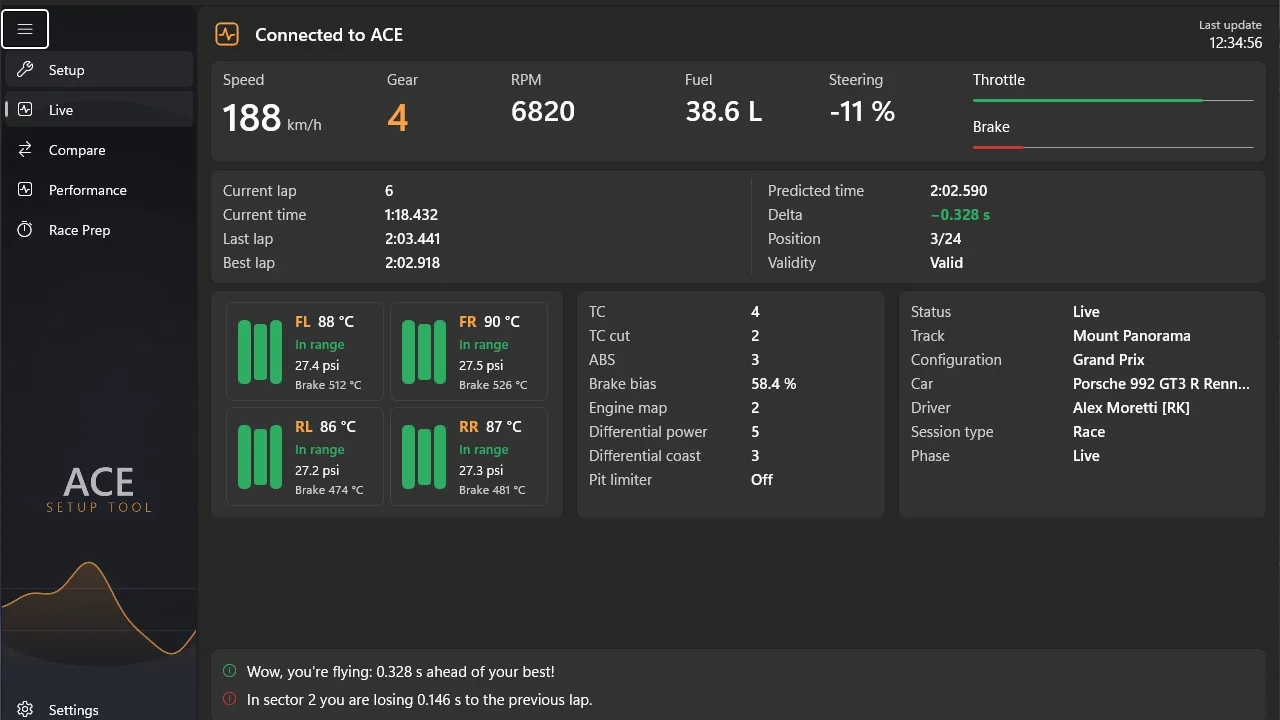
What this mod does
ACE Setup Tool is a desktop app by agastal for anyone who takes setups seriously in Assetto Corsa EVO. It brings together in one program what you’d normally do with spreadsheets, folders of files and a telemetry viewer.
Main features
- Setup manager: reads, edits and backs up .carsetup files, with pressures, camber and toe in real units, and export to CSV or PDF.
- Comparison tool: two setups side by side with the differences highlighted.
- MoTeC telemetry: imports laps and shows throttle, brake, steering and racing line, and lets you compare them.
- Diagnostics: charts for pressures and temperatures, suspension, ride height and bump stops.
- Strategy: calculates stops and fuel based on race length.
- Live dashboard with data from the game’s shared memory.
Languages and privacy
It’s available in Spanish, English, Italian, French and German, and follows Windows’ light or dark theme. Everything is stored on your computer: according to the author, it doesn’t send data to any server.
Versions
There’s a per-user installer, which doesn’t ask for admin rights, and a portable version. The «-net» variants are smaller but require .NET 10 to be installed. Since 1.1.0 it updates from the settings with download verification. It’s an independent project, not affiliated with Kunos.
User rating
Highlights and things to keep in mind
- Setups, telemetry and strategy in one program
- Includes a Spanish interface
- Built-in updater with verification
- 64-bit Windows only
- Not open source
- Few ratings so far
Requirements
- 64-bit Windows 10 or 11
- Assetto Corsa EVO on PC (Steam)
- .NET 10 only if you choose the -net versions
How to install it
- Go to the project's releases page on GitHub.
- Download setup.exe (installer) or portable.zip (portable).
- If you choose the portable version, extract the whole ZIP; don't run the .exe on its own.
- Open the program and choose your language.
- Point it to where your setups are and start managing or comparing them.
- To analyze laps, import the MoTeC files the game records.
Version history
-
1.2.05 Sep 2026Current
Graphical camber, toe and pressure indicators; race flag on the live dashboard
-
1.1.04 Sep 2026
Updates from Settings with verification and a full user guide
-
1.0.230 Aug 2026
Log reading adapted to EVO 0.9 (HotLap, TimeAttack and stints)
Common problems
Is it paid?
No. It's freeware with its own license; it's not open source.
Does it need admin rights?
No. The installer is per-user.
Does it send my data anywhere?
According to the author, no: settings and telemetry are stored only on your computer.
More mods for AC EVO


 Multiplayer
  Multiplayer