ACE Manager – Quick Join for Assetto Corsa EVO
Server browser for Assetto Corsa EVO: filter sessions, see which cars and tracks you're missing, install mods and join races with friends from Windows.
Download ACE Manager – Quick Join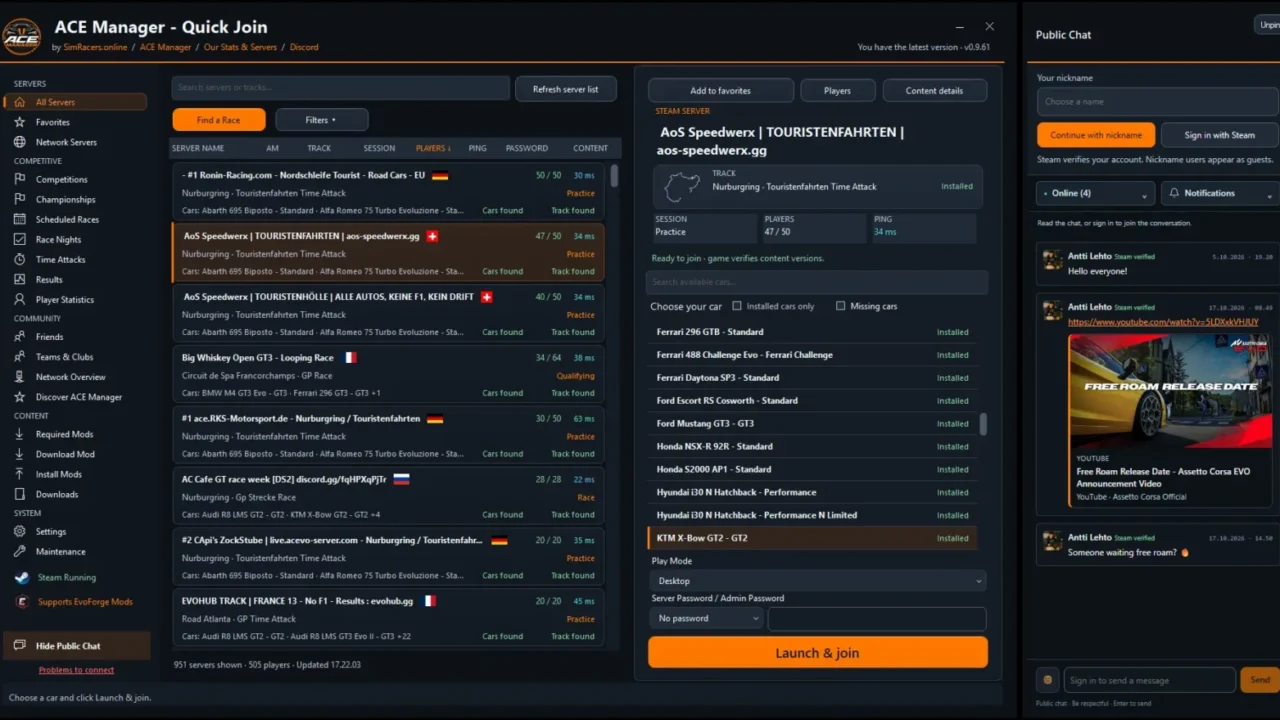
More screenshots on OverTake.gg ↗
What this mod does
ACE Manager – Quick Join is a lightweight Windows app for finding Assetto Corsa EVO servers, discovering community events and jumping into a race. It’s the companion to ACE Manager, the server manager by the same author, aSaFIN, and doesn’t need a separate account.
What’s included
- Server browser with tabs for all servers, favorites and network servers, plus search and filters by track, car, session and mods.
- Options to hide empty or password-protected servers, color-coded ping, connected players and approximate location with flags.
- Filters showing whether you have or are missing each server’s cars and tracks.
- Car and track mod installation from ZIP, RAR, 7z or KSPKG, with EvoForge support.
- Launch in desktop mode, virtual reality (OpenXR) or through the Steam dialog.
- Public chat, friends with invites, leaderboards, championships, time trials and race nights.
Requirements
It runs on 64-bit Windows with .NET Framework 4.8 and Microsoft Edge WebView2, and Steam must be open before you launch the game. Many features depend on the community using a recent version of ACE Manager and its Hub.
Security
The executable isn’t signed. The author publishes the ZIP hash and a VirusTotal scan of 0.9.63 with no detections, although an earlier version did trigger warnings from some antivirus programs.
User rating
Highlights and things to keep in mind
- Filters servers by the cars and tracks you own
- Installs missing mods
- Social features and championships
- Executable without a digital signature
- Windows only
- No ratings yet
Requirements
- Assetto Corsa EVO on PC (Steam)
- 64-bit Windows
- .NET Framework 4.8 and Microsoft Edge WebView2 Runtime
- Free OverTake.gg account to download
How to install it
- Download the ZIP from the Quick Join page on OverTake.gg.
- If you want, check the SHA-256 hash the author publishes.
- Extract the ZIP and open the Quick Join app.
- Open Steam before launching the game.
- Find a server, pick a car and click to join in desktop mode or in VR.
Version history
-
0.9.6318 Oct 2026Current
Clearer friend profiles with rank, ELO and safety; the updater only accepts its own DLLs
-
—26 Sep 2026
First release on OverTake.gg
Common problems
Can I use it to create servers?
No. That's what ACE Manager, by the same author, is for; Quick Join is for finding and joining them.
Can it install the mods a server requires?
Yes. It installs cars and tracks from ZIP, RAR, 7z or KSPKG, including from EvoForge.
Is it safe?
The executable isn't signed. The author publishes the hash and a VirusTotal scan with no detections for 0.9.63.
More mods for AC EVO


 Multiplayer