Eagle Feather FLX 359 and Lost Bayou FLX 359 (Goggles56) for American Truck Simulator
Two Goggles56 paintjobs for the FLX Mods Peterbilt 359, every cab: Eagle Feather (metallic or four editable colors) and Lost Bayou. FLX truck sold separately.
Download Eagle Feather FLX 359 and Lost Bayou FLX 359 (Goggles56)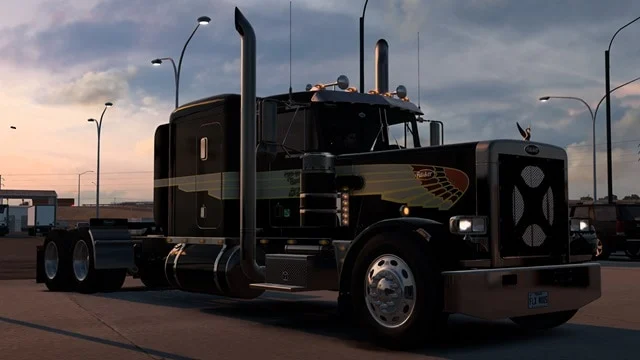
More screenshots on Steam Workshop ↗
What this mod does
Goggles56 is one of the most active painters on the ATS Workshop, and two of his most popular packs are for the FLX Mods Peterbilt 359, a classic long-nose truck that doesn’t come with the game. This page covers both.
Eagle Feather FLX 359
- Eagle feather design for every cab of the 359.
- Two versions: a metallic finish and one with four editable colors.
- Released on January 12, 2026; it’s the more subscribed of the two.
Lost Bayou FLX 359
- Lost Bayou paintjob for every cab of the 359.
- Metallic, unlocked base color, so you pick the shade.
- Released on October 10, 2025. It pairs with the author’s Lost Bayou trailer pack.
Requirements
Both paintjobs need the FLX Mods Peterbilt 359, which you install separately; the author only says to search for it as “FLX Mods” and doesn’t link it. No DLC required. Neither lists a game version, and neither has had updates.
No bugs reported in the comments; one user thanks the author for keeping the 359 alive. The author has paint tutorials on YouTube and a Discord.
Unofficial fan-made mod. Names, logos and trademarks belong to their respective owners; neither the author nor Holymod is affiliated with them.
Holyfix Check
Will it work with your mods?
Load your game.log.txt and check whether this mod is for your ATS version, whether you're missing a mod or DLC it needs and where to place it.
It's in Documents › American Truck Simulator › game.log.txt. It's read in your browser: the file is never uploaded.
Something else failing? Holyfix for ATS checks all your mods at once.
User rating
Highlights and things to keep in mind
- Every cab of the 359
- Editable colors
- Two designs from the same author
- You need the FLX 359 separately
- No game version listed
- No updates since release
Requirements
- American Truck Simulator (no version listed; released in October 2025 and January 2026)
- Steam account
- The FLX Mods Peterbilt 359, installed separately
How to install it
- Open the “Eagle Feather FLX 359. All cabs. 2 Versions” page on Steam Workshop and click “Subscribe”.
- Launch American Truck Simulator and wait for Steam to finish downloading the mod.
- Open your profile's Mod Manager and enable “Eagle Feather FLX 359. All cabs. 2 Versions”.
- If you also want Lost Bayou, subscribe to “Lost Bayou FLX 359. All Cabs” and enable it.
- Install and enable the FLX Mods Peterbilt 359.
- Go to a service shop and pick the paintjob on the 359.
Version history
-
12 Jan 2026Current
Eagle Feather FLX 359 released (one note)
-
10 Oct 2025
Lost Bayou FLX 359 released (one note)
Common problems
Do they work on the SCS Peterbilt 389?
No. They're for the FLX Mods Peterbilt 359.
Can I change the colors?
Eagle Feather has a version with four editable colors; on Lost Bayou the base color is unlocked.
Where do I get the 359?
The author only says to search for it as “FLX Mods”.
More mods for ATS
 ATS 1.56
  ATS 1.56
  ATS 1.59
  ATS 1.57
  ATS 1.56
  ATS 1.57