Kenworth W900 better dashboard (Mo) for American Truck Simulator
Mo redoes the stock Kenworth W900's screens: cruise, ETA, rest time, fuel left and compass, in black and white or four colors. Tuned for 1.50 per his changelog.
Download Kenworth W900 better dashboard (Mo)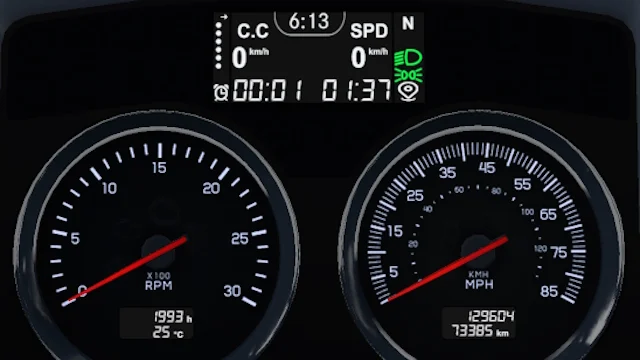
More screenshots on Steam Workshop ↗
What this mod does
Kenworth W900 better dashboard is a mod by Mo that changes the dashboard screens of SCS’s Kenworth W900 in American Truck Simulator. It replaces the classic green with black and white and reorganizes the information. It has over 22,000 subscribers.
What each screen shows
- Screen 1: cruise control, speed, time until your next rest, ETA and clock. If you have fatigue turned off, the clock takes the place of the rest timer.
- Screen 2: clock and compass.
- Screen 3: fuel left, the distance you can still drive and a fuel bar.
- Screen 7: a detail with the Kenworth motif.
Variants
You can choose between Classic, green, blue, red and No Fatigue (without the top clock on screen 1). It’s the author’s first mod, which he made for his own use.
Version
The description doesn’t list a version. In the changelog, the latest note (May 24, 2024) fixes a screen color bug with 1.50. In August 2025, when asked about 1.60, the author told players to try it, without confirming it.
Compatibility
It’s for SCS’s W900. The author said in July 2025 that he doesn’t have Jon Ruda’s W900 to test it with that mod. It’s under 100 KB.
Holyfix Check
Will it work with your mods?
Load your game.log.txt and check whether this mod is for your ATS version, whether you're missing a mod or DLC it needs and where to place it.
It's in Documents › American Truck Simulator › game.log.txt. It's read in your browser: the file is never uploaded.
Something else failing? Holyfix for ATS checks all your mods at once.
User rating
Our rating
0.0 / 5- Cruise, ETA and rest time on the same screen
- Range and fuel bar
- Five color variants
- Latest game version confirmed by the author: 1.50. It may cause errors in 1.61; Holyfix will warn you if so.
- Only for SCS's Kenworth W900
- The author asks you not to modify or reupload it without permission
- Unofficial mod: trademarks belong to their owners; neither Holymod nor the author is affiliated with them
Requirements
- American Truck Simulator 1.50 (latest confirmed by the author)
- Steam account to subscribe on the Workshop
- SCS's Kenworth W900
How to install it
- Open the "Kenworth W900 better dashboard" page on Steam Workshop and click "Subscribe".
- Launch American Truck Simulator and wait for Steam to finish the download.
- Open your profile's Mod Manager and enable the mod.
- Take your Kenworth W900 to a service shop and pick the dashboard variant you prefer.
Version history
-
24 May 2024Current
Fixed screen color with 1.50
-
24 Nov 2023
Code updated with the new 1.49 features
Common problems
What variants are there?
Classic, green, blue, red and No Fatigue, without the top clock.
What if I don't use fatigue?
The clock replaces the time until rest on screen 1.
Does it work with Jon Ruda's W900?
The author hasn't tested it with that mod.
More mods for ATS
 Requires DLC
  Requires DLCMultiplayer
  Requires DLC
  ✓ ATS 1.61Requires DLC
  ✓ ATS 1.61Requires DLC