Freightliner Cascadia 2019 Improved Dashboard (Knights Gaming) for American Truck Simulator
Knights Gaming upgrades SCS's Freightliner Cascadia 2019 dash: range, AdBlue, ETA, rest time, blind spot and an always-on screen. Version 3.7 from August 2026.
Download Freightliner Cascadia 2019 Improved Dashboard (Knights Gaming)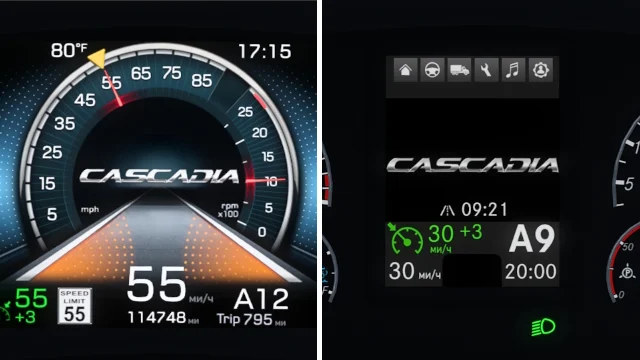
More screenshots on Steam Workshop ↗
What this mod does
Freightliner Cascadia 2019 Improved Dashboard is a mod by Knights Gaming that improves the dashboard of SCS’s Freightliner Cascadia 2019 in American Truck Simulator. It’s credited to KnightRider and AMYLECH. It has over 18,000 subscribers.
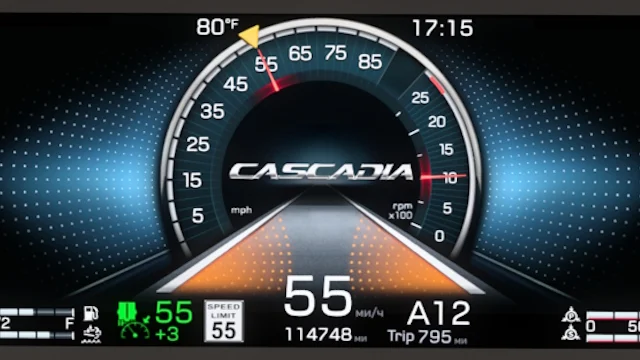
Digital cluster
- Cruise control speed and tolerance, trip fuel economy and distance, and a retarder icon.
- Fuel and AdBlue (DEF) in liters and as a percentage, plus estimated range.
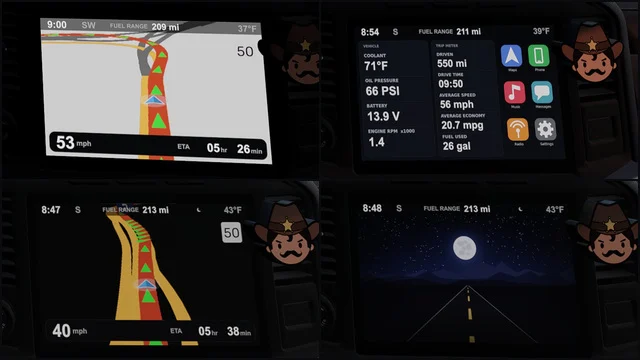
- ETA (hidden with no destination) and a countdown to your next rest (hidden if you don’t use fatigue).
- Soot, oil, suspension load, differential temperature and blind spot indicators.
- Always-on screen and a new map page in the infotainment system.
Classic cluster
It adds current speed, fuel and AdBlue with percentage, range, retarder, ETA, rest time and a page with the Cascadia logo. It changes the gear indicator and removes the particulate filter and engine pages.
Version
The description doesn’t list a game version. The latest number cited in the changelog is 1.51 (October 2024). Version 3.7, from August 20, 2026, adds the always-on screen.
Compatibility
The author clarifies that it doesn’t work on Jon Ruda’s Cascadia 125. One player says you have to change the cab trim package to see it. Another reported a game crash in 2024.
Holyfix Check
Will it work with your mods?
Load your game.log.txt and check whether this mod is for your ATS version, whether you're missing a mod or DLC it needs and where to place it.
It's in Documents › American Truck Simulator › game.log.txt. It's read in your browser: the file is never uploaded.
Something else failing? Holyfix for ATS checks all your mods at once.
User rating
Our rating
0.0 / 5- Range, AdBlue and ETA on the cluster
- Blind spot indicators
- Updated in August 2026
- Latest game version confirmed by the author: 1.51. It may cause errors in 1.61; Holyfix will warn you if so.
- Only for SCS's Cascadia 2019
- A player reported a game crash in 2024
- Unofficial mod: trademarks belong to their owners; neither Holymod nor the author is affiliated with them
Requirements
Links go to each DLC’s official Steam page.
- American Truck Simulator 1.51 or later (the latest number the author cites)
- Steam account to subscribe on the Workshop
- Freightliner Cascadia DLC (SCS's Cascadia 2019)
How to install it
- Open the "Freightliner Cascadia 2019 Improved Dashboard" page on Steam Workshop and click "Subscribe".
- Launch American Truck Simulator and wait for Steam to finish the download.
- Open your profile's Mod Manager and enable the mod.
- Take your Cascadia 2019 to a service shop and, if you don't see the new dashboard, change the cab trim package.
Version history
-
3.720 Aug 2026Current
Always-on screen and new map page
-
3.65 Oct 2024
Fixes
-
3.54 Oct 2024
Support for 1.51 and blind spot indicators
Common problems
Does it work on Jon Ruda's Cascadia 125?
No, according to the author.
I don't see the new dashboard
A player fixed it by changing the cab trim package.
Which cluster should I pick?
There are improvements for both the digital and the classic one.
More mods for ATS
 ✓ ATS 1.61Requires DLC
  ✓ ATS 1.61Requires DLC
  Requires DLCMultiplayer
  Requires DLC
  ✓ ATS 1.61Requires DLC
  ✓ ATS 1.61Requires DLC