Freightliner Cascadia 2024 Improved Dashboard (Knights Gaming) for American Truck Simulator
Better dashboard for SCS's Freightliner Cascadia 2024: cruise, range, AdBlue, ETA, blind spot and always-on screen. By Knights Gaming; version 1.3, August 2026.
Download Freightliner Cascadia 2024 Improved Dashboard (Knights Gaming)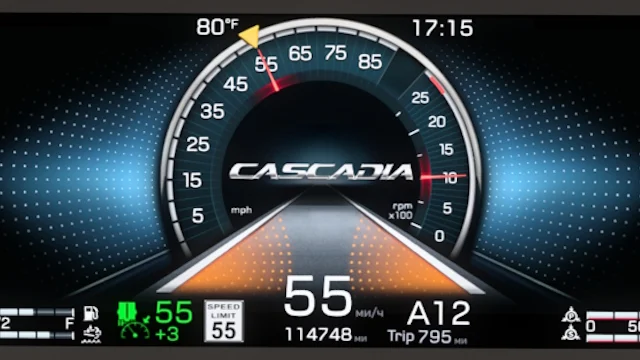
More screenshots on Steam Workshop ↗
What this mod does
Freightliner Cascadia 2024 Improved Dashboard is a mod by Knights Gaming that improves the dashboard of SCS’s Freightliner Cascadia 2024 (fifth generation) in American Truck Simulator. It’s credited to KnightRider and AMYLECH. It has over 21,000 subscribers.
What it adds
- Cruise control speed and tolerance.
- Average fuel economy and trip distance, plus a retarder icon.
- Fuel left, in liters and as a percentage, AdBlue (DEF) as a percentage and estimated range.
- ETA, hidden when there’s no delivery or navigation, and time until your next rest, hidden if you don’t use fatigue.
- A page with the Cascadia logo, soot, oil, suspension load and differential temperature.
- Left and right blind spot indicators.
- Always-on screen and a new map page in the infotainment system.
- New gear indicator; removes the transmission’s «ECONOMY» icon, which didn’t work.
Version
The author doesn’t list a game version. Version 1.3, from August 20, 2026, adds the always-on screen. In February 2026 a player said it worked on 1.57.
Details
The author won’t add the right mirror camera to the screen until SCS fixes the FPS drop it causes. A player warned that someone might be reuploading his dashboards: use only the official Steam Workshop page.
Holyfix Check
Will it work with your mods?
Load your game.log.txt and check whether this mod is for your ATS version, whether you're missing a mod or DLC it needs and where to place it.
It's in Documents › American Truck Simulator › game.log.txt. It's read in your browser: the file is never uploaded.
Something else failing? Holyfix for ATS checks all your mods at once.
User rating
Our rating
0.0 / 5- Tons of useful info on the cluster
- Blind spot and always-on screen
- Updated in August 2026
- The author doesn't specify a game version. It may cause errors in 1.61; Holyfix will warn you if so.
- Only for SCS's Cascadia 2024
- Unofficial mod: trademarks belong to their owners; neither Holymod nor the author is affiliated with them
Requirements
Links go to each DLC’s official Steam page.
- Up-to-date American Truck Simulator (the author doesn't specify a version)
- Steam account to subscribe on the Workshop
- Freightliner Cascadia DLC (The Fifth Generation)
How to install it
- Open the "Freightliner Cascadia 2024 Improved Dashboard" page on Steam Workshop and click "Subscribe".
- Launch American Truck Simulator and wait for Steam to finish the download.
- Open your profile's Mod Manager and enable the mod.
- Get in your Freightliner Cascadia 2024 and flip through the new cluster pages.
Version history
-
1.320 Aug 2026Current
Always-on screen and new map page
-
1.25 Nov 2024
Fixes
-
1.131 Oct 2024
Fixes
Common problems
Which truck is it for?
SCS's Freightliner Cascadia 2024 (fifth generation).
Does it show the mirror camera?
No; the author is waiting for SCS to fix the FPS drop.
Where do I download it?
Only from its official Steam Workshop page.
More mods for ATS
 ✓ ATS 1.61Requires DLC
  ✓ ATS 1.61Requires DLC
  ✓ ATS 1.61Requires DLC
  ✓ ATS 1.61Requires DLC
  ATS 1.59
  ATS 1.60