Job Screen (in-cab trip screen) for American Truck Simulator
An in-cab accessory screen showing trip distance, the time, your ETA, speed and speed limit. Standard and full-screen versions, free on Steam Workshop.
Download Job Screen (in-cab trip screen)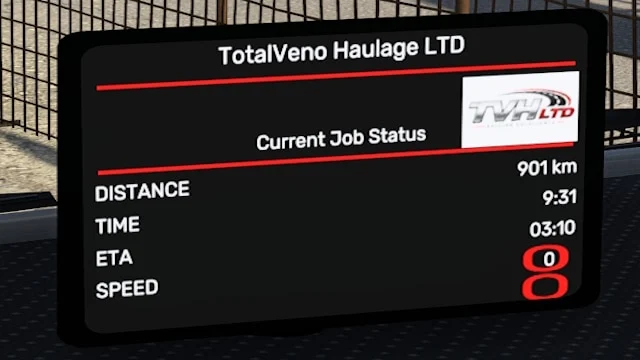
More screenshots on Steam Workshop ↗
What this mod does
Job Screen, by TotalVeno, is a cab accessory: a small screen with the details of your current trip. It’s not meant to replace the GPS, the author explains, but to round out a realistic cab where the navigation stays in place.
What it shows
- Trip distance, which resets to zero on every trip (handy for roleplay).
- Current time and estimated time of arrival, if you have a destination set.
- Current speed and speed limit.
There’s a standard and a full-screen variant, with right, left or front mounting.
Compatible trucks
The latest update added GPS compatibility with the Volvo VNL 2018 and 2025, Western Star 49X, 57X and 5700XE, Freightliner Cascadia 2019 and 2024, International 9900i and LT, Kenworth T680 2022 and Mack Pinnacle.
Known issues
The mod started out in ETS2 and the author adapted it to ATS; on some trucks the screen ends up facing the wrong way if you place it on the dashboard or center console. If other mods use the same screen data, some lines may not show up, and fixed values like 75 km/h point to a conflict: change the load order. The author only plans to add trucks.
Holyfix Check
Will it work with your mods?
Load your game.log.txt and check whether this mod is for your ATS version, whether you're missing a mod or DLC it needs and where to place it.
It's in Documents › American Truck Simulator › game.log.txt. It's read in your browser: the file is never uploaded.
Something else failing? Holyfix for ATS checks all your mods at once.
User rating
Highlights and things to keep in mind
- Useful trip info without covering the GPS
- Several mounting positions
- Compatible with modern SCS trucks
- Wrong orientation on some dashboards
- May conflict with other screen mods
- The author doesn't list a game version
Requirements
- American Truck Simulator 1.60 or later (the author doesn't list a version)
- No DLC according to the Steam page
How to install it
- Open the “Job Screen” page on Steam Workshop and click “Subscribe”.
- Launch American Truck Simulator and wait for Steam to finish downloading the mod.
- Open your profile's Mod Manager and enable “Job Screen”.
- At the service shop, open the truck's cabin accessories and place the screen where you like (right, left or front).
- Set a destination on the GPS so the ETA shows up.
Version history
-
10 Jul 2026Current
GPS compatible with more trucks, plus right, left and front mounts
-
4 Jul 2026
First release
Common problems
Does it replace the GPS?
No. The author designed it as a complement for a realistic cab.
Why does it always show 75 km/h or have missing lines?
It's usually a conflict with another screen mod; try changing the load order.
Why is it crooked on the dashboard?
The mod comes from ETS2, and on some ATS trucks the orientation doesn't fit the dashboard or center console.
Is there a customizable version?
The author links one on an external host; we recommend the Steam Workshop one.
More mods for ATS
 ATS 1.60Requires DLC
  ✓ ATS 1.61
  ✓ ATS 1.61
  ✓ ATS 1.61Requires DLC
  ✓ ATS 1.61Requires DLC
  ✓ ATS 1.61Requires DLC