Volvo VNL 2025 – Improved Radio Infotainment Screens for American Truck Simulator
Adds more screens to the touch radio of SCS's Volvo VNL 2025: menu, GPS, mirror cameras, clock and screen off, cycled with one key. Free on Steam Workshop and fixed for ATS 1.61.
Download Volvo VNL 2025 – Improved Radio Infotainment Screens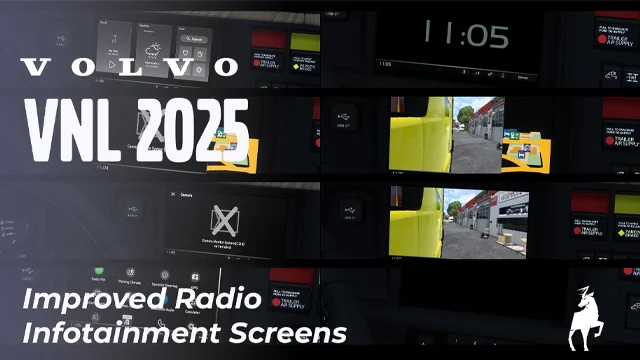
More screenshots on Steam Workshop ↗
What this mod does
Improved Radio Infotainment Screens is a mod by Graf Boinenn for SCS’s Volvo VNL 2025. In the base game, the center dashboard display barely shows the GPS; with this mod it looks much more like the one in the real truck, because it adds several screens you can switch between.
Included screens
- Main menu with widgets.
- GPS (the default screen).
- Right mirror camera next to the GPS, or the camera alone in full screen.
- My apps, a clock and a screen-off mode.
How to use it
In Options, Controls, Interior section, bind a key to Infotainment Display Mode and press it to go from one screen to the next. The camera screens refer to SCS’s camera mirror system (CMS); if your truck doesn’t have it, you’ll see a notice instead.
Version and limitations
The author fixed it for 1.61 on September 17, 2026, after several users reported it had stopped working. The music and weather in the menu are a static image, the app icons can’t be used, and the clock doesn’t mimic the real truck’s analog one. The author plans to add estimated time of arrival, outside temperature and hours until the next rest. It’s part of his «OEM Improved Infotainment Series» collection, which includes a version for the Freightliner Cascadia 2024.
Holyfix Check
Will it work with your mods?
Load your game.log.txt and check whether this mod is for your ATS version, whether you're missing a mod or DLC it needs and where to place it.
It's in Documents › American Truck Simulator › game.log.txt. It's read in your browser: the file is never uploaded.
Something else failing? Holyfix for ATS checks all your mods at once.
User rating
Highlights and things to keep in mind
- Center display much closer to the real VNL's
- Switch screens with a single key
- Updated for 1.61
- Only for SCS's Volvo VNL 2025
- Part of the menu is static images
- Almost 90 MB for an interior mod
Requirements
- American Truck Simulator 1.61
- SCS's Volvo VNL 2025
- No DLC according to the Steam page
How to install it
- Open the "SCS's Volvo VNL 2025 - Improved Radio Infotainment Screens" page on Steam Workshop and click "Subscribe".
- Launch American Truck Simulator and wait for Steam to finish downloading the mod.
- Open the Mod Manager in your profile and enable "SCS's Volvo VNL 2025 - Improved Radio Infotainment Screens".
- In Options, Controls, Interior section, bind a key to "Infotainment Display Mode".
- Get in the VNL 2025 and press that key to switch screens.
Version history
-
17 Sep 2026Current
Fix for ATS 1.61.* (the change log has 7 notes)
-
20 May 2026
First release
Common problems
How do I switch screens?
Bind a key to "Infotainment Display Mode" in the Interior section of the controls settings and press it.
Does it work in 1.61?
Yes. It stopped working when 1.61 came out, and the author fixed it on September 17, 2026.
Are the cameras the side mirrors?
No. They're SCS's camera mirrors (CMS); without that accessory you'll see a message.
Can I have a gray GPS background?
The GPS uses a dark background; the author offered a gray-background version in the comments.
More mods for ATS
 ATS 1.60
  ATS 1.60Requires DLC
  ✓ ATS 1.61
  ✓ ATS 1.61Requires DLC
  ✓ ATS 1.61Requires DLC
  ✓ ATS 1.61Requires DLC