Dash GPS Displays – Semi Trucks for American Truck Simulator
A 10-inch accessory GPS for SCS trucks that also uses the center display: map, speed limit, range, truck data and night mode. For 21 trucks and two Outlaw models.
Download Dash GPS Displays – Semi Trucks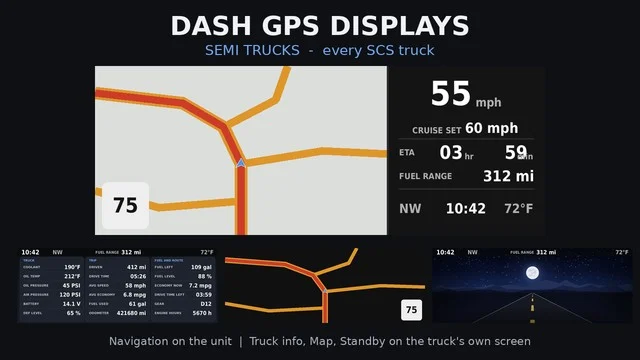
More screenshots on Steam Workshop ↗
What this mod does
Dash GPS Displays – Semi Trucks is the truck version of Superneo10‘s accessory GPS: a 10-inch widescreen navigator you buy at the service shop, in the accessories slot, which also makes use of each truck’s center display.
What it shows
- On the GPS: map with speed limit, speed, cruise control, arrival, range, heading, clock, outside temperature and low-fuel warning.
- On the center display: truck data, map only, standby and off, switched with the «Infotainment Display Mode» control.
- Trucks without a center display (Cascadia 2019, LoneStar, LT, Anthem, Pinnacle and International 9900i) get those pages on the GPS itself.
Compatible trucks
Cascadia 2019 and 2024; International LoneStar, LT and 9900i; Kenworth T680, T680 2022 and W900; Mack Anthem and Pinnacle; Peterbilt 389 and 579; Volvo VNL, VNL 2018, VNL 2025 and VNR Electric; Western Star 49X, 57X and 5700XE. Among modded trucks, only the Outlaw Kenworth W900 and the Outlaw Peterbilt 359 V2, with the navigation page.
Compatibility
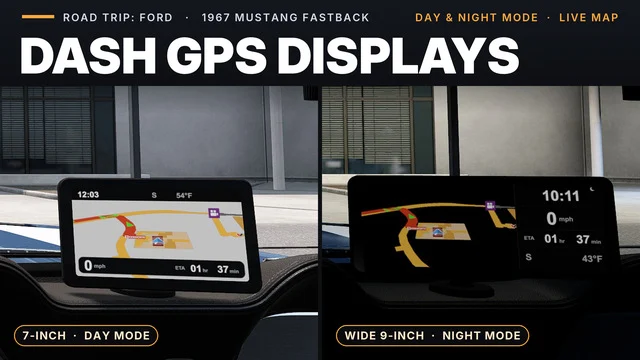
Disable other mods that change the GPS or the center display; instrument cluster mods are fine. Load it above other interior mods for those trucks. There’s a version for the Mustang 1967.
Holyfix Check
Will it work with your mods?
Load your game.log.txt and check whether this mod is for your ATS version, whether you're missing a mod or DLC it needs and where to place it.
It's in Documents › American Truck Simulator › game.log.txt. It's read in your browser: the file is never uploaded.
Something else failing? Holyfix for ATS checks all your mods at once.
User rating
Highlights and things to keep in mind
- Covers all SCS trucks
- Makes use of each truck's center display
- Automatic night mode with the headlights
- Incompatible with other GPS or center display mods
- Some data shows as "--" on certain trucks
- Only two compatible modded trucks
Requirements
- American Truck Simulator 1.61
- SCS trucks (with their DLCs if they're paid) or Outlaw W900 / 359 V2
- Steam account
How to install it
- Open the "Dash GPS Displays - Semi Trucks" page on Steam Workshop and click "Subscribe".
- Launch American Truck Simulator and wait for Steam to finish downloading the mod.
- Open the Mod Manager in your profile and enable "Dash GPS Displays - Semi Trucks".
- Disable other mods that change the trucks' GPS or center display, and place this one above other interior mods.
- At the service shop, buy the 10-inch widescreen GPS (Dash GPS Display Wide) in the accessories slot and choose its position.
- Bind a key to "Infotainment Display Mode" to switch pages.
Version history
-
20 Oct 2026Current
Latest update (the change log has 10 notes)
-
1.2.524 Oct 2026
Data, map, standby and off pages on the Western Star 5700XE center display
-
8 Oct 2026
Release
Common problems
Does it work with modded trucks?
Only with the Outlaw Kenworth W900 and the Outlaw Peterbilt 359 V2, and only with the navigation page.
Where can I place it?
In the center or on the left of the dashboard, or on the windshield, depending on the truck.
Does it conflict with other mods?
Yes with ones that change the GPS or the center display; not with instrument cluster mods.
What does it show in the VNR Electric?
Battery charge and power; the GPS shows range and low battery.
More mods for ATS
 ✓ ATS 1.61Requires DLC
  ✓ ATS 1.61Requires DLC
  ✓ ATS 1.61Requires DLC
  ✓ ATS 1.61Requires DLC
  ✓ ATS 1.61
  ATS 1.58