TabletGPS for American Truck Simulator
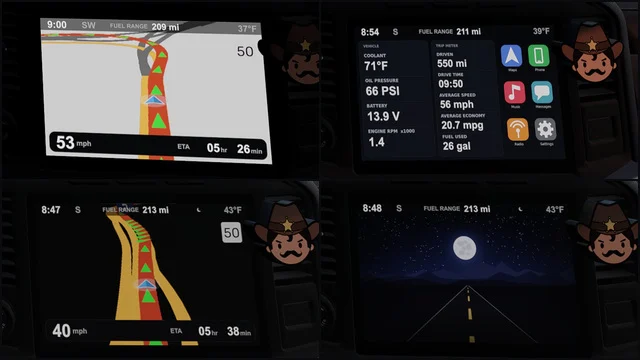
A GPS tablet as a cab accessory for 14 SCS trucks, from Freightliner to Western Star. Free on Steam Workshop; the author lists it for ATS 1.58.
Download TabletGPS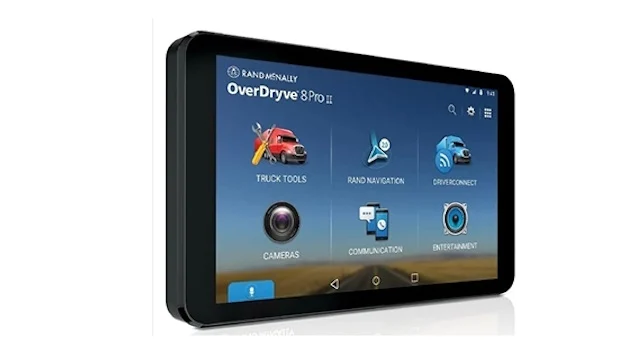
More screenshots on Steam Workshop ↗
What this mod does
TabletGPS is a cab accessory by Getsuga2B that adds a GPS tablet to American Truck Simulator trucks. It’s an alternative to the built-in navigation screens for players who prefer a device mounted in the cab.
Compatible trucks
- Freightliner: Cascadia 2019 and Cascadia 2024.
- Kenworth: T680, T680 2022 and W900.
- Mack: Anthem and Pinnacle.
- Peterbilt: 389 and 579.
- Volvo: VNL and VNL 2018.
- Western Star: 49X, 57X and 5700XE.
Version
The author lists compatibility with 1.58, and the latest update is from March 9, 2026. There’s no confirmation for 1.60 or 1.61, so try it on a secondary profile first. There are also no user comments reporting bugs.
Things to keep in mind
The list doesn’t include the newest trucks, like the 2025 Volvo VNL or the International LT, or any modded trucks. The description is short and says nothing about load order or compatibility with other accessories.
If improving the screen your truck already has is enough for you, check out Better Navigation FOV, which widens the field of view of the dashboard GPS.
Holyfix Check
Will it work with your mods?
Load your game.log.txt and check whether this mod is for your ATS version, whether you're missing a mod or DLC it needs and where to place it.
It's in Documents › American Truck Simulator › game.log.txt. It's read in your browser: the file is never uploaded.
Something else failing? Holyfix for ATS checks all your mods at once.
User rating
Highlights and things to keep in mind
- GPS tablet for 14 SCS trucks
- Lightweight (1.79 MB)
- No DLC needed
- Listed for 1.58; unconfirmed on 1.61
- Doesn't include the newest trucks
- Very brief description
Requirements
- American Truck Simulator 1.58 (version listed by the author)
- Steam account
- One of the 14 compatible SCS trucks
How to install it
- Open the "TabletGPS" page on Steam Workshop and click "Subscribe".
- Launch American Truck Simulator and wait for Steam to finish downloading the mod.
- Go to your profile's Mod Manager and enable "TabletGPS".
- Take your truck to a service shop.
- Find the GPS tablet among the cab accessories and fit it.
Version history
-
9 Mar 2026Current
Latest update (5 change notes)
Common problems
Which trucks does it work on?
14 SCS models: Freightliner Cascadia, Kenworth T680 and W900, Mack Anthem and Pinnacle, Peterbilt 389 and 579, Volvo VNL and Western Star.
Does it work on 1.61?
The author only lists 1.58; try it on a test profile first.
Does it work on the Volvo VNL 2025?
It isn't on the list of compatible trucks.
More mods for ATS
 ATS 1.59
  ATS 1.59
  ✓ ATS 1.61Requires DLC
  ✓ ATS 1.61Requires DLC
  ✓ ATS 1.61Requires DLC
  ATS 1.59