Freightliner Cascadia 2024 – Improved Radio Infotainment Screens for American Truck Simulator
More screens for the Freightliner Cascadia 2024 touch radio: two menus, a GPS with compass and ETA, a clock and a screen-off mode. Needs the Fifth Generation Cascadia DLC; tagged for ATS 1.60.
Download Freightliner Cascadia 2024 – Improved Radio Infotainment Screens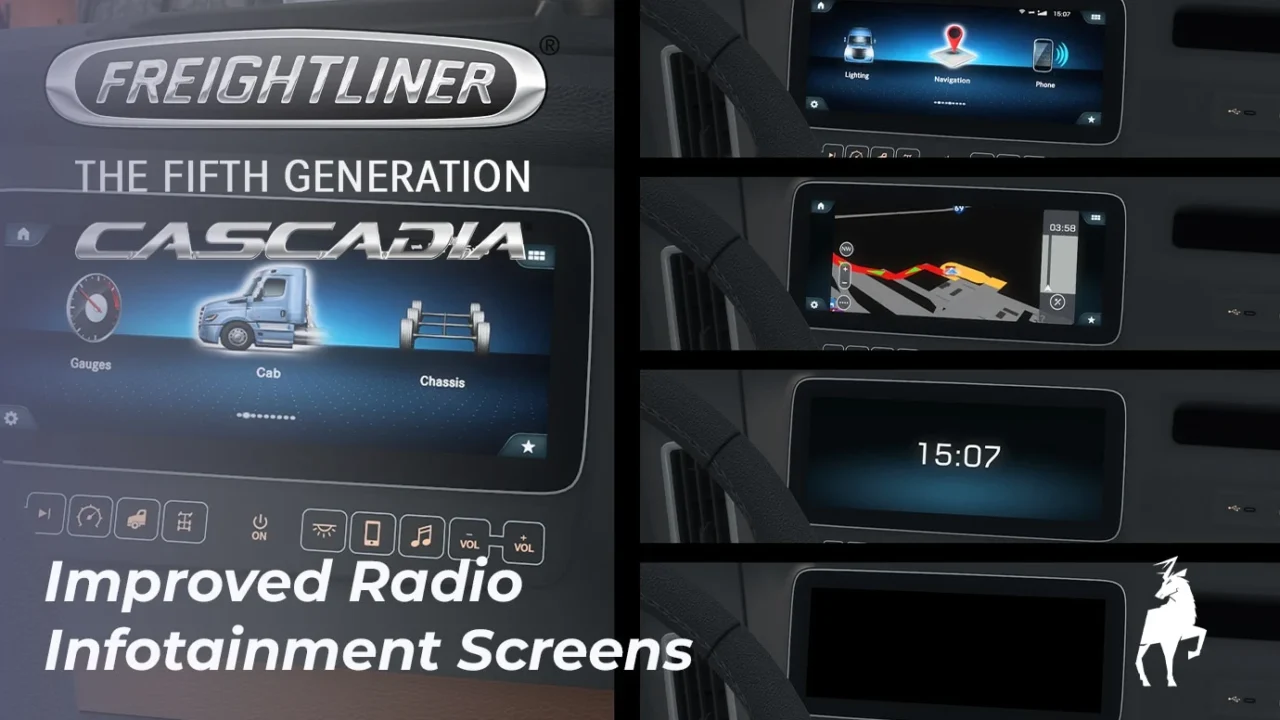
More screenshots on Steam Workshop ↗
What this mod does
This is the Freightliner Cascadia 2024 version of Graf Boinenn‘s screens mod. It expands the center dashboard display with several views you cycle through with a single key. The author notes that not every screen from the real truck can be recreated because of game engine limits, and that he made all the screens, icons and fonts from scratch.
Included screens
- Two main menus (cab and navigation), as static images.
- GPS with a TomTom-style interface, compass and estimated time of arrival.
- In-game clock and a screen-off mode.
Requirements and usage
You need the Freightliner Cascadia (The Fifth Generation) DLC. Bind a key to Infotainment Display Mode in the Interior section of the controls. The GPS doesn’t show the distance to your destination, and the compass only shows a letter.
Compatibility and load order
It works with Knights Gaming’s Cascadia 2024 Improved Dashboard if you place this mod above it: the GPS is modified, so the order matters. One user had a conflict with the same author’s VNL 2025 dashboard, and the creator recommended raising the priority of one of the two. It’s tagged for 1.60. There’s also a version for the Volvo VNL 2025.
Holyfix Check
Will it work with your mods?
Load your game.log.txt and check whether this mod is for your ATS version, whether you're missing a mod or DLC it needs and where to place it.
It's in Documents › American Truck Simulator › game.log.txt. It's read in your browser: the file is never uploaded.
Something else failing? Holyfix for ATS checks all your mods at once.
User rating
Highlights and things to keep in mind
- Screens, icons and fonts made from scratch
- GPS with compass and arrival time
- Compatible with the Knights Gaming dashboard
- Requires the Fifth Generation Cascadia DLC
- Tagged for 1.60; the page doesn't confirm 1.61
- Load order matters if you use other dashboard mods
Requirements
- American Truck Simulator 1.60 or later
- Freightliner Cascadia (The Fifth Generation) DLC
How to install it
- Open the "SCS's Freightliner Cascadia 2024 - Improved Radio Infotainment Screens" page on Steam Workshop and click "Subscribe".
- Launch American Truck Simulator and wait for Steam to finish downloading the mod.
- Open the Mod Manager in your profile and enable "SCS's Freightliner Cascadia 2024 - Improved Radio Infotainment Screens".
- If you use Knights Gaming's Cascadia 2024 Improved Dashboard, place this mod above it.
- In Options, Controls, Interior section, bind a key to "Infotainment Display Mode" and use it inside the Cascadia 2024.
Version history
-
24 Jul 2026Current
Latest update (3 notes in the change log)
-
19 Jul 2026
First release
Common problems
Do I need any DLC?
Yes, Freightliner Cascadia (The Fifth Generation), which is the one that adds the Cascadia 2024.
Is it compatible with Knights Gaming's improved dashboard?
Yes, if you place this mod above it in the Mod Manager.
Does it show the distance to the destination?
No. The GPS has a compass and estimated time of arrival, but no distance.
Will there be more trucks?
The author wants to finish the Daimler trucks, which share the same interface, and then Kenworth.
More mods for ATS
 ATS 1.60
  ✓ ATS 1.61
  ✓ ATS 1.61
  ✓ ATS 1.61Requires DLC
  ✓ ATS 1.61Requires DLC
  ✓ ATS 1.61Requires DLC