Peterbilt 579 Blackened Chrome (BillyBone99) for American Truck Simulator
Swaps the chrome on SCS's Peterbilt 579 day cab (4×2 and short 6×4) for onyx black: exhaust, bumpers, fenders and side fairings with tanks and steps.
Download Peterbilt 579 Blackened Chrome (BillyBone99)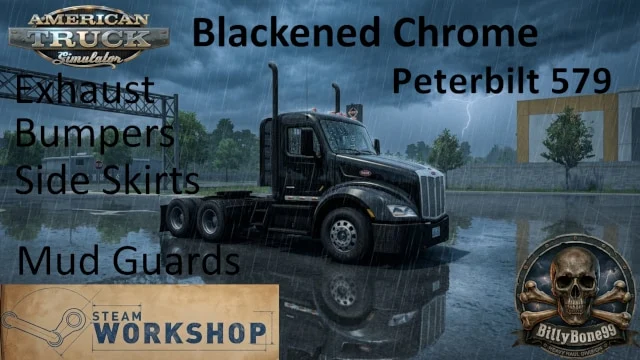
More screenshots on Steam Workshop ↗
What this mod does
Peterbilt 579 Blackened Chrome is a mod by BillyBone99 that changes the texture of the chrome parts on SCS’s Peterbilt 579 to an onyx black finish. It’s the classic «blackout» look you see on lots of custom semi trucks in the US and Mexico, without having to hunt for parts from other mods.
Which parts change
- Exhaust.
- Bumpers.
- Fenders.
- Side fairings, including the fuel tanks, battery box and steps.
Which truck it affects
According to the author, only the Peterbilt 579 without a sleeper (day cab) with the 4×2 and short 6×4 chassis. If your 579 has a sleeper or a long chassis, you won’t see the change. It’s a texture replacement, so it affects those parts without you having to buy anything new in the shop.
Version and credits
It was released on June 19, 2026, in the ATS 1.60 era, and it’s about 421 KB. The author doesn’t list a game version, load order or compatibility with other mods; if you use another mod that changes 579 textures, load this one above it. Credits go to the author and to SCS for the base models. It doesn’t require any DLC, and no bugs have been reported.
Unofficial fan-made mod. All names, logos and trademarks belong to their respective owners; neither the author nor Holymod is affiliated with them.
Holyfix Check
Will it work with your mods?
Load your game.log.txt and check whether this mod is for your ATS version, whether you're missing a mod or DLC it needs and where to place it.
It's in Documents › American Truck Simulator › game.log.txt. It's read in your browser: the file is never uploaded.
Something else failing? Holyfix for ATS checks all your mods at once.
User rating
Highlights and things to keep in mind
- Blackout look with no extra parts
- Very lightweight file
- Uses SCS's models
- Only for the 579 day cab, 4x2 and short 6x4
- Affects all the listed chrome parts at once
- No game version listed
Requirements
- American Truck Simulator (no version listed; released in June 2026)
- Steam account
- A Peterbilt 579 day cab with a 4x2 or short 6x4 chassis
How to install it
- Open the "Peterbilt 579 Blackened Chrome" page on Steam Workshop and click "Subscribe".
- Launch American Truck Simulator and wait for Steam to finish downloading the mod.
- Open your profile's Mod Manager and enable "Peterbilt 579 Blackened Chrome".
- If you use other 579 texture mods, place this one above them in the load order.
- Load your profile and check your Peterbilt 579 day cab: the chrome parts now appear black.
Version history
-
19 Jun 2026Current
Released on Steam Workshop (one change note)
Common problems
Does it work on the 579 with a sleeper?
No. The author says it only affects the day cab with the 4x2 and short 6x4 chassis.
Do I have to buy new parts?
No. It replaces the chrome texture on those parts.
Do I need DLC?
Not according to Steam.
More mods for ATS
 ATS 1.60
  ATS 1.59
  ATS 1.60
  ✓ ATS 1.61
  ✓ ATS 1.61
  ✓ ATS 1.61