Bus Display Controller for BeamNG.drive
App to change bus destination signs: in-game routes in one click, alternating custom text and images. Works with the Wentward DT40L and modded buses; 0.39-ready.
Download Bus Display Controller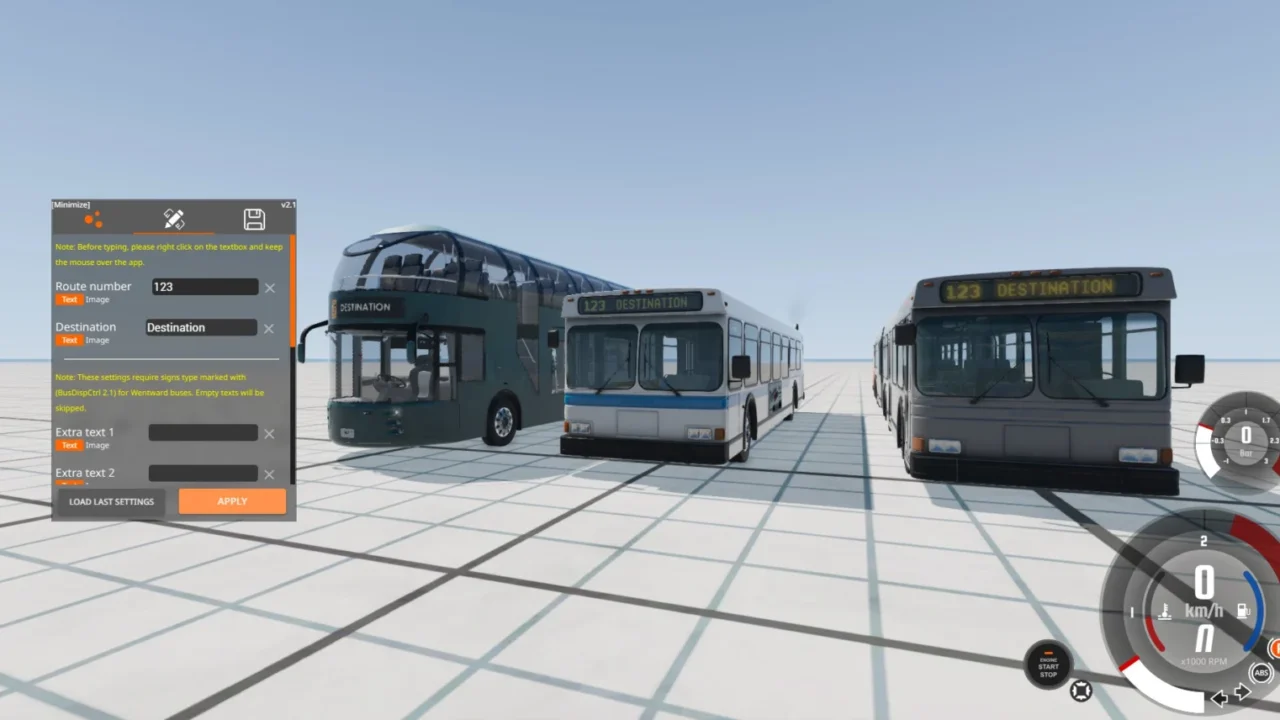
More screenshots on Official BeamNG Repository (beamng.com/resources) ↗
What this mod does
Bus Display Controller is a UI app that lets you control the electronic destination sign on BeamNG.drive’s buses. It’s by the author of the Capsule bus, and it’s almost essential if you enjoy driving bus routes.
What it does
- Routes tab: applies the destinations of the game’s built-in bus lines in one click.
- Free text tab: type your own destination and route number.
- Multi-phase mode: the sign alternates between up to three different texts, like real buses.
- Images: you can display logos by placing the files in the specified folder.
- Saves tab: store your texts to reuse them.
- Background color changes on color signs, color inversion on monochrome ones and transitions between screens.
Compatible buses
It works with the base game’s Wentward DT40L and with several modded buses: Wentward Pack, Capsule, Hirochi Aero, Wentward EU12M and Daewon LN.
Release notes
After 0.39 came out, some users reported that it had stopped working; version 2.8.1 from August 4, 2026, is the 0.39 compatibility update. The mod is marked as experimental, but it has been getting improvements for years.
User rating
Highlights and things to keep in mind
- Adds a lot of realism to bus routes
- In-game routes in one click and alternating texts
- Very lightweight file
- Only works with a specific list of buses
- You have to add it to the HUD manually
- Marked as experimental
Requirements
- BeamNG.drive 0.39
- A compatible bus (Wentward DT40L or one of the listed mods)
How to install it
- Open the Bus Display Controller page on the official Repository and click Download, or subscribe from the game.
- If you download it manually, copy the .zip (don't unzip it) into the mods folder inside your user folder.
- Start Freeroam with a compatible bus.
- Press Esc, go to System > HUD Apps, choose the Freeroam layout and click Edit layout.
- Click Add app, search for Bus Display Controller and choose Add to layout.
- Use the app's tabs to pick a route, type your text or load a saved one.
Version history
-
2.8.14 Aug 2026Current
Compatibility update for 0.39.
-
—17 Oct 2025
Texture fix after 0.37 and support for the Daewon LN with sample logos.
-
—16 Jan 2024
Transitions between screens and compatibility with the Hirochi Aero and Wentward EU12M.
Common problems
I can't see the app in the game, where is it?
It doesn't appear on its own: you have to add it to the HUD layout from the pause menu (System > HUD Apps > Edit layout > Add app).
It stopped working after updating to 0.39, what should I do?
Install version 2.8.1, which is the update for 0.39, and delete the previous one.
Does it work with any bus?
No, only with the compatible ones: Wentward DT40L, Wentward Pack, Capsule, Hirochi Aero, Wentward EU12M and Daewon LN.
More mods for BeamNG
 Multiplayer