Enhanced Tachometer and Forced Induction for BeamNG.drive
Upgraded tachometer and boost gauge apps with a needle trail, adjustable redline and backlighting that reacts to your lights. Updated in September 2026.
Download Enhanced Tachometer and Forced Induction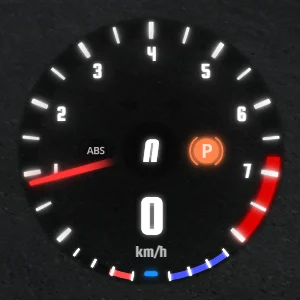
More screenshots on Official BeamNG Repository (beamng.com/resources) ↗
What this mod does
Enhanced Tachometer and Forced Induction replaces two of BeamNG.drive’s most-used UI apps, the tachometer and the boost pressure gauge, with clearer, more configurable versions. It’s based on the stock Tacho2 and ForcedInduction apps, so they fit the game’s style.
What it adds
- Tachometer with two styles: one similar to the original and a v2 variant.
- Turbo or supercharger boost gauge, also in two styles.
- Needle trail modes: needle with trail or trail only, so you can see the revs climb.
- Short or long redline on the tachometer.
- Backlighting that changes depending on whether the car’s lights are on or off.
How to use it
You change the settings by clicking on the app itself: the left side of the tachometer cycles through the trail modes and the right side changes the redline length; on the boost gauge, a click changes the trail mode. Your settings are kept when you switch vehicles.
Release notes
2.0.0 (September 7, 2026) migrates the apps to Vue, remakes the SVG graphics, improves the needle trail, adds a backlight fade and takes the RPM from a different source so it responds faster. It’s a small mod, under 1 MB.
User rating
Highlights and things to keep in mind
- Tachometer and boost gauge easier to read than the stock ones
- Needle trail and backlighting tied to the lights
- Very lightweight and remade in September 2026
- The author doesn't explicitly mention 0.39 in the changelog
- You have to add the apps manually from the UI editor
- May need an update after each major game version
Requirements
- BeamNG.drive 0.39
- No other mods needed
How to install it
- Open the Enhanced Tachometer and Forced Induction page on the official BeamNG Repository.
- Click Download or subscribe from the in-game Repository.
- If you download it manually, copy the .zip (don't unzip it) into the mods folder in your user folder.
- In the game, open the UI Apps editor from the menu and look for the new tachometer and boost pressure apps.
- Add them to the screen, place them wherever you like and, if you want, remove the equivalent stock apps.
- Click each app to change the trail mode and the redline length.
Version history
-
2.0.07 Sep 2026Current
Migration to Vue, remade SVGs, improved needle trail, backlight fade and faster RPM response.
-
—7 Aug 2023
Fixed settings resetting when switching vehicles and the boost gauge when switching from turbo to naturally aspirated.
-
—4 Aug 2023
Settings are now saved; the tachometer now disappears when switching to objects.
Common problems
I don't know how to use it
You need to add the apps from the UI Apps editor; you change the settings by clicking on the app itself.
The boost gauge reads in bar even though I use PSI
A user reported it in 2023 and the author confirmed he was fixing it.
I see a white border around the tachometer with HDR
A user mentioned it in August 2026 on 0.39, before version 2.0.0. If it happens to you on the current version, let the author know on the Repository.
More mods for BeamNG
 Multiplayer