BMW X5 G05 2024 for Euro Truck Simulator 2
BMW's big SUV, the 2024 X5 G05, drivable in ETS2 1.61. Free, with its own digital dashboard and black or brown interiors. You buy it at the mod dealer.
Download BMW X5 G05 2024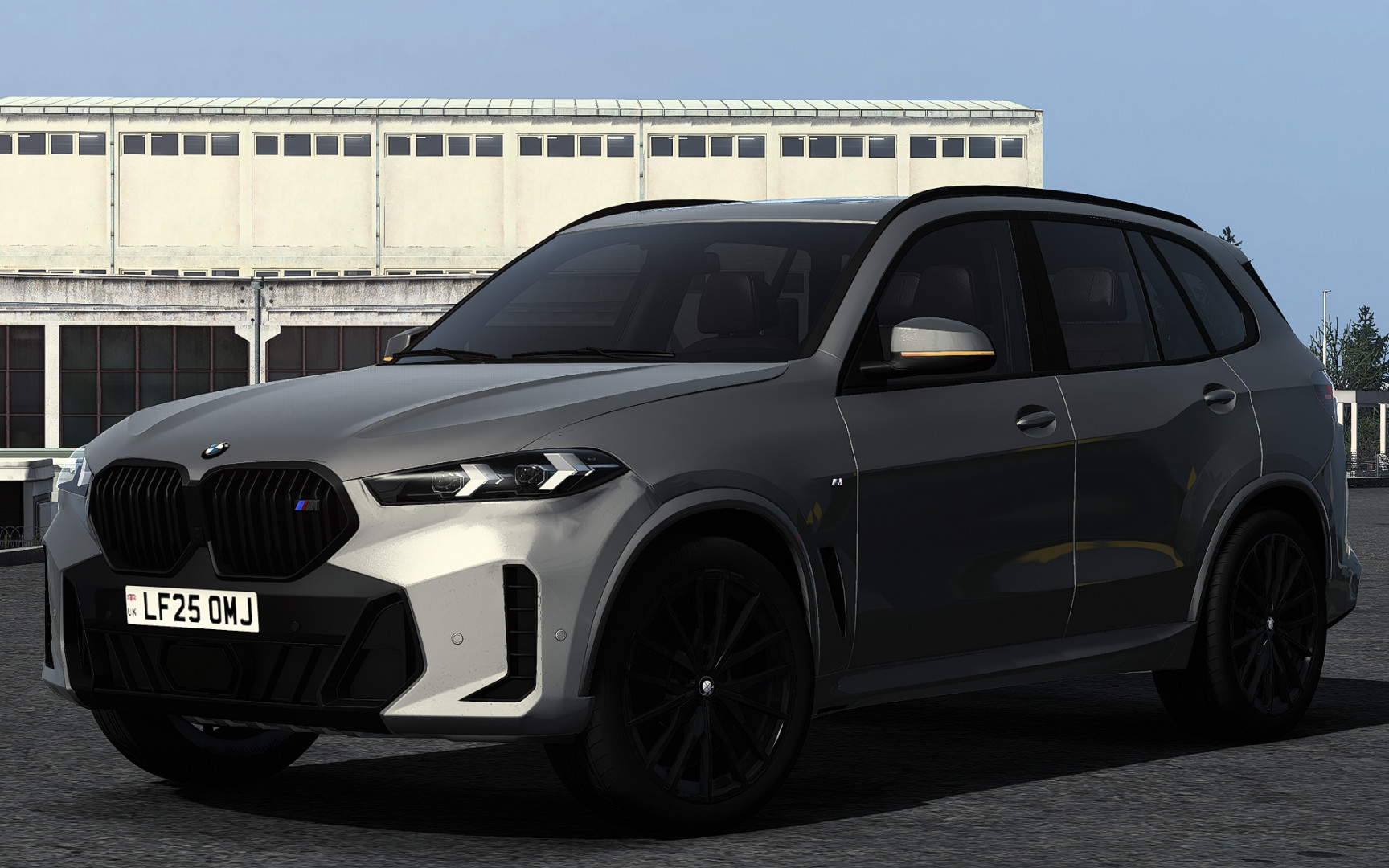
More screenshots on ModLand (author's verified account) ↗
What this mod does
This mod adds the BMW X5 G05 (2024 version) to Euro Truck Simulator 2 as your own car. It’s a comfortable family SUV, made for anyone who wants to get around the map in something more practical than a sports car.
What’s included
- Highly detailed exterior and interior, with its own UI and a digital speedometer with extra data.
- Good road handling, front windows that open and functional wipers.
- Animated turn signal stalk, wiper stalk and handbrake button.
- Engine and transmission tuned to the real model’s acceleration (0-100, 0-200 and 0-250 km/h).
- Two interior colors: black and brown.
Who it’s for
For anyone who prefers a premium-brand SUV that’s very common on Spanish roads. It works just as well on the highway as on the back roads of the Iberia DLC.
Version
Version 1.5 updates it to 1.61. As with the author’s other cars, top speed is only reached in seventh gear.
Holyfix Check
Will it work with your mods?
Load your game.log.txt and check whether this mod is for your ETS2 version, whether you're missing a mod or DLC it needs and where to place it.
It's in Documents › Euro Truck Simulator 2 › game.log.txt. It's read in your browser: the file is never uploaded.
Something else failing? Holyfix for ETS2 checks all your mods at once.
User rating
Mod video
Highlights and things to keep in mind
- Comfortable premium SUV for long trips
- Detailed interior with two finishes
- Free and no DLC needed
- A file of about 156 MB
- The ModLand page shows 1.60.x even though the changelog says 1.61
- It downloads from Modsfire, not from Steam
Requirements
- Euro Truck Simulator 2 updated to version 1.61
- Download from the author's ModLand page (hosted on Modsfire)
- No DLC or other mods needed
How to install it
- Open the mod's page on ModLand (Nimit's account) and click the download button.
- Download the file from Modsfire, the host the author uses.
- If it comes compressed, extract the .scs file and copy it to Documents/Euro Truck Simulator 2/mod.
- Open ETS2, go to the Mod Manager and enable the car.
- In your save, go to any truck dealer and enter the mod dealer access.
- Pick BMW, buy the car and assign it as your vehicle.
Common problems
Where do I buy it?
In the mod dealer access at any truck dealer; look for BMW.
Why doesn't it reach top speed?
You need to get into seventh gear.
What interior colors are there?
Black and brown.
More mods for ETS2
 ✓ ETS2 1.61
  ✓ ETS2 1.61
  ✓ ETS2 1.61
  ✓ ETS2 1.61
  ✓ ETS2 1.61
  ✓ ETS2 1.61