Functional Fog Lights for Euro Truck Simulator 2
Makes the factory fog lights on SCS trucks actually light the road, switching on with your high or low beams. By the Realistic Truck Physics author; Mod Pass ($3/month), ETS2 1.61.
Download Functional Fog Lights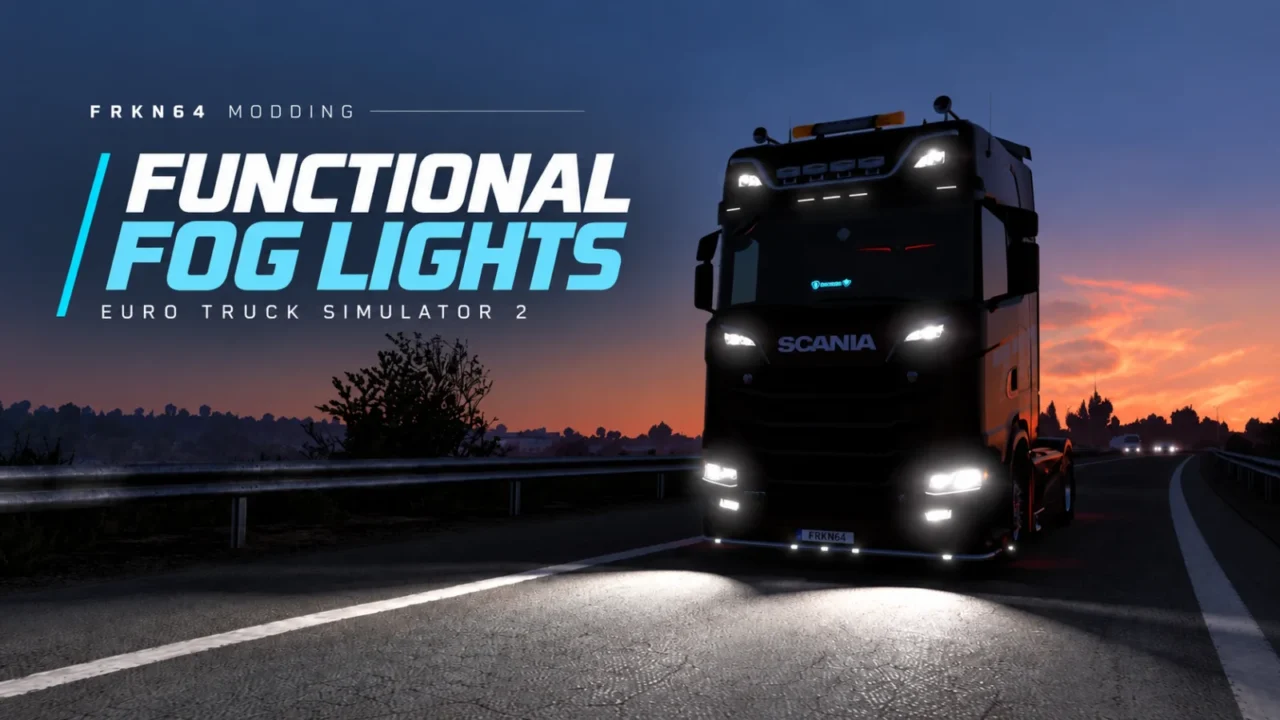
More screenshots on frkn64modding.com (author's website); the download is on Modsy with Mod Pass ↗
What this mod does
In ETS2, many trucks have fog lights in the bumper that don’t light anything. Functional Fog Lights, by Frkn64 (author of Realistic Truck Physics and Realistic Vehicle Lights), makes those factory fog lights work and cast light onto the road.
How it works
No key binding or extra accessories needed. There are two editions: in one, the fog lights turn on with the high beams, and in the other, with the low beams. You pick the one you prefer when you install it.
Compatible trucks
It covers 32 SCS truck configurations, including:
- DAF XF Euro 6, XF/XG/XG+ 2021, XD and XF Electric.
- MAN TGX, TGX Euro 6 and TGX 2020.
- Mercedes-Benz Actros and New Actros; Renault Magnum and T.
- Scania R 2009, R and S 2016 and electric S.
- Volvo FH16 2009 and 2012, FH 2021 and FH 2024.
Limitations
It only works with the game’s original trucks, not with trucks from other modders. Tuning bumpers or light clusters that replace the stock parts can cancel it out, and on some models it depends on the factory configuration.
Version and access
Version 1.1 is compatible with ETS2 1.61. It’s exclusive to the Mod Pass, the $3-a-month subscription on Modsy, the platform the author uses.
Holyfix Check
Will it work with your mods?
Load your game.log.txt and check whether this mod is for your ETS2 version, whether you're missing a mod or DLC it needs and where to place it.
It's in Documents › Euro Truck Simulator 2 › game.log.txt. It's read in your browser: the file is never uploaded.
Something else failing? Holyfix for ETS2 checks all your mods at once.
User rating
Highlights and things to keep in mind
- Makes use of the fog lights the trucks already have
- No extra keys or accessories
- Veteran author with widely used mods
- Requires the paid Mod Pass ($3/month)
- SCS trucks only; doesn't work with trucks from other modders
- Tuning bumpers or headlights can cancel it out
Requirements
- Euro Truck Simulator 2 1.61
- A Mod Pass subscription on Modsy ($3/month)
- An original SCS truck from the compatible list
How to install it
- Go to the mod's official page on Frkn64's website and follow the link to Modsy.
- Subscribe to the Mod Pass and download the edition you prefer (high or low beams).
- Copy the .scs file into Documents/Euro Truck Simulator 2/mod.
- Enable it in the Mod Manager, above mods that change truck lights.
- In-game, turn on your high beams (or low beams, depending on the edition) and the fog lights will turn on with them.
Common problems
Does it work with trucks from other modders?
No. The author says it's only for original SCS trucks.
Do I need a new key?
No. The fog lights turn on with the high or low beams, depending on the edition you install.
Is it free?
No. It's exclusive to Modsy's Mod Pass, which costs $3 a month.
More mods for ETS2
 ✓ ETS2 1.61
  ✓ ETS2 1.61
  ✓ ETS2 1.61
  ✓ ETS2 1.61
  ETS2 1.58
  ✓ ETS2 1.61