Interior Ambient Lighting: cabin ambient light in 11 colors (zanteartzbtw) for Euro Truck Simulator 2
Soft cabin ambient light for night driving in 24 official ETS2 trucks, in 11 colors (purple, red, blue, pink, turquoise, cold or warm white…). 0.9 MB, 3,300 subscribers. Free.
Download Interior Ambient Lighting: cabin ambient light in 11 colors (zanteartzbtw)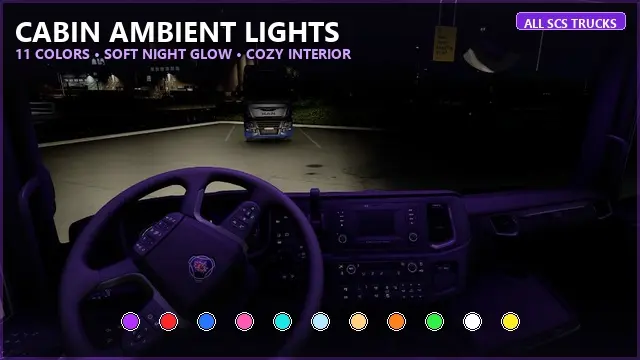
More screenshots on Steam Workshop ↗
What this mod does
Interior Ambient Lighting (11 Colors), by zanteartzbtw, adds a soft ambient light to the cabin for night routes, without glare: the author quotes about 15 lumens. It came out November 7, 2026 and in three days already passed 3,300 subscribers.
Supported trucks
- DAF XF 105, XF Euro 6, XG/XG+ 2021 and XD.
- Iveco Stralis and Stralis Hi-Way.
- MAN TGX Euro 5, Euro 6 and 2020.
- Mercedes-Benz Actros Euro 5 and New Actros 2014.
- Renault Magnum, Premium, Range T and E-Tech T.
- Scania R 2009, Streamline, Next Gen R and S 2016 and S BEV.
- Volvo FH16 Classic, FH 2012, FH Aero 2024 and FH Electric.
Colors
Purple, red, blue, pink, turquoise, cold white, warm white, orange, green, white and yellow.
How to use it
Enable it in the Mod Manager; in the workshop, click the roof beacon slot and pick a color; turn on low beams at night to see it.
Version and notes
The author doesn’t name an ETS2 version; it was updated November 7, 2026 (2 change notes) and weighs 0.9 MB. The Iveco S-Way is missing, and a player says the Scania Next Gen S has no red; the author says a fix is coming. Brands belong to their owners.
Holyfix Check
Will it work with your mods?
Load your game.log.txt and check whether this mod is for your ETS2 version, whether you're missing a mod or DLC it needs and where to place it.
It's in Documents › Euro Truck Simulator 2 › game.log.txt. It's read in your browser: the file is never uploaded.
Something else failing? Holyfix for ETS2 checks all your mods at once.
User rating
Highlights and things to keep in mind
- 11 colors for 24 official trucks
- Only 0.9 MB
- Very popular in its first week
- The author doesn't name an ETS2 version; Holyfix warns you if it throws errors
- No Iveco S-Way and no red on the Scania Next Gen S, according to a player
- Uses the roof beacon slot
- Unofficial mod: brands belong to their owners; neither Holymod nor the author is affiliated with them
Requirements
- Euro Truck Simulator 2
- Steam account to subscribe on the Workshop
How to install it
- Open the mod page on Steam Workshop and click “Subscribe”.
- Start ETS2 and enable “Interior Ambient Lighting” in the Mod Manager.
- In the workshop, click the roof beacon slot and pick the color.
- Turn on low beams at night: the ambient light shows in the cabin.
Version history
-
Update of Nov 7, 20267 Nov 2026Current
Release and first fix the same day
Common problems
Which trucks does it work on?
24 official trucks, from the DAF XF 105 to the Volvo FH Aero 2024 (no Iveco S-Way for now).
How do I pick the color?
From the roof beacon slot in the workshop.
Which version does it work with?
The author doesn't say; it was published November 7, 2026.
Does it glare?
No: it's a soft light, about 15 lumens according to the author.
More mods for ETS2
 ✓ ETS2 1.62
 ✓ ETS2 1.62
 ✓ ETS2 1.62
 ETS2 1.61