Logo Light (所有车标都能亮): illuminated logos for SCS trucks for Euro Truck Simulator 2
Lights up the logos on every dealer truck in ETS2, in eight colors: Scania, Volvo, MAN, DAF, Mercedes, Iveco and Renault. Free on Steam Workshop.
Download Logo Light (所有车标都能亮): illuminated logos for SCS trucks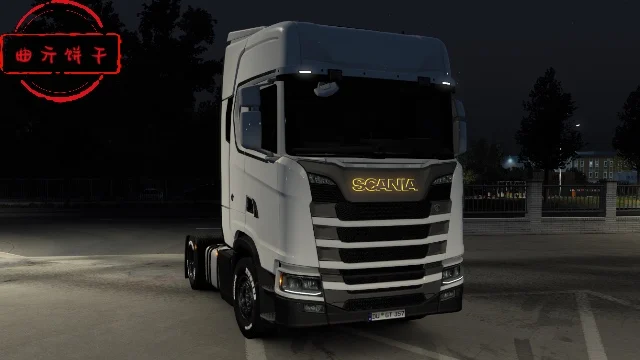
More screenshots on Steam Workshop ↗
What this mod does
Logo Light (in Chinese, 所有车标都能亮) is a mod by Chinese author 曲亓饼干 (Cookies) that lets you light up the brand logo on Euro Truck Simulator 2 trucks. It’s one of the flashiest tuning parts for stock trucks.
Compatible trucks
Every truck sold at the game’s dealers, including:
- Scania P, G, R and S.
- Volvo FH6 Aero, FH6 and FH5.
- MAN TGX 2020 and TGX Euro 6.
- DAF XG, next-gen XF, XD and XF Space Aero.
- Mercedes-Benz Actros 2014.
- Iveco S-Way and Renault T.
Colors
There are eight light colors: red, orange, yellow, green, cyan, blue, purple and white.
Version and known issues
It was released on June 19, 2025. In December 2025 the author replied that it works fully and without issues on 1.57. If the orange looks white from outside, the author explains that it’s caused by another graphics mod (雪月插件 or “Snow Moon”), not this one. Some trucks on the list are DLC: you can only use the logo on the ones you own.
Holyfix Check
Will it work with your mods?
Load your game.log.txt and check whether this mod is for your ETS2 version, whether you're missing a mod or DLC it needs and where to place it.
It's in Documents › Euro Truck Simulator 2 › game.log.txt. It's read in your browser: the file is never uploaded.
Something else failing? Holyfix for ETS2 checks all your mods at once.
User rating
Our rating
0.0 / 5- Works on every brand in the game
- Eight colors to choose from
- Highly rated by users
- Latest game version confirmed by the author: 1.57. It may cause errors on 1.61; Holyfix will warn you if so.
- The description is in Chinese
- Unofficial mod: trademarks belong to their owners; neither Holymod nor the author is affiliated with them
Requirements
- Euro Truck Simulator 2 (the author confirms 1.57)
- No DLC required (DLC trucks only if you own them)
- Steam account
How to install it
- Open the mod's page on Steam Workshop and click “Subscribe”.
- Wait for Steam to finish the download.
- Launch ETS2, open the Mod Manager and enable the mod.
- In your save, take your truck to a service shop with tuning.
- Find the illuminated logo among the truck's tuning parts and pick the color.
Common problems
What colors are there?
Red, orange, yellow, green, cyan, blue, purple and white.
The orange looks white
The author says it's caused by the “Snow Moon” graphics mod (雪月插件).
Does it work on 1.57?
Yes: the author confirmed it in December 2025.
Does it work on modded trucks?
The author only lists the game's dealer trucks.
More mods for ETS2
 ETS2 1.57
 ETS2 1.59