Scania Smart Dash Improved Dashboard for Euro Truck Simulator 2
Expands the Scania S and R Smart Dash with blind spot, axle indicators, axle load, ETA and rest time. Free on Steam, version 2.0 for ETS2 1.61.
Download Scania Smart Dash Improved Dashboard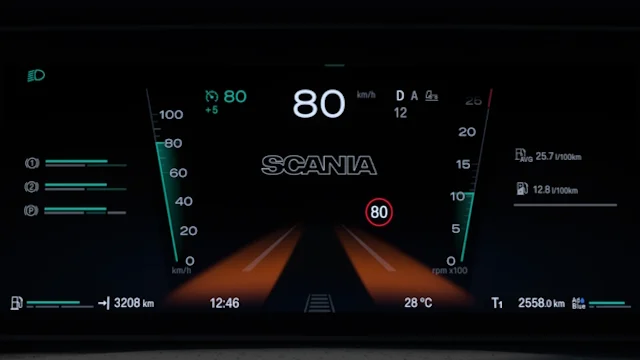
More screenshots on Steam Workshop ↗
What this mod does
Scania Smart Dash Improved Dashboard improves the Smart Dash instrument cluster SCS gave the Scania Next Generation. It’s made by KnightRider (Knights Gaming) and AMYLECH, and adds information the stock dashboard doesn’t show.
What it adds
- Odometer, low beam indicator and blind spot indicators.
- Truck and trailer axle indicators, plus pages showing rear axle and suspension load.
- Fuel gauge, cruise control memory and tolerance, trip time, and oil temperature and turbo pressure bars.
- Speed limit, estimated time of arrival and time until your next rest on the infotainment screen.
- New interior versions for high R and S cabs with 2, 3 and 4 axles, plus the Super and 770 variants.
Compatibility
It works with SCS’s 2016+ Scania S and R with the Smart Dash interior and is compatible with Swap Body Carrier Chassis Pack. The full axle indicators only work with the interiors labeled «Improved Dashboard».
Known issues
The text is still small, there’s no mirror camera (the Scania NG doesn’t have one) and the right-hand drive version is still pending. Comments mention that the blind spot seems reversed and that it doesn’t work on low cabs.
Holyfix Check
Will it work with your mods?
Load your game.log.txt and check whether this mod is for your ETS2 version, whether you're missing a mod or DLC it needs and where to place it.
It's in Documents › Euro Truck Simulator 2 › game.log.txt. It's read in your browser: the file is never uploaded.
Something else failing? Holyfix for ETS2 checks all your mods at once.
User rating
Highlights and things to keep in mind
- Much more information on the dashboard
- Updated for 1.61
- More than 239,000 subscribers
- Small text on some screens
- No UK version for now
- Complaints about a reversed blind spot and bugs on low cabs
Requirements
- Euro Truck Simulator 2 1.61
- Steam account
- An SCS Scania S or R with the Smart Dash interior
How to install it
- Open the "Scania Smart Dash Improved Dashboard" page on Steam Workshop and click "Subscribe".
- Launch Euro Truck Simulator 2 and wait for Steam to finish downloading the mod.
- Open your profile's Mod Manager and enable "Scania Smart Dash Improved Dashboard".
- At a service shop, choose one of the interiors labeled "Improved Dashboard" to get all the indicators.
- Switch pages on the dashboard screen to see axle load and suspension.
Version history
-
2.07 Sep 2026Current
Support for the upcoming 1.61
-
1.86 May 2026
1.59 support and a new warning sound
-
1.722 Apr 2026
Support for Swap Body Carrier Chassis Pack
-
1.614 Dec 2025
New interior versions for high S and R cabs
Common problems
Does it work with the old Scania NG dashboard?
No. It's for the Smart Dash interior; the same author has another mod, Scania NG Improved Dashboard, for the previous cluster.
Why can't I see the axle indicators?
The author explains they only fully work with the interiors labeled "Improved Dashboard".
Is there a right-hand drive version?
Not yet; the author has it planned.
Can I sell add-ons for this mod?
No. The author forbids selling the mod or add-ons for it, and free add-ons need his permission.
More mods for ETS2
 ETS2 1.57
  ✓ ETS2 1.61
  ETS2 1.55Requires DLC
  ✓ ETS2 1.61Requires DLC
  ETS2 1.54Requires DLC
  ETS2 1.60Requires DLC