Smoke in my Trucks: continuous exhaust smoke for Euro Truck Simulator 2
Adds continuous exhaust smoke to SCS dealer trucks: it follows each exhaust outlet and changes with turns and speed. Works from 1.50 to 1.61 per the author.
Download Smoke in my Trucks: continuous exhaust smoke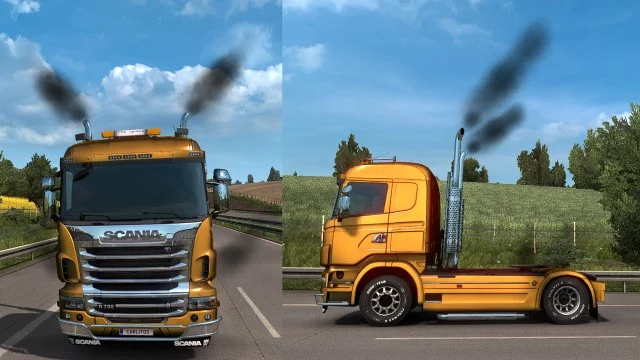
More screenshots on Steam Workshop ↗
What this mod does
Smoke in my Trucks is a mod by Carlitos that makes Euro Truck Simulator 2’s stock trucks puff smoke from their exhausts continuously. It’s been on the Workshop since January 2021 and has over 170,000 subscribers.
How it works
- The smoke comes out in each exhaust’s original direction.
- The trail changes when the truck turns and when it speeds up or slows down.
- It works with the game’s original trucks bought at the DAF, Iveco, MAN, Mercedes-Benz, Renault, Scania and Volvo dealers.
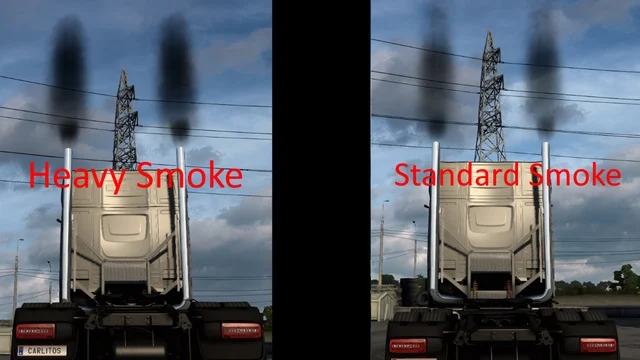
- The author also publishes separate light smoke and heavy smoke versions.
Smoke cut-off and plugin
For the smoke cut-off to work, the author requires installing ToniVolma’s MODGuard.dll plugin in the game’s bin\win_x64\plugins folder. Without the plugin the smoke still comes out, but it doesn’t cut off.
Load order
If you also use Traffic Trucks Smoke, by the same author, place Smoke in my Trucks above it in the Mod Manager.
Version
The description says the mod is compatible with the current game version, from 1.50 to 1.61. The latest file Steam shows is from December 3, 2025.
Holyfix Check
Will it work with your mods?
Load your game.log.txt and check whether this mod is for your ETS2 version, whether you're missing a mod or DLC it needs and where to place it.
It's in Documents › Euro Truck Simulator 2 › game.log.txt. It's read in your browser: the file is never uploaded.
Something else failing? Holyfix for ETS2 checks all your mods at once.
User rating
Our rating
0.0 / 5- Dynamic smoke that follows each exhaust
- Compatible with trucks from all seven SCS brands
- Light or heavy smoke options
- The smoke cut-off needs an external .dll plugin
- The latest file is from December 2025, although the description mentions 1.61
- Unofficial mod: brands belong to their owners; neither Holymod nor the author is affiliated with them
Requirements
- Euro Truck Simulator 2 (1.50 to 1.61, per the author)
- Stock SCS trucks bought at a dealer
- Optional: MODGuard.dll plugin for the smoke cut-off
How to install it
- Open the mod page on Steam Workshop and click "Subscribe".
- Wait for Steam to finish downloading.
- Launch ETS2 and open the Mod Manager.
- Enable "Smoke in my Trucks" and confirm the changes.
- If you want the smoke cut-off, install the MODGuard.dll plugin in steamapps/common/Euro Truck Simulator 2/bin/win_x64/plugins, as the author explains.
- If you use Traffic Trucks Smoke, keep Smoke in my Trucks above it in the list.
Common problems
Does it work with modded trucks?
The author describes it for the game's original trucks bought at dealers.
What is MODGuard.dll for?
It's the plugin that makes the smoke cut-off work; without it the smoke doesn't cut off.
Are there versions with more or less smoke?
Yes, the author publishes Light Smoke and Heavy Smoke separately.
More mods for ETS2
 ✓ ETS2 1.61
  ✓ ETS2 1.61
  ETS2 1.59
  ETS2 1.58
  ETS2 1.57
  ETS2 1.57