BetterMap for Hytale
Plugin that turns Hytale's map into a persistent one: it saves what you explore and adds a cave mode, waypoints with teleport and a shared server map.
Download BetterMap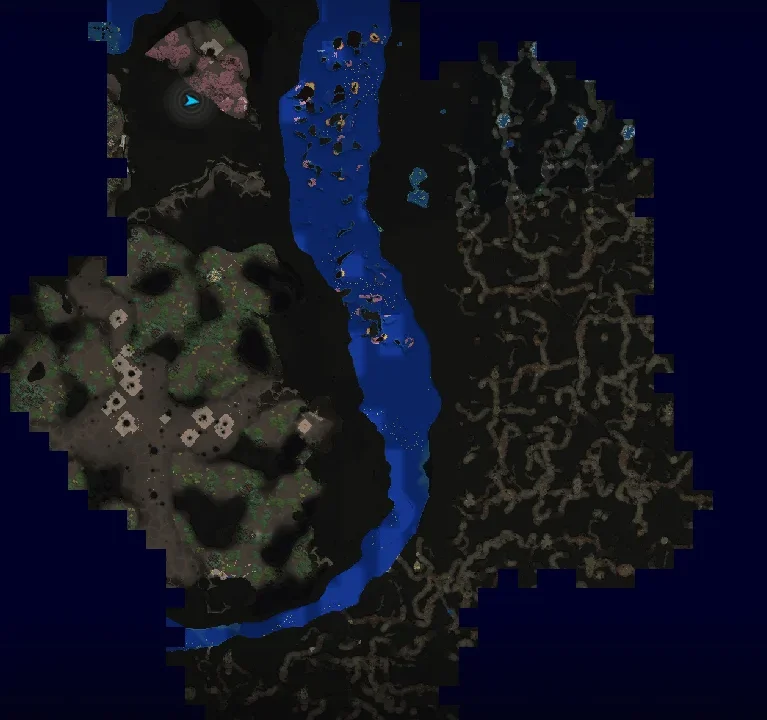
More screenshots on CurseForge ↗
What this mod does
Hytale’s world map only shows the nearby area and forgets where you’ve been. BetterMap is a server plugin that permanently saves everything you explore, so your map grows with you session after session.
What it adds
- Persistent exploration: visited areas stay recorded between sessions.
- Cave mode to see underground, with an optional fog of war.
- An expanded waypoint system: create, edit and teleport to marked points (depending on the permissions set by the admin).
- World border display and a player radar on the compass.
- Shared map mode so the whole group can see what anyone has explored.
- Multi-world support and dynamic chunk loading to avoid hurting performance.
Who it’s for
For players who play long survival saves and want to find their way without jotting down coordinates, and for server admins looking for a shared map for their community. It includes an in-game config menu.
Version
Version 1.3.8 is tagged on CurseForge for Hytale 0.6. If you play on an earlier version of the game, use the matching file from the Files tab. The code is open source (AGPLv3 license).
Update (Oct 12, 2026): with Update 7 (0.7) now out, the author has already published a compatible file: version 1.3.9 (October 12, 2026). What’s described on this page was checked with the previous version; check the author’s changelog in case anything has changed.
User rating
Highlights and things to keep in mind
- The map finally remembers everything you've explored
- Cave mode and teleport waypoints are very handy in survival
- Open source and updated for the latest game version
- Each mod version is tied to a specific Hytale version
- Teleporting depends on the permissions set by the server admin
Requirements
- Hytale (Early Access) on PC, version 0.7 for version 1.3.8 of the mod
- Enable the mod in the world settings or install it on the server
How to install it
- Open the mod's page on CurseForge and click Install to install it with the CurseForge app, or download the .jar file from the Files tab.
- If you download it manually, copy the .jar into the mods folder: on Windows %APPDATA%\Hytale\UserData\Mods.
- Open Hytale and, in the world list, right-click the world where you want to use it.
- Check BetterMap in the mod list and click Save World Settings.
- On a dedicated server, put the .jar in the server's mods folder and restart it.
- Enter the world and open the map to start recording your exploration.
Version history
-
1.3.912 Oct 2026Current
File for Hytale 0.7 (Update 7)
Common problems
Do all players on a server have to install it?
No. In Hytale, mods run on the server and players receive the content when they connect.
I copied the mod but it doesn't show up in my save
Mods are enabled per world: right-click the world, check BetterMap and save the settings.
Is what I explored before installing the mod lost?
The mod can only record what you explore after it's installed; you'll have to revisit earlier areas.
More mods for Hytale
 Multiplayer
  Multiplayer
  Multiplayer
  Multiplayer
  Multiplayer
  Multiplayer