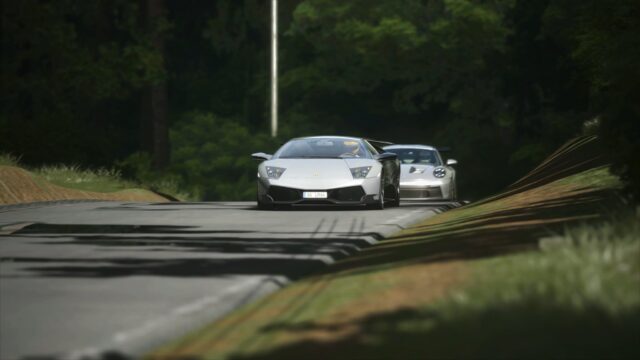
REVOLUTION PP Filter for Assetto Corsa
A post-processing filter for Pure Gamma with Ultra and Optimized video and CSP presets. Free, updated in December 2025 and rated 4.95.
Download REVOLUTION PP Filter
More screenshots on OverTake.gg (formerly RaceDepartment) ↗
What this mod does
REVOLUTION is a post-processing filter by zr0w for Pure in Gamma mode. It’s free, came out in February 2025 and quickly passed 29,000 downloads with a rating of 4.95 out of 5. Version 1.3, from December 2025, tweaked the lighting and shadows.
What’s included
- The filter for Pure Gamma; the author makes clear that LCS mode isn’t supported.
- Custom Shaders Patch and video presets in two tiers: Ultra and Optimized.
- Atmospheric fog and fixed auto exposure since version 1.1.
- Color and lighting tweaks revised in 1.15 and 1.3.
The most important thing when installing it
The author repeats it in all caps: after applying the filter, reset your Pure settings (Pure Config). If the image comes out too bright, reapply the CSP preset you chose, Ultra or Optimized, as he explained in patch 1.11.
Who it’s for
For anyone already using Pure who wants a punchier look than the default without setting up ReShade. If your PC is on the limit, start with the Optimized preset. The author also has a Patreon with early access to the next public version.
User rating
Highlights and things to keep in mind
- 4.95 out of 5 rating
- Ultra and Optimized presets
- Updated in December 2025
- Needs Pure, which is paid
- Gamma mode only
- You have to reset Pure Config when installing it
Requirements
- Assetto Corsa for PC
- Pure in Gamma mode (paid, on Peter Boese's Patreon)
- Custom Shaders Patch
- Free OverTake.gg account to download
How to install it
- Install or update Pure and Custom Shaders Patch.
- Go to the REVOLUTION page on OverTake.gg, log in and download the file (about 58 KB).
- Copy the filter and apply the CSP and video preset you prefer: Ultra or Optimized.
- Reset your Pure settings (Pure Config) after applying the filter.
- Pick Pure Gamma and the REVOLUTION filter in the video settings.
Version history
-
1.327 Dec 2025Current
Adjusted lighting and shadows and minor fixes from 1.2
-
1.1513 Jul 2025
Fixes, updated CSP preset and color and lighting tweaks
-
1.1130 Apr 2025
Fix for the filter being too bright
-
1.119 Mar 2025
Fixed auto exposure and atmospheric fog
Common problems
Does it work with Pure LCS?
No; the author says it's for Gamma and LCS isn't supported.
The image looks too bright
Reapply the CSP preset (Ultra or Optimized), as the author explained in patch 1.11.
Is it paid?
No. It's free; the author has a Patreon for anyone who wants to try the next version early.
More mods for Assetto Corsa