Realistic+ PPFilter for Pure for Assetto Corsa
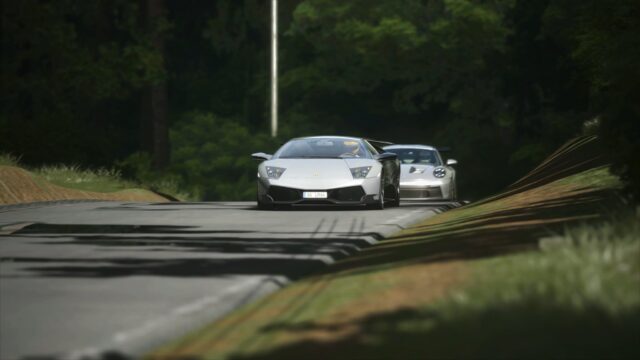
A lightweight post-processing filter for Pure that aims for a natural, ReShade-like look without the FPS hit. Free, with a 4.96 rating.
Download Realistic+ PPFilter for Pure
More screenshots on OverTake.gg (formerly RaceDepartment) ↗
What this mod does
Realistic+ PPFilter is a post-processing filter by CzarNy04, built and tested with Pure. The idea is to get a realistic look similar to ReShade, but without the FPS drop that ReShade usually brings. It’s free, has more than 24,000 downloads and a rating of 4.96 out of 5 from 24 reviews.
What it offers
- Almost entirely new color correction since version 15 and slightly brighter nights.
- Support for Pure’s auto exposure.
- Its own glare effect since version 14.
- The March 2025 update turned it into a lighter filter with a more natural tone.
What about Sol?
In 2022 the author did release a Sol variant, but today the mod page makes it clear that it’s designed for Pure and that he doesn’t know how it behaves with Sol. One user warns that it uses a lot of GPU with Sol, so it isn’t the best choice if you don’t use Pure.
Installation and tips
Copy the contents of the archive into your Assetto Corsa folder and pick the filter in the video settings. Another user recommends adjusting the ground brightness if it looks too dark or too bright.
User rating
Highlights and things to keep in mind
- 4.96 out of 5 rating
- Lightweight and made for driving
- Updated in 2025
- Needs Pure, which is paid
- Not recommended with Sol
- Few reviews
Requirements
- Assetto Corsa for PC
- Pure (paid, on Peter Boese's Patreon)
- Custom Shaders Patch
- Free OverTake.gg account to download
How to install it
- Install or update Pure and Custom Shaders Patch.
- Go to the filter's page on OverTake.gg, log in and download the file (about 35 KB).
- Copy its contents into your Assetto Corsa folder.
- Pick Realistic+ as the post-processing filter in the video settings.
- If needed, adjust the ground brightness in the Pure settings.
Version history
-
03.20259 Mar 2025Current
Lighter, more natural filter with subtler color correction
-
1529 Jul 2022
Almost entirely new color correction, brighter nights and Pure auto exposure
-
1427 Jul 2022
New glare and small improvements
-
1312 Jun 2022
Adapted to the new Pure version
Common problems
Does it work with Sol?
It's designed for Pure. The author says he doesn't know how it runs with Sol, and one user warns it uses a lot of GPU that way.
Does it hurt FPS much?
Avoiding that is exactly the point: it mimics the ReShade look without the performance cost.
Who helped?
The author thanks Ciba1991, creator of the C13 filters, for his advice.
More mods for Assetto Corsa