Dash GPS Voices (English navigation voices) for American Truck Simulator
Seven English GPS voices with personality for ATS 1.61: short turn prompts plus unique lines on departure, arrival, rerouting or speeding. Keeps the SCS voices.
Download Dash GPS Voices (English navigation voices)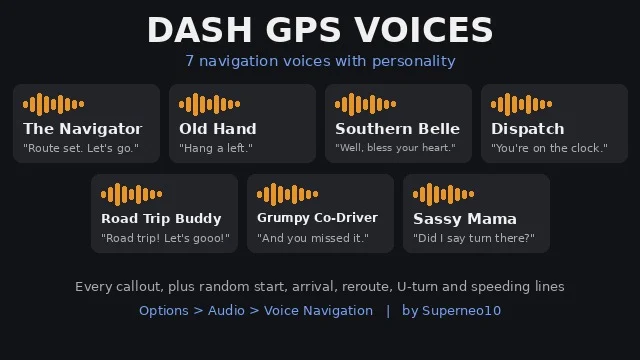
More screenshots on Steam Workshop ↗
What this mod does
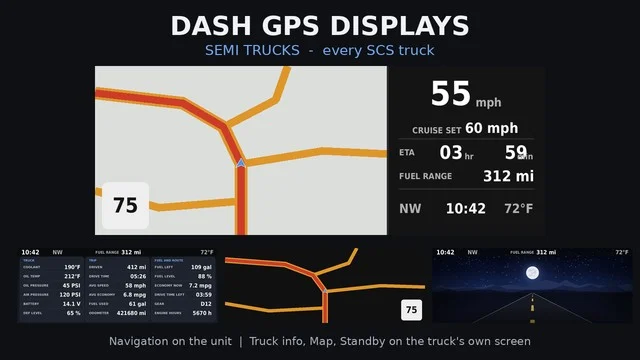
Dash GPS Voices is a pack by Superneo10, the author of the Dash GPS Displays mods, that adds seven English navigation voices to American Truck Simulator. Turn prompts stay short and clear; each voice’s personality comes through when you start a route, when you arrive, if you miss an exit, on U-turns and when you’re going too fast.
The seven voices
- The Navigator, Old Hand, Southern Belle and Dispatch.
- Road Trip Buddy, Grumpy Co-Driver and Sassy Mama.
They cover every voice prompt in the game and include several random takes for departure, arrival, rerouting, U-turns and speeding, plus a two-tone chime for the sound-only speed warning.
How to use it
Turn on voice navigation in Options › Audio and pick an “English – Dash GPS” voice. To hear the speeding lines, set the speed warning to voice mode. It works in any truck or car, with or without the Dash GPS Displays screens.
Compatibility
It only adds new voices and doesn’t replace any SCS ones, so it works alongside other voice packs and map mods. The author made and tested it on 1.61 and released it on October 24, 2026. The voices were generated with ElevenLabs.
Holyfix Check
Will it work with your mods?
Load your game.log.txt and check whether this mod is for your ATS version, whether you're missing a mod or DLC it needs and where to place it.
It's in Documents › American Truck Simulator › game.log.txt. It's read in your browser: the file is never uploaded.
Something else failing? Holyfix for ATS checks all your mods at once.
User rating
Our rating
0.0 / 5- Seven voices with personality that keep turn prompts clear
- Replaces nothing: works alongside other voice packs and maps
- Works in any truck or car
- All voices are in English
- Voices generated with ElevenLabs, not recorded by voice actors
- A very new mod, with few subscribers so far
Requirements
- American Truck Simulator 1.61
- A Steam account
- No DLC or other mods required
How to install it
- Open the “Dash GPS Voices” page on Steam Workshop and click “Subscribe”.
- Launch American Truck Simulator, wait for Steam to download the mod and enable it in the Mod Manager.
- Go to Options › Audio and turn on voice navigation.
- Pick one of the “English - Dash GPS” voices.
- If you want the speeding lines, set the speed warning to voice mode.
Version history
-
24 Oct 2026Current
Release (1 change note)
Common problems
Are there Spanish voices?
No. All seven voices are in English.
Do I need the Dash GPS Displays screens?
No. They work in any truck or car, with or without them.
Does it remove the game's voices?
No. It only adds new voices, so you can keep using the SCS ones and other packs.
How were they made?
The author says the voices were created with ElevenLabs.
More mods for ATS
 ✓ ATS 1.61Requires DLC
 ✓ ATS 1.61
 ✓ ATS 1.61