Change colour of Parking guide to light blue for ATS Ver.1.1 for American Truck Simulator
Changes the American Truck Simulator parking guide color from dark blue to light blue so it's easier to see at night. Ver.1.1 from January 3, 2026, 57.8 KB; marked as optional for Convoy, per the author.
Download Change colour of Parking guide to light blue for ATS Ver.1.1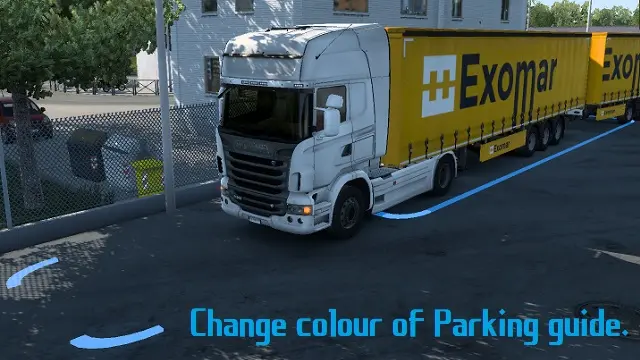
Official screenshots by the author: © みれにあさん on Steam WorkshopMore screenshots on steamcommunity.com (Steam Workshop) ↗
What this mod does
Change colour of Parking guide to light blue (パーキングガイドを水色に変更) is the American Truck Simulator version of the UI mod by みれにあさん that changes the color of the parking guide, the strip the game draws on the ground when you back a trailer into place. It replaces the original dark blue with a brighter light blue because, according to the author, the stock color is hard to see at night. Version 1.1, from January 3, 2026, improves visibility, although the look differs slightly from the original.
Author’s warnings
The author himself warns that on pale ground, very common on ATS maps, the light blue may still be hard to see, and points to his other variants: yellow, vermilion, orange and red, all with an ATS and an ETS2 version. He also acknowledges a side effect: the job marker and other ground areas change color. In the comments he explains that all his parking guide color mods are marked as optional for Convoy. He asks that the file not be redistributed.
Facts
Posted on June 29, 2024 and updated on January 3, 2026, with four change notes; it weighs 57.8 KB and has 418 subscribers. It needs no DLC or other mods, and the author doesn’t say which game version it’s for. More tools for ATS and gameplay mods for ATS.
Holyfix Check
Will it work with your mods?
Load your game.log.txt and check whether this mod is for your ATS version, whether you're missing a mod or DLC it needs and where to place it.
It's in Documents › American Truck Simulator › game.log.txt. It's read in your browser: the file is never uploaded.
Something else failing? Holyfix for ATS checks all your mods at once.
User rating
Highlights and things to keep in mind
- Light blue parking guide, far more visible at night
- Tiny (57.8 KB) with no DLC requirements
- Marked as optional for Convoy, according to the author
- The author doesn't say which game version it's for; Holyfix will warn you if it throws errors
- It also changes the color of the job marker and other ground areas (side effect acknowledged by the author)
- On the pale ground common in ATS it may still be hard to see; the author offers yellow, vermilion, orange and red variants
- The author asks that the mod not be redistributed
- The look of Ver.1.1 differs slightly from the original guide, according to the author
Requirements
- American Truck Simulator
- Steam account to subscribe on the Workshop
How to install it
- Subscribe to the mod on the Steam Workshop
- Open ATS, go to the Mod Manager and enable Change colour of Parking guide to light blue
- Confirm the changes and load your profile
- When parking a trailer, the ground guide shows in light blue
Version history
-
1.13 Jan 2026Current
Improved visibility; the look differs slightly from the original
-
—24 Jul 2024
Files compressed to reduce the download size
-
1.029 Jun 2024
First version
Common problems
What does it change?
The color of the guide shown on the ground when parking: from dark blue to a light blue that's easier to see at night.
Is it visible in ATS?
The author warns that on the pale ground common in ATS it may still be hard to see, and points to his other colors (yellow, vermilion, orange, red).
Does it have side effects?
Yes, it also changes the color of the job marker and other ground areas.
Which ATS version is it for?
The author doesn't say. Ver.1.1 is from January 3, 2026.
Does it work in Convoy?
According to the author in the comments, his parking guide color mods are marked as optional for Convoy.
More mods for ATS
 ATS 1.61Requires DLC
 ATS 1.61Requires DLC
 ATS 1.61Requires DLC
 ATS 1.59
 ATS 1.60
 ATS 1.60Requires DLC