渲染优化 (Rendering Optimization): cliffs and objects detailed from afar, no LOD pop-in, in ATS for American Truck Simulator
Graphics mod for American Truck Simulator that fixes cliffs and objects that only showed detail up close: detail no longer loads in steps as you approach. By guhaisheng810921; 8.6 MB, October 2, 2026; 711 subscribers.
Download 渲染优化 (Rendering Optimization): cliffs and objects detailed from afar, no LOD pop-in, in ATS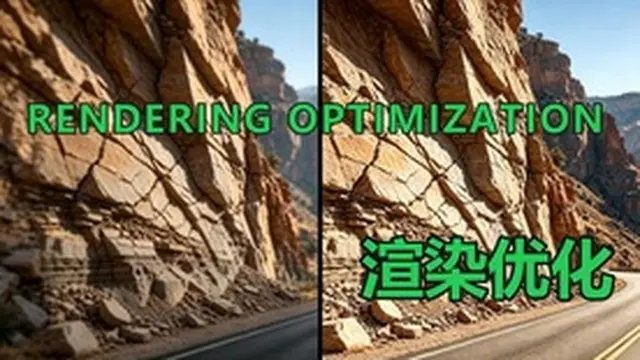
Official screenshots by the author: © guhaisheng810921 on Steam WorkshopMore screenshots on steamcommunity.com (Steam Workshop) ↗
What this mod does
渲染优化 (Rendering Optimization), by guhaisheng810921, is a graphics mod for American Truck Simulator that tackles one of the game’s most visible flaws: cliffs, rocks and other scenery objects that only show their full detail once you’re on top of them and switch models in steps (the well-known LOD pop-in). With the mod, per the description, detail no longer loads in stages and objects look defined from further away. It pays off especially in the deserts and canyons of Arizona, Utah or Nevada, where rocky terrain dominates the view.
What’s included
- Cliffs and scenery objects with detail visible at longer range.
- Level-of-detail transitions without steps.
- 8.6 MB file.
Requirements and notes
The official description is two lines, in Chinese and English, and states neither the game version, how it works, the performance impact nor the load order. Since it shows more detail at distance, some extra GPU load is reasonable to expect, though the author doesn’t quantify it. It went up on October 2, 2026, has four change notes and 711 subscribers at the time of this review; in the comments users confirm it fixes LOD appearing too close, praise it in VR and ask for an ETS2 version and one for trees. No DLC or dependencies are listed. For more draw distance, pair it with CinemaLife Horizons and see the rest of the ATS graphics mods.
Holyfix Check
Will it work with your mods?
Load your game.log.txt and check whether this mod is for your ATS version, whether you're missing a mod or DLC it needs and where to place it.
It's in Documents › American Truck Simulator › game.log.txt. It's read in your browser: the file is never uploaded.
Something else failing? Holyfix for ATS checks all your mods at once.
User rating
Highlights and things to keep in mind
- Cliffs and rocks defined from afar, no pop-in
- Highly rated by VR players
- 711 subscribers in under two months
- The author states neither the game version nor the performance impact
- Two-line description: it doesn't explain how it works or the load order
- ATS only; the ETS2 version has been requested but doesn't exist
Requirements
- American Truck Simulator
- Steam account to subscribe on the Workshop
How to install it
- Open the mod's Steam Workshop page and click "Subscribe".
- Start American Truck Simulator and open the Mod Manager for your profile.
- Enable the mod and confirm the changes.
- Drive through areas with cliffs or rocks to notice the detail from afar.
Version history
-
update2 Oct 2026Current
Four change notes on release day on Steam Workshop
Common problems
What exactly does it fix?
Cliffs and objects only showing detail up close and switching models in steps.
Does it lower performance?
The author doesn't say; showing more detail at distance may demand a bit more from the GPU.
Which game version is it for?
The author doesn't say; it was released on October 2, 2026.
Is there an ETS2 version?
Not yet; several users have asked for one in the comments.
More mods for ATS
 Requires DLC
 ATS 1.59
 ATS 1.61
 ATS 1.59
 ATS 1.61
 ATS 1.60