Adviser Top Bar Small HUD for American Truck Simulator
Moves the HUD into a top bar with speed, gear, cruise, fuel and fatigue, plus a small map up top. No new tachometer. Version 1.61.1019, free on Steam Workshop.
Download Adviser Top Bar Small HUD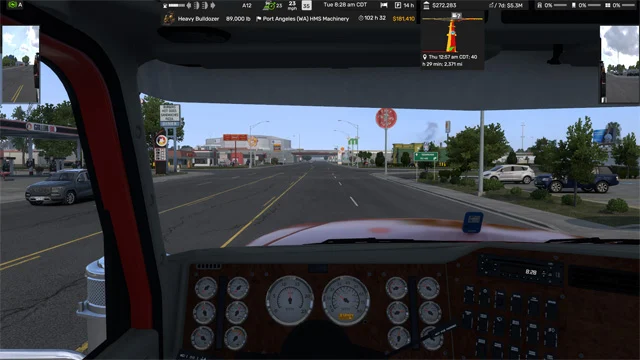
More screenshots on Steam Workshop ↗
What this mod does
Adviser Top Bar Small HUD is another UI mod by Distiller. It removes the new tachometer, shrinks the map and moves it to the top of the screen, and gathers the gauges into a top bar. It’s the alternative for anyone who wants the bar without giving up the map; if you’d rather remove it completely, there’s Adviser Top Bar NO GPS.
What the bar shows
- Warning lights, fuel, lights and turn signals.
- Gear, cruise control, speed and speed limit.
- In-game time, fatigue monitor and a strip with the company name.
Version and screens
It only works on 1.59 or later. Version 1.61.1019 was released on October 19, 2026. It’s tested from 1920×1080 to 7680×1440, and in the comments the author shared a variant for ultrawide monitors. You can enable widgets and adjust transparency with the F6 key.
Add-ons and known issues
The author offers HUD mirror and tachometer add-ons in his collections. A user with the Volvo VNL 2025 reported that the radio widget covers the truck’s center screen; the author said he’ll look for a fix. In the meantime, you can set the radio to only show up when you change stations.
Holyfix Check
Will it work with your mods?
Load your game.log.txt and check whether this mod is for your ATS version, whether you're missing a mod or DLC it needs and where to place it.
It's in Documents › American Truck Simulator › game.log.txt. It's read in your browser: the file is never uploaded.
Something else failing? Holyfix for ATS checks all your mods at once.
User rating
Highlights and things to keep in mind
- Clean HUD with a small map
- Updated for 1.61
- Tested at many resolutions
- Only works on 1.59 or later
- The radio widget can cover in-cab screens
- Don't combine it with other HUD mods
Requirements
- American Truck Simulator 1.59 or later (current version for 1.61)
- No DLC
How to install it
- Open the “Adviser Top Bar Small HUD” page on Steam Workshop and click “Subscribe”.
- Launch American Truck Simulator and wait for Steam to finish downloading the mod.
- Open your profile's Mod Manager and enable “Adviser Top Bar Small HUD”.
- Use only one HUD mod at a time (for example, don't combine it with another top or bottom bar).
- Press F6 in the game to choose widgets and adjust transparency.
Version history
-
1.61.101919 Oct 2026Current
Latest update (14 notes in the changelog)
-
12 May 2026
First release
Common problems
How is it different from the NO GPS version?
This one keeps a small map at the top; the other removes it.
Does it work on ultrawide monitors?
It's tested up to 7680x1440 and the author shared a variant for wide screens.
Can I get the tachometer back?
Yes, with the tachometer add-ons the author publishes.
The radio covers my truck's screen. What do I do?
Set the radio to only show up when you change stations; the author is looking into moving it.
More mods for ATS
 ✓ ATS 1.61
  ATS 1.60
  ✓ ATS 1.61
  ATS 1.60
  ✓ ATS 1.61
  ✓ ATS 1.61