Discreet Dead Ends – Beacon (road closure barriers) for American Truck Simulator
Swaps the floating X-and-arrow barriers on closed roads for posts with red and white spheres and a night-blinking beacon. Tested on ATS 1.60 and 1.61.
Download Discreet Dead Ends – Beacon (road closure barriers)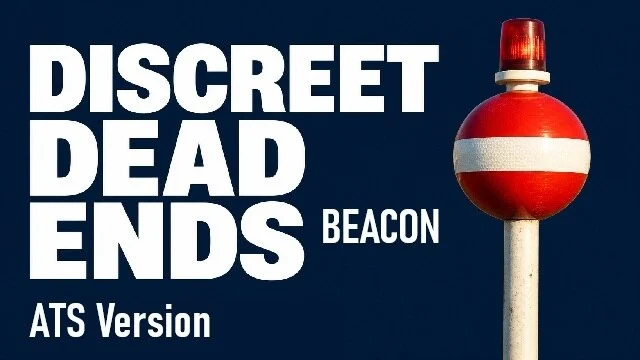
More screenshots on Steam Workshop ↗
What this mod does
Discreet Dead Ends – Beacon, by LKN194, changes the look of the barriers that mark closed roads in American Truck Simulator. Instead of the X’s and arrows floating in the middle of the street, you’ll see red and white spherical markers at the ends of the barrier.
What’s included
- A tall metal post with a flashing red beacon that’s easy to see at night.
- A 2.95 m lateral offset to move the markers out of the lanes.
- The original invisible collision stays: the mod doesn’t open roads.
- Optional Convoy support.
Version and settings
The author tested it on 1.60 and 1.61, with separate packages for ATS and ETS2. Leave barriers enabled in the game’s graphics settings, because the markers are anchored to them.
Compatibility and known issues
It’s not compatible with mods that hide the barriers, such as “No DeadEnds!”: if one of them has higher priority, the markers don’t show up. Don’t combine it with other mods that replace the same barriers either. Since it depends on where SCS placed each barrier, the markers sometimes overlap, sit very close together, end up half-buried or float slightly. Traffic still follows its scripted routes, even through closed areas.
Holyfix Check
Will it work with your mods?
Load your game.log.txt and check whether this mod is for your ATS version, whether you're missing a mod or DLC it needs and where to place it.
It's in Documents › American Truck Simulator › game.log.txt. It's read in your browser: the file is never uploaded.
Something else failing? Holyfix for ATS checks all your mods at once.
User rating
Highlights and things to keep in mind
- Closed streets look much less jarring
- Flashing beacon visible at night
- Tested on 1.61
- Incompatible with mods that hide barriers
- Some markers overlap or end up buried
- Requires barriers to be enabled
Requirements
- American Truck Simulator 1.60 or 1.61
- Barriers enabled in the graphics settings
- No DLC
How to install it
- Open the “Discreet Dead Ends - Beacon - ATS Version” page on Steam Workshop and click “Subscribe”.
- Launch American Truck Simulator and wait for Steam to finish downloading the mod.
- Open your profile's Mod Manager and enable “Discreet Dead Ends - Beacon - ATS Version”.
- Disable mods that hide or replace the dead-end barriers (for example, “No DeadEnds!”).
- Check in the graphics settings that barriers are still visible.
Version history
-
12 Oct 2026Current
Latest update (3 notes; includes optional Convoy support)
-
13 Sep 2026
First release
Common problems
Can I drive through closed streets?
No. The original invisible collision stays; the mod only changes the look.
Does it work with “No DeadEnds!”?
No. The markers are anchored to the original barrier, so if another mod hides it they don't show up.
Does it work in Convoy?
The author added optional Convoy support.
Is there an ETS2 version?
Yes, the author publishes a separate package for Euro Truck Simulator 2.
More mods for ATS
 ✓ ATS 1.61
  ATS 1.60
  ✓ ATS 1.61
  ✓ ATS 1.61
  ✓ ATS 1.61
  ✓ ATS 1.61