Bottom Bar for ATS 1.61 for American Truck Simulator
Rearranges the bottom HUD bar so long cargo and destination names don't overlap, with telemetry under the steering wheel and smaller mirrors. Free on Steam Workshop, ATS 1.61 only.
Download Bottom Bar for ATS 1.61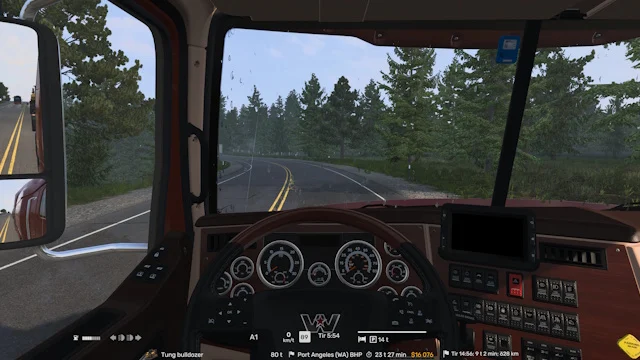
More screenshots on Steam Workshop ↗
What this mod does
Bottom Bar for ATS 1.61 is a UI mod by Marc that rearranges the bottom info bar so it’s easier to read. The main goal: keep long cargo and destination names from overlapping other info.
How the screen looks
- The cargo type box stretches across the bottom row.
- Weight, state flag and full destination sit on a separate row, next to it.
- Gear, cruise control, speed limit sign and digital speedometer are grouped under the steering wheel line.
- On the right, the fatigue bar, bed icon and rest hours sit compactly above the time and date.
- Includes smaller mirrors; if you prefer the stock ones, the author links another version.
Version
It’s for 1.61 only: the author confirmed it no longer works on 1.60. He designed it at 3840×2400, so on 1080p screens it’s worth checking how it looks. There’s an ETS2 version too.
Reviews
Most comments thank the author for the 1.61 update. One user still on 1.60 saw two purple boxes in the bottom-left corner with the indicators widget enabled: that’s the sign you’re on a game version it isn’t made for.
By the same author, if you’d rather have everything at the top: Top Bar for ATS 1.61.
Holyfix Check
Will it work with your mods?
Load your game.log.txt and check whether this mod is for your ATS version, whether you're missing a mod or DLC it needs and where to place it.
It's in Documents › American Truck Simulator › game.log.txt. It's read in your browser: the file is never uploaded.
Something else failing? Holyfix for ATS checks all your mods at once.
User rating
Highlights and things to keep in mind
- Long cargo and destination names always readable
- Telemetry grouped under the steering wheel
- Very popular and updated for 1.61
- Only works on 1.61
- Designed at 3840x2400: check how it looks at your resolution
- Smaller mirrors by default
Requirements
- American Truck Simulator 1.61
- Steam account
- No DLC or additional mods
How to install it
- Open the "BOTTOM BAR FOR ATS 1.61" page on Steam Workshop and click "Subscribe".
- Launch American Truck Simulator and wait for Steam to finish downloading the mod.
- Go to your profile's Mod Manager and enable "BOTTOM BAR FOR ATS 1.61".
- Disable other HUD or route advisor mods.
- If you want normal-size mirrors, use the version the author links in the description.
Version history
-
22 Sep 2026Current
Updated for 1.61 (6 change notes)
Common problems
Does it work on 1.60?
No; the author confirmed this version is for 1.61 only.
Why do I see purple boxes?
It usually happens when you use it on a game version other than 1.61.
Can I keep the stock mirrors?
Yes, the author links a version with normal mirrors.
More mods for ATS
 ✓ ATS 1.61
  ATS 1.59
  ✓ ATS 1.61
  ✓ ATS 1.61
  ✓ ATS 1.61
  ✓ ATS 1.61