Undiscovered ATS Roads (Transparent GPS Line) for American Truck Simulator
Helps you find the last undiscovered roads to complete 100% of the map, with a semi-transparent blue GPS line. Free on Steam Workshop, compatible with ATS 1.61 and ProMods Canada.
Download Undiscovered ATS Roads (Transparent GPS Line)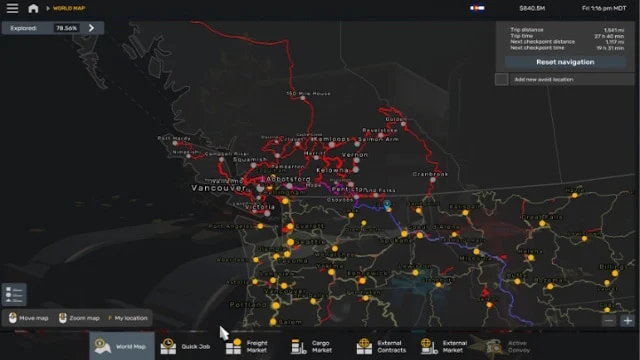
More screenshots on Steam Workshop ↗
What this mod does
Undiscovered ATS Roads is a mod by Qazme for players stuck at 99.99% map exploration. It highlights the spots and roads you still haven’t driven so you can stop searching blindly.
How it works
- Makes undiscovered roads and intersections easier to spot on the map.
- Changes the GPS line to a semi-transparent blue one, so you can see what’s underneath and pick your next turn.
Compatibility
The author lists it as compatible with 1.61 or later, with ProMods Canada and with NTTF. One user confirmed it also worked for them on 1.60. One player says the mod helped them reach 100% in both ATS and ETS2.
Known issues
With the Road Trip DLC vehicles, one user noticed the gas station and rest area icons disappeared from the in-cab GPS, although they were still on the world map. The author released a fix on October 14, 2026, but warns he hadn’t tested it yet. He also points out that certain map icons are off by default: turn them on in the map options before assuming it’s a bug in the mod.
Once you’ve completed the map, you can disable it and go back to your usual color scheme.
Holyfix Check
Will it work with your mods?
Load your game.log.txt and check whether this mod is for your ATS version, whether you're missing a mod or DLC it needs and where to place it.
It's in Documents › American Truck Simulator › game.log.txt. It's read in your browser: the file is never uploaded.
Something else failing? Holyfix for ATS checks all your mods at once.
User rating
Highlights and things to keep in mind
- Perfect for completing 100% of the map
- Compatible with ProMods Canada
- Tiny (53 KB)
- Road Trip fix not yet tested by the author
- Changes the GPS line while it's active
- Some icons depend on the map options
Requirements
- American Truck Simulator 1.61 or later
- Steam account
- No DLC or additional mods
How to install it
- Open the "Undiscovered ATS Roads (Transparent GPS Line)" page on Steam Workshop and click "Subscribe".
- Launch American Truck Simulator and wait for Steam to finish downloading the mod.
- Go to your profile's Mod Manager and enable "Undiscovered ATS Roads (Transparent GPS Line)".
- Open the map (M) and turn on the icons you want to see in its options.
- Look for the undiscovered stretches and plot a route to them.
Version history
-
14 Oct 2026Current
Fix for GPS icons on Road Trip vehicles (2 change notes)
Common problems
Does it work with ProMods Canada?
Yes, the author lists it as compatible with ProMods Canada and NTTF.
Why can't I see some icons?
SCS turns certain icons off by default; turn them on in the map options.
Does it cause issues with Road Trip?
Some gas station icons weren't showing on those vehicles' GPS; the author released a fix in October 2026.
More mods for ATS
 ✓ ATS 1.61
  ✓ ATS 1.61
  ✓ ATS 1.61
  ✓ ATS 1.61
  ✓ ATS 1.61
  ATS 1.59