Real Icons (Dacova Modding) for American Truck Simulator
STOP markings on the ground, parking stripes that turn green when your trailer lines up and posts with amber lights at night. Free on Steam Workshop for ATS 1.61, with a description in Spanish.
Download Real Icons (Dacova Modding)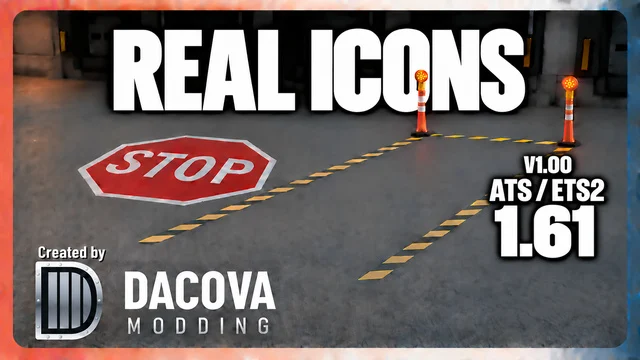
More screenshots on Steam Workshop ↗
What this mod does
Real Icons is a mod by Dacova Modding that replaces the job zone icons with more realistic markings. Its description comes in English, Spanish and Portuguese, which is unusual on the Workshop.
What it adds
- STOP markings painted on the ground.
- Parking and hitching stripes that give a green signal when the trailer is lined up.
- Weathered delineator posts with reflective bands and amber lights that blink at night.
Version and multiplayer
Version 1.00 was released on October 8, 2026 for ATS 1.61; there’s a separate version for ETS2. It’s optional on Convoy: you can use it if the server allows it.
Installation and load order
It doesn’t need a specific priority in the Mod Manager, unless you have another marker mod that conflicts with it; in that case, the one higher up wins. Enable only one version of Real Icons. If you already use Realistic Interaction Symbols, stick with one of the two.
Reviews
The comments are very positive: they highlight that it makes parking easier without breaking immersion. One user wonders whether the STOP markings at gas stations, weigh stations and service shops clutter the scene too much. No bugs reported so far.
Holyfix Check
Will it work with your mods?
Load your game.log.txt and check whether this mod is for your ATS version, whether you're missing a mod or DLC it needs and where to place it.
It's in Documents › American Truck Simulator › game.log.txt. It's read in your browser: the file is never uploaded.
Something else failing? Holyfix for ATS checks all your mods at once.
User rating
Highlights and things to keep in mind
- Clear green signal when the trailer lines up
- Description also available in Spanish
- Made for 1.61 and Convoy-friendly
- Very new mod (October 2026)
- Conflicts with other marker mods
- The STOP markings can feel excessive in some areas
Requirements
- American Truck Simulator 1.61
- Steam account
- No DLC or additional mods
How to install it
- Open the "Real Icons — DACOVA MODDING" page on Steam Workshop and click "Subscribe".
- Launch American Truck Simulator and wait for Steam to finish downloading the mod.
- Go to your profile's Mod Manager and enable "Real Icons — DACOVA MODDING".
- Enable only one version of Real Icons and disable other marker mods.
- On Convoy, use it only if the server allows optional mods.
Version history
-
1.008 Oct 2026Current
First version (3 change notes on the same day)
Common problems
Does it work in multiplayer?
It's optional on Convoy if the server allows it, according to the author.
Does it need a specific spot in the list?
No, unless it conflicts with another marker mod.
Is there an ETS2 version?
Yes, the author publishes a separate version.
More mods for ATS
 ✓ ATS 1.61
  ATS 1.59
  ✓ ATS 1.61
  ATS 1.59
  ATS 1.57
  ✓ ATS 1.61